Deblending
Separating overlapping seismic shots to remove incoherent noise
Theory
What is Deblending?
Deblending is the process of separating overlapping seismic shots that were fired close in time during simultaneous-source acquisition.
In blended acquisition:
- Two or more shot records overlap in time
- They interfere with each other
- Raw gathers contain blended noise and cross-talk
Deblending removes this interference to recover clean, unblended shot gathers.
Why blended acquisition is used?
- Higher productivity
- Denser source sampling
- Lower cost
- Better illumination
Why deblending is needed?
- To remove cross-talk between overlapping shots
- To recover individual source wavefields
- Required before imaging, velocity analysis, AVO, inversion
Simultaneous sources produce incoherent noise, while true reflections are coherent.
Therefore:
- If we enforce coherency across offsets/inlines, reflections remain
- If we enforce incoherency, blended interference is removed
This is done using:
- Iterative subtraction
- Sparse inversion
- Median filtering
- f-x domain coherency constraints
- Moveout (velocity) constraints
- Time-variant muting
Input data
Note: This module is deprecated. For new projects, use the Iterative Deblending module instead, which provides improved convergence and more robust noise suppression.
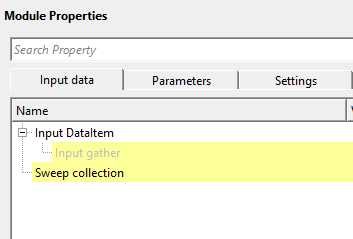
Input DataItem
Input gather
connect/reference to the Output gather that needs to be deblended/separated from the incoherent noise.
Connect this input to the blended shot gather you want to separate. This should be the raw pre-stack data from a simultaneous-source acquisition survey. The gather must be in the time domain and contain all traces from the blended record, including the interfering shots from secondary sources.
Sweep collection
provide the sweeps information. This is applicable for LAND seismic data which is recorded by vibroseis. Seismic operators stores the sweep information in the trace headers. connect/reference to the corresponding trace headers where the sweep information is stored.
This input is required for land vibroseis surveys and contains the pilot sweep waveforms for each source. The module uses the sweep information to characterize the interference pattern of each blended source and to design the deblending operators. Connect this to the trace headers or gather that contains the recorded pilot sweeps. The number of sweep traces provided here determines how many overlapping sources the module can separate.
Parameters
Use time-variant delending
this option enables the time-variant deblending approach. Blending is not uniform, due to that time-variant deblending helps in attenuating the incoherent noise and brings stability and reduces artifacts to the result. By default, TRUE (Checked).
When enabled (default), the module applies a time-variant bandpass pre-conditioning step before the main deblending filter. This step exploits the fact that blended interference is incoherent across offset and varies with time: it uses a cross-correlation-based coherency measure to suppress the interference while preserving coherent reflections. The pre-conditioned gather is then passed to the deblending filter. Keeping this option enabled is strongly recommended for vibroseis data, as sweep interference changes significantly with travel time. Disabling it forces the module to deblend the raw gather directly, which can increase residual noise in the output.
Cross-correlation time
cross-correlation helps in detecting the coherent and incoherent noise based on the cross correlation time window. The smaller the cross-correlation time, the finer the details.
Default value: 5.0 s. This parameter controls the time window (in seconds) used when cross-correlating traces to distinguish coherent reflections from incoherent blending noise. It is used by both the time-variant bandpass pre-conditioning step and the main deblending filter. A smaller value (for example, 0.5–1.0 s) gives higher temporal resolution and is better at capturing rapid changes in the interference pattern, but may increase sensitivity to noise. A larger value (for example, 3–5 s) produces a smoother, more stable coherency estimate and is suitable when the blending delay between sources is long. For typical land vibroseis surveys with record lengths of 6–8 s, the default of 5.0 s is a safe starting point.
V0
specify the reference velocity value. This value is used to guide coherency. Reflections consistent with V0 are preserved and considered as true signal and the others are considered as incoherent and attenuated.
Default value: 3000 m/s. This reference velocity defines the expected moveout of coherent primary reflections in the data. During the time-variant bandpass pre-conditioning step, energy that moves out at a rate consistent with V0 across the offset axis is treated as signal and preserved. Energy that does not follow this moveout pattern is classified as incoherent blending noise and suppressed. Set V0 to a representative average velocity for the survey area — typically the near-surface replacement velocity or the stacking velocity at shallow times. Using a value that is too low will cause some reflections to be mislabelled as noise; using a value that is too high may allow some blending interference to pass through. This parameter is only active when Use time-variant deblending is enabled.
Deblending degree
specify the deblending degree value. This value can be treated as an iteration number where it controls the aggressiveness of the attenuation. Higher the degree value, aggressive separation/attenuation that may lead to primary damage.
Default value: 0. This integer parameter controls how aggressively the deblending filter attenuates the blending interference. A value of 0 applies the minimum degree of separation, which is conservative and least likely to damage primary amplitudes. Increasing the degree value applies progressively stronger interference suppression at the cost of increased risk of signal leakage or amplitude distortion on the primary reflections. A value of -1 completely bypasses the deblending step — the input gather is passed through unchanged. This bypass mode is useful for QC: connect the module with Degree = -1 to compare the raw blended data against the deblended result from an adjacent module. Start with the default of 0 and increase only if residual blending noise remains visible in the output gathers.
Window
this is time-spatial window is used to apply the deblending operator. Larger window size smooths the result and less accurate. Smaller window size may give better results however that may create artifacts.
Default value: 0.1 s (100 ms). This parameter defines the time length of the sliding analysis window applied when the time-variant bandpass pre-conditioning step computes the local coherency measure. A window of 100 ms typically spans several dominant seismic wavelengths, providing a stable estimate without over-smoothing rapidly changing signal. Shorter windows (for example, 50 ms) can track sharper amplitude variations and may be better for shallow, thin-bed data, but they increase sensitivity to random noise and can introduce ringing artifacts. Longer windows (for example, 200–500 ms) produce a smoother, more stable separation but may smear thin-bed events. This parameter is only active when Use time-variant deblending is enabled.
F1
provide the lower frequency to be considered while performing the deblending. Lower frequency is hard to deblend.
Default value: 0 Hz. This is the lower frequency bound of the analysis band used by the time-variant coherency filter. Setting F1 to 0 Hz includes all low-frequency content. Low-frequency energy is difficult to deblend because the interference from overlapping shots overlaps strongly with primary signal at low frequencies, where wavelengths are long and spatial coherency is hard to distinguish. If the blending noise at low frequencies is causing signal damage, you can raise F1 to exclude those frequencies from the coherency filter (for example, set F1 = 5 or 10 Hz), though this may leave some low-frequency blending noise in the output. This parameter is only active when Use time-variant deblending is enabled.
F2
provide the higher frequency to be considered while performing the deblending. Incoherent noise commonly higher frequency and it is easier to separate.
Default value: 90 Hz. This is the upper frequency bound of the analysis band used by the time-variant coherency filter. At higher frequencies the blending interference is more incoherent relative to primary reflections, making it easier for the filter to distinguish and suppress. The default of 90 Hz covers the typical usable bandwidth of land vibroseis data. Set F2 to match the high-cut corner of your data's usable bandwidth — using a value much higher than the signal bandwidth will include noise in the coherency estimate without benefit. Together, F1 and F2 define the frequency range over which the coherency-based blending suppression operates. This parameter is only active when Use time-variant deblending is enabled.
Settings
Auto-connection
By default, TRUE(Checked).It will automatically connects to the next module. To avoid auto-connect, the user should uncheck this option.
Bad data values option { Fix, Notify, Continue }
This is applicable whenever there is a bad value or NaN (Not a Number) in the data. By default, Notify. While testing, it is good to opt as Notify option. Once we understand the root cause of it, the user can either choose the option Fix or Continue. In this way, the job won't stop/fail during the production.
Notify
It will notify the issue if there are any bad values or NaN. This will halt the workflow execution.
Fix
It will fix the bad values and continue executing the workflow.
Continue
This option will continue the execution of the workflow however if there are any bad values or NaN, it won't fix it.
Number of threads
One less than total no of nodes/threads to execute a job in multi-thread mode. Limit number of threads on main machine.
Skip
By default, FALSE(Unchecked). This option helps to bypass the module from the workflow.
Output data
Output DataItem
Output gather
generates the output gather after deblending. This is free from any incoherent noise.
This is the primary output of the module: the fully deblended shot gather with blending interference suppressed. The output has the same geometry, sample interval, and trace count as the input gather. Connect this output to the next processing step (for example, noise attenuation, velocity analysis, or stack). If Deblending degree is set to -1, this output is identical to the input gather (bypass mode).
GGatherItemOutFiltered
generates the filtered output gather
This secondary output contains the intermediate result of the time-variant bandpass pre-conditioning step — that is, the gather after coherency-based frequency filtering but before the main deblending filter is applied. It is useful for QC: by comparing this output against the primary deblended output and the raw input, you can judge how much blending suppression was achieved in each stage. This output is only populated when Use time-variant deblending is enabled; otherwise it will be identical to the raw input gather.
Information
There is no information available for this module so the user can ignore it.
Examples
Actions
There are no action items available for this module.
Video lesson
YouTube video lesson, click here to open [VIDEO IN PROCESS...]
Related articles
Yilmaz. O., 1987, Seismic data processing: Society of Exploration Geophysicist
 * * * If you have any questions, please send an e-mail to: support@geomage.com * * *
References
Berkhout, A. J., 2008, Changing the mindset in seismic data acquisition: The Leading Edge, 27, 924-938.