Create Vrms picking from Vrms model
Creating internal velocity picks from an external velocity model.
Theory
Create Vrms Pickings from Vrms Model module converts a continuous Vrms velocity model into discrete Vrms picking functions that can be directly used for NMO correction and velocity analysis workflows.
This module samples the Vrms model spatially and vertically within a user-defined time range and geometry step, and outputs the velocities in a g-Platform internal format (NMO picking) compatible with subsequent processing modules. Controlled sampling, gating, and interpolation ensure that the generated picks are stable, smooth, and geologically consistent.
Gating options (constant or time-variant) are applied to limit short-wavelength velocity fluctuations, while optional extremum-based point selection helps capture significant velocity changes without introducing noise. Angle-related gates may also be used to manage angle-dependent effects in advanced moveout workflows.
Overall, this step bridges the gap between a smoothed Vrms velocity model and practical, usable velocity picks, ensuring reliable NMO correction, improved stacking, and stable migration results.
Input data
Vrms model
this is the input RMS velocity model that is used to generate internal velocity format file. Connect/reference to Output Velocity model.
Connect this input to the output of a velocity model source module — for example, a Read SEG-Y module loaded with a Vrms velocity volume in SEG-Y format. The model provides the velocity values that will be sampled and converted to discrete picking functions. This input is always required.
Geometry for new model
specify the geometry for the new velocity model.
Connect this input to a binning geometry item that defines the spatial distribution of CMP or bin locations where velocity picks will be generated. This input is used when Output geometry is set to By bins geometry. The module will extract velocity profiles at every Nth bin location, controlled by the Geometry step parameter.
Input Vrms picking item scheme
an existing Vrms picking item whose spatial structure will be used to define the output picking locations.
This input is only required when Output geometry is set to By Vrms picking scheme. The module will reuse the existing pick locations and time nodes from this scheme, replacing their velocity values by re-sampling from the input Vrms model. This is useful for updating velocities in an already-defined picking grid without changing its structure.
Parameters
Geometry step - Defines the spatial sampling interval used when converting velocities. Controls how often velocity values are extracted from the velocity model.
Velocity picks are created at every Nth bin location in the connected geometry, where N is the value of this parameter. The default value is 200 (minimum: 1). For example, a value of 200 means a velocity function is generated at every 200th bin, producing a coarse but manageable picking grid. Reduce this value to create denser spatial coverage, at the cost of longer processing time and a larger output file. Increase it to produce a sparser, quicker result for testing purposes.
For example, if the user wants to give a geometry step of 200 points, it generates the velocities at every 200th point.
Out picking file
specify the destination output file name and it's path. This file is an internal format RMS velocity file.
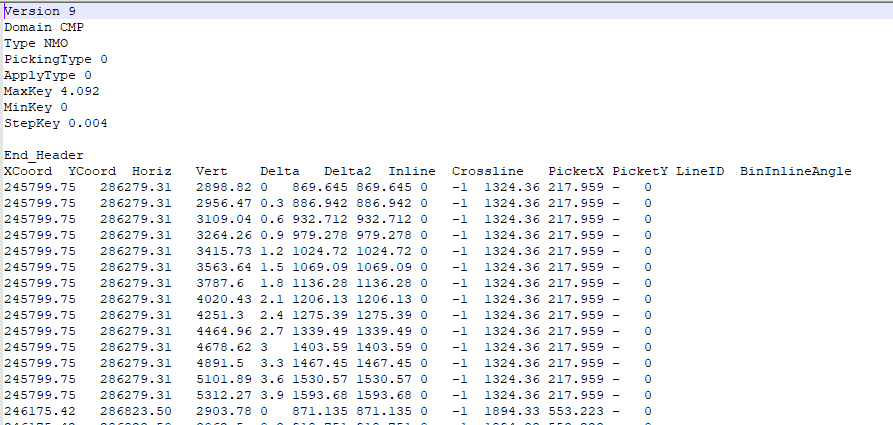
Enter the full path and file name for the output velocity picking file. For NMO picking format, the file is saved with a .corr extension, which is the g-Platform internal ASCII format for velocity and mute functions. For MF picking format, the file is saved as a tab-delimited text file with a .txt extension containing columns for X/Y coordinates, velocity, angle, time, and uncertainty values. This field is required — the module will fail if no valid path is provided.
Make points by extremums - Generates Vrms picking points at velocity extrema. Useful for automatic picking of significant velocity changes.
Default: false. When set to false, pick points are placed at uniform time intervals controlled by the Time step parameter. When set to true, the module detects local maxima and minima in the velocity profile and places pick points only at those significant inflection points. This produces a more compact picking function that highlights geologically meaningful velocity contrasts without generating redundant points in flat velocity zones.
Make points by extremums - false
Time step
Vrms points are created using uniform sampling instead. Time interval between successive Vrms samples. Controls vertical resolution of the output velocity picks.
This parameter is active only when Make points by extremums is set to false. Default: 0.3 s. A pick point is placed at every time sample that falls on a multiple of this interval. For example, a time step of 0.3 s produces picks at 0, 0.3, 0.6, 0.9 s, etc. Smaller values produce more pick points and a higher-resolution velocity function; larger values yield a coarser, smoother result.
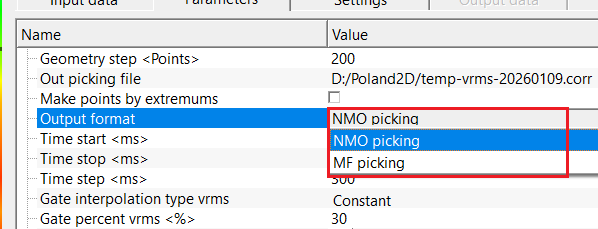
Output format { NMO picking, MF picking }
select output file format from that drop down menu. By default, NMO picking.
Choose the format in which the output picking file is written. NMO picking (default) produces a g-Platform internal binary picking file (.corr) that can be referenced directly in NMO correction and velocity analysis modules. MF picking produces a tab-delimited ASCII text file (.txt) containing columns for X coordinate, Y coordinate, velocity (V), angle (A in radians), time (T), velocity uncertainty (DeltaV), and angle uncertainty (DeltaA). Use MF picking when the output is intended for matched-filter or angle-dependent velocity workflows.
Output geometry { By bins geometry, By Vrms picking scheme }
controls which spatial framework is used to place the output velocity picks.
Default: By bins geometry. This parameter is visible only when Output format is set to NMO picking.
By bins geometry — the module iterates through the bin locations provided in the Geometry for new model input, sampling the Vrms model at every Nth bin (controlled by Geometry step). Use this option to create a new picking grid from scratch.
By Vrms picking scheme — the module reuses the spatial and temporal structure of the Input Vrms picking item scheme and replaces only the velocity values by re-querying the input Vrms model at each existing pick location. Use this option when you want to update velocities within an existing picking framework.
Time start - Start time for Vrms conversion. Velocities above this time are ignored.
The earliest two-way time (in seconds) at which velocity picks will be generated. No picks are placed above (earlier than) this time. Default: auto (a value of -0.001 or less means the module will automatically use the start of the Vrms model, i.e., time zero). Set a positive value to exclude near-surface velocity artefacts or to restrict the output to a specific target interval.
Time stop - End time for Vrms conversion. Limits the maximum time range of the output velocities.
The latest two-way time (in seconds) at which velocity picks will be generated. Default: auto (a value of -0.001 or less means the module will automatically use the full length of the Vrms model). The effective stop time is also capped at the last sample of the input model, even if a larger value is entered. Set a specific value to focus the output on a particular time window and avoid generating picks in zones of low reliability at the bottom of the model.
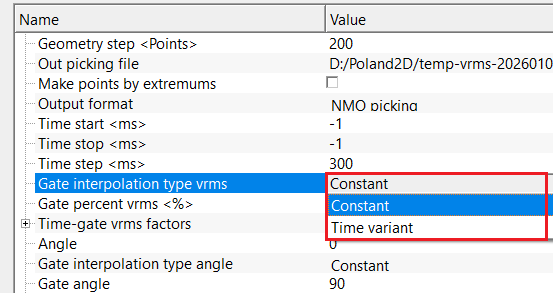
Gate interpolation type vrms { Constant, Time variant } - Specifies how Vrms values are interpolated within time gates. Constant applies fixed gating; Time Variant allows gate size to vary with time. By default, Constant.
The velocity gate defines the acceptable uncertainty band around each picked velocity value, expressed as a fraction of that velocity. When set to Constant, the same gate fraction (from Gate percent vrms) is applied uniformly across all times. When set to Time variant, the gate values are interpolated from the Time-gate vrms factors table, allowing the gate to increase with depth as velocity uncertainty typically grows.
Gate percent vrms - Defines the percentage of Vrms variation allowed within each gate. Used to control smoothing strength during conversion.
Active only when Gate interpolation type vrms is set to Constant. Default: 0.3 (valid range: 0 – 10). This value is used as a fractional multiplier of the local Vrms value to compute the velocity uncertainty band stored with each pick point. For example, a gate of 0.3 means the pick uncertainty is 30% of the local velocity. A wider gate allows more velocity variation around the picked value; a narrower gate constrains picks more tightly to the model.
Time-gate vrms factors - Scaling factors applied to Vrms values within defined time gates. Used to stabilize or adjust Vrms behavior in specific intervals.
Active only when Gate interpolation type vrms is set to Time variant. This table defines a set of time–gate pairs. Gate values are linearly interpolated between the table entries to produce a smoothly varying gate function across the full time range. The default table provides four control points: 0 s → 0.025, 0.5 s → 0.05, 1.0 s → 0.1, 2.0 s → 0.2, reflecting the typical geophysical expectation that velocity uncertainty increases with depth. Add or edit entries to customise the gate profile for your dataset.
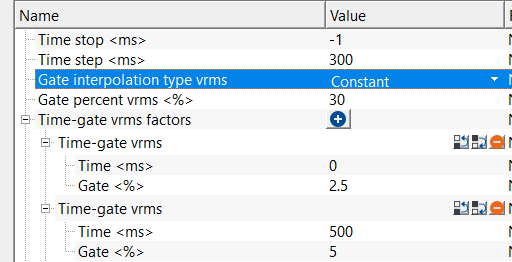
Time-gate vrms
Time–Gate Vrms entries allow multiple gates at different times.
Time
The two-way time (in seconds) at which this gate control point is defined. Default values: 0, 0.5, 1.0, 2.0 s. The gate values between control points are linearly interpolated.
Gate
The gate fraction at this control point (valid range: 0 – 10). Default values: 0.025, 0.05, 0.1, 0.2. This value is multiplied by the local velocity to determine the velocity uncertainty band at the corresponding time. Larger values allow broader velocity uncertainty at deeper times.
Angle - Defines the reference angle used for velocity or moveout control. Primarily used in angle-dependent velocity workflows.
Default: 0 degrees (valid range: -90 to 90). This sets the reference incidence angle associated with each output velocity pick. It is stored alongside the velocity value and is used downstream in angle-dependent workflows such as MF (Matched Filter) processing. For standard NMO correction without angle dependence, leave this at the default value of 0.
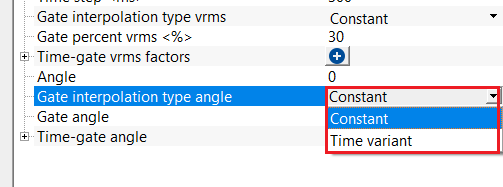
Gate interpolation type angle { Constant, Time variant } - Specifies interpolation behavior of angle gates. Time Variant allows angle gates to change with time.
Default: Constant. Controls whether the angle uncertainty gate is fixed at a single value across all times (Constant) or varies with time according to the Time-gate angle table (Time variant). This parameter has an effect only for MF picking output.
Gate angle - Defines the angular aperture used for angle gating. Controls sensitivity to angle-dependent velocity effects.
Active only when Gate interpolation type angle is set to Constant. Default: 90 degrees (minimum: 1). Sets the constant angular uncertainty window associated with each pick. A value of 90 degrees effectively makes angle gating non-restrictive. Reduce this value in angle-constrained workflows to limit the angular aperture used during matched-filter velocity updates.
Time-gate angle - Time–Gate Angle entries allow angle control at different time intervals.
Active only when Gate interpolation type angle is set to Time variant. This table defines a set of time–angle gate control points that are linearly interpolated across the full time range. The default table entries are: 0 s → 5°, 0.5 s → 10°, 1.0 s → 30°, 2.0 s → 60°, reflecting increasingly wide angle apertures at greater depths.
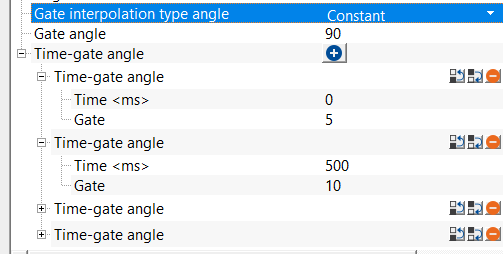
Time-gate angle
Time
Two-way time (in seconds) at which the angle gate control point is applied. Default values: 0, 0.5, 1.0, 2.0 s.
Gate
Angular aperture in degrees at the corresponding time control point. Default values: 5°, 10°, 30°, 60°. The angle gate is linearly interpolated between control points. Larger angles allow wider acceptance of incidence angle variation at deeper times.
Settings
Number of threads
One less than total no of nodes/threads to execute a job in multi-thread mode. Limit number of threads on main machine.
This module processes bin locations in parallel using multiple CPU threads. Increase this value to speed up computation on large datasets. The effective number of threads used during processing is one plus the value entered here. Setting this to a value higher than the number of available CPU cores will not improve performance and may slow the system. Leave at the default for typical use.
Skip
By default, FALSE(Unchecked). This option helps to bypass the module from the workflow.
Output data
This module produces one output data item: Output Vrms picking item. This item carries the generated Vrms picking functions in g-Platform internal format and can be connected to the input of subsequent modules that require NMO velocity picks, such as NMO correction, velocity analysis, or further velocity conversion modules.
In addition, the module writes the output velocity file to disk at the path specified in the Out picking file parameter. For NMO picking format, this is a .corr file. For MF picking format, this is a tab-delimited .txt file. No seismic trace data is passed through this module.
Information
There is no information available for this module.
Examples
In this example workflow, we are reading an external velocity model which is in SEGY format. We are reading this velocity file by using Read SEG-Y traces module. Make the changes to Load data to RAM as YES from NO. The Output gather from this module will be referenced/connected to Velocity model of Create Vrms picking from Vrms model module.
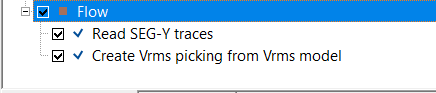
Make the necessary references/connections as required by Crate Vrms picking from Vrms model module.
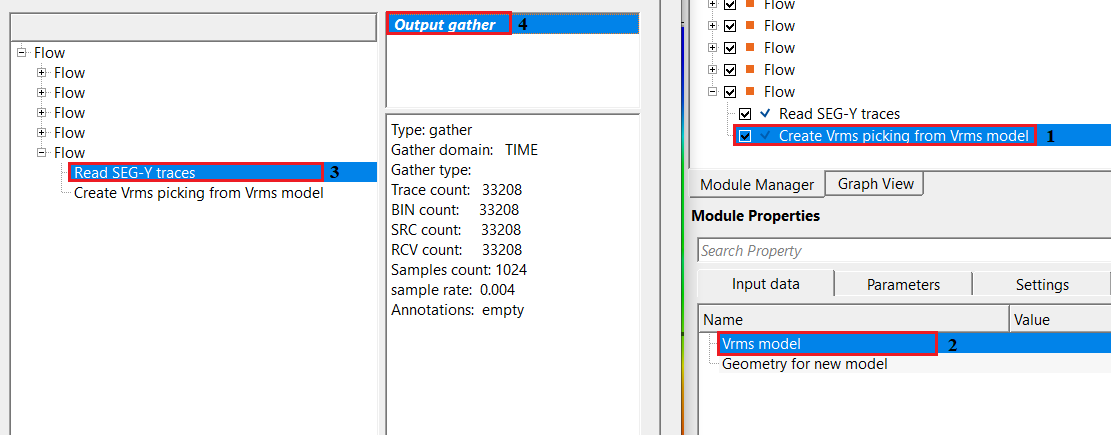
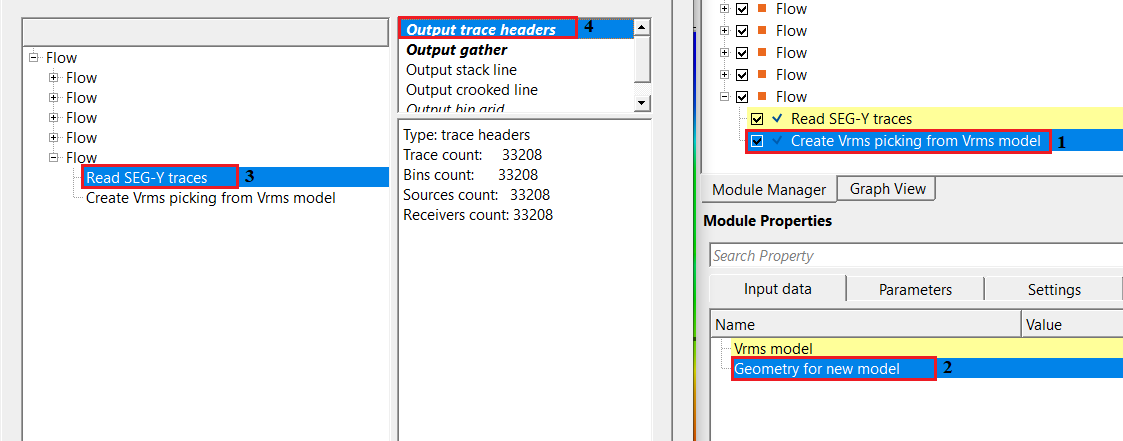
After setting up the necessary references/connections and parameters, execute the module and check the output file. It will be an ASCII file with an extension of .corr (which is a g-Platform internal file format for velocities and mutes).
Actions
There are no action items available for this module so the user can ignore it.
Video lesson
YouTube video lesson, click here to open [VIDEO IN PROCESS...]
Related articles
Yilmaz. O., 1987, Seismic data processing: Society of Exploration Geophysicist
 * * * If you have any questions, please send an e-mail to: support@geomage.com * * *