2D Radial trace denoise
Attenuation of coherent noise (ground roll) in radial domain
Theory
The radial trace transform is a simple transform to map gathers in t-x domain into an apparent velocity and travel time domain. In radial domain, traces are reorganized based on their angle/apparent velocity rather than the conventional source-receiver offset coordinates.
Noise like ground roll and diffractions exhibit strong coherent patterns in the radial domain compared to the time-offset domain. It makes it easier to attenuate in the radial domain than in t-x domain. Ground roll contaminates the near offset traces in the t-x domain with low frequency & high amplitudes. When the ground roll is transformed in to radial domain, it forms a linear or fan like pattern and it is easily distinguishable with hyperbolic reflections/events.
The apparent frequency of the ground roll will also be transformed in the RT domain. Ground roll can be extracted via the use of filters in the RT domain, to generate a noise model. This noise model can then be adaptively subtracted from the original input data. Results show that this method produces better results than an F-K filter, with less reduction in the amplitude spectrum.
The radial transform is defined by:
v = \frac{x}{t}
Where
x - offset (distance between source and receiver)
t - two way travel time
v - apparent velocity
Input data
Input DataItem
Input gather
connect/reference to input gather that should be transformed to radial domain. Usually shot gather or cmp gather with increasing offset is an ideal as input gather.
Parameters
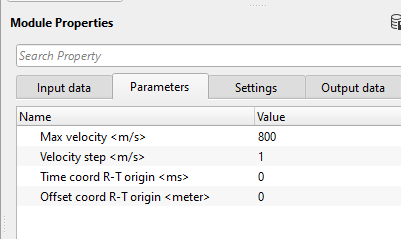
Max velocity
specify the maximum velocity that should be considered in the radial trace domain to align the seismic traces along the radial domain.
Velocity step
a smaller velocity step improves the noise attenuation however increases the computation time. Specify the velocity step size that is used as an interval in the radial trace domain. This determines the resolution of gather in radial(R-T) domain.
Time coord R-T origin
specify the starting time. This value ensures that both seismic wavelet initiation time and radial trace initiation time aligns to better separate the signal and noise based on the coherency of the noise. By default, 0 which should be good.
Offset coord R-T origin
it helps in modeling of the linear (ground roll) and hyperbolic events based on the spatial variation of the seismic data. Ground roll concentrates in the near offset area. By default, 0 and keep the value same.
Settings
Auto-connection - By default, TRUE(Checked).It will automatically connects to the next module. To avoid auto-connect, the user should uncheck this option.
Bad data values option { Fix, Notify, Continue } - This is applicable whenever there is a bad value or NaN (Not a Number) in the data. By default, Notify. While testing, it is good to opt as Notify option. Once we understand the root cause of it, the user can either choose the option Fix or Continue. In this way, the job won't stop/fail during the production.
Notify - It will notify the issue if there are any bad values or NaN. This is halt the workflow execution.
Fix - It will fix the bad values and continue executing the workflow.
Continue - This option will continue the execution of the workflow however if there are any bad values or NaN, it won't fix it.
Calculate difference - This option creates the difference display gather between input and output gathers. By default Unchecked. To create a difference, check the option.
Number of threads - One less than total no of nodes/threads to execute a job in multi-thread mode. Limit number of threads on main machine.
Skip - By default, FALSE(Unchecked). This option helps to bypass the module from the workflow.
Output data
Output DataItem
Output gather
generates the radial trace denoise output gather. This can be used as an connection/reference to the next module.
Gather of difference
generates the difference between the input and output gather.
Output gather
generates the R-T transformed output gather as processing output gather.
Information
There is no information available for this module so the user can ignore it.
Examples
In this example, we use radial trace denoise module along with band pass as a sub-sequence procedure. The idea behind applying a band pass filter inside the radial trace denoise module is to filter out the low frequency ground roll noise in the radial domain. It is easier to distinguish the linear and hyperbolic events in R-T or radial trace domain.
We provide an input along with ground roll to the radial trace domain module however this input majorly consists of the ground roll and bit of primary energy. For this application, we are using Mute by velocity module to prepare the input data for Radial trace denoise module. We consider the difference gather as an input to Radial trace denoise module.
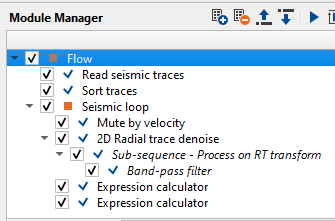
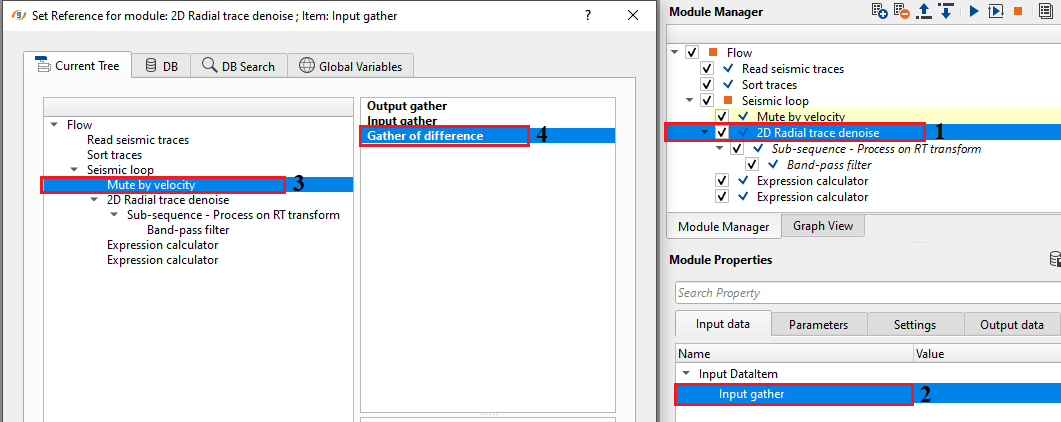
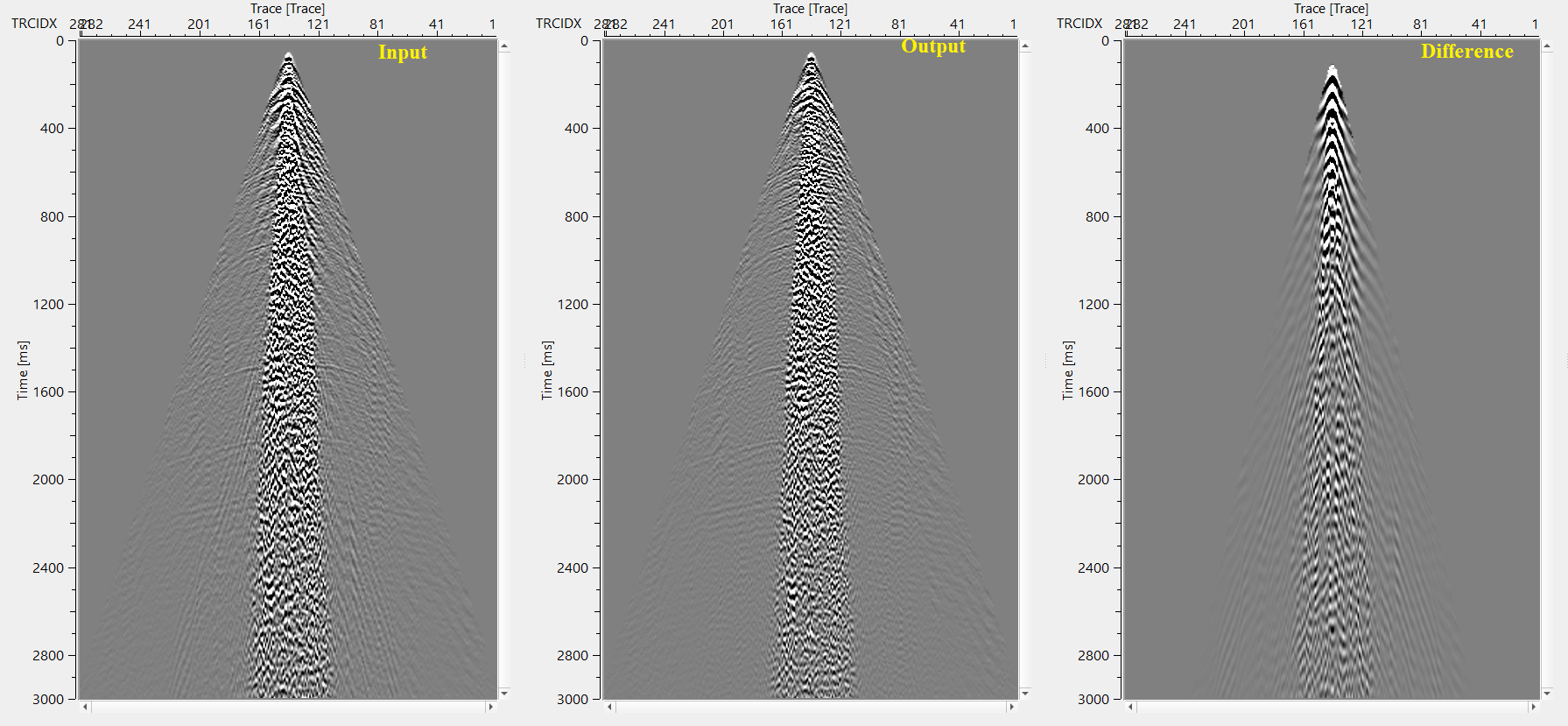
Execute the module 2D radial trace denoise module after setting up the parameters. Launch Vista items. It generates, Input, Output, Difference and Processing Output gather.
Let's look into Processing - Output gather. This is the output in radial trace (R-T) domain after transformation. We can clearly distinguish between the hyperbolic and linear events in the R-T domain as shown in the below figure.
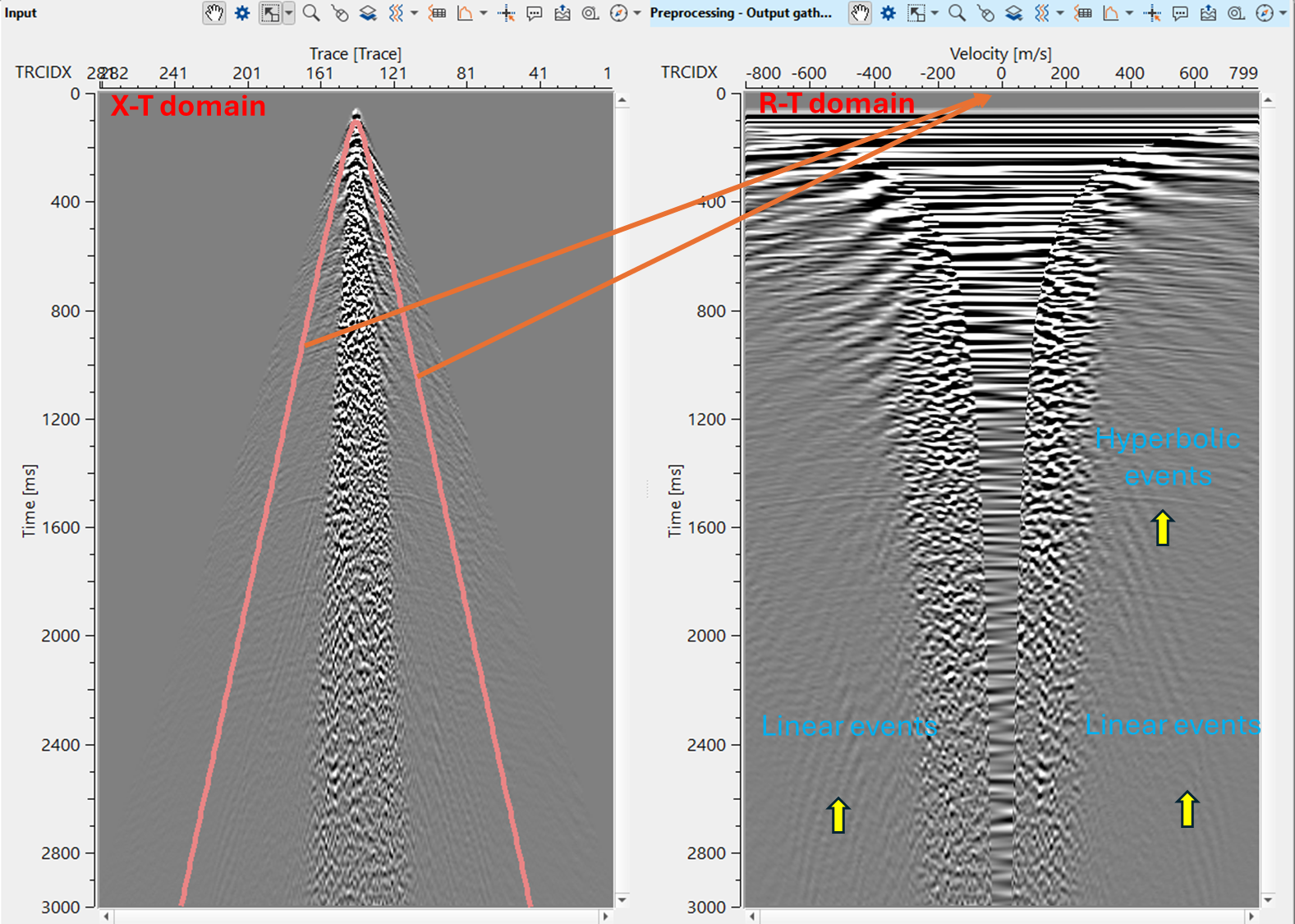
When the data transformed from X-T domain to R-T domain, each trace is aligned along the radial domain with a velocity ranging from 0 to 800 m/s with a velocity step size of 1 m/s. On the horizontal axis, we observe all the ground roll velocities starting from ~400 m/s to 800 m/s in the form of linear events. With the combination of band pass filter, we attenuate these low frequency ground roll in the R-T domain and later transform them back to X-T domain.
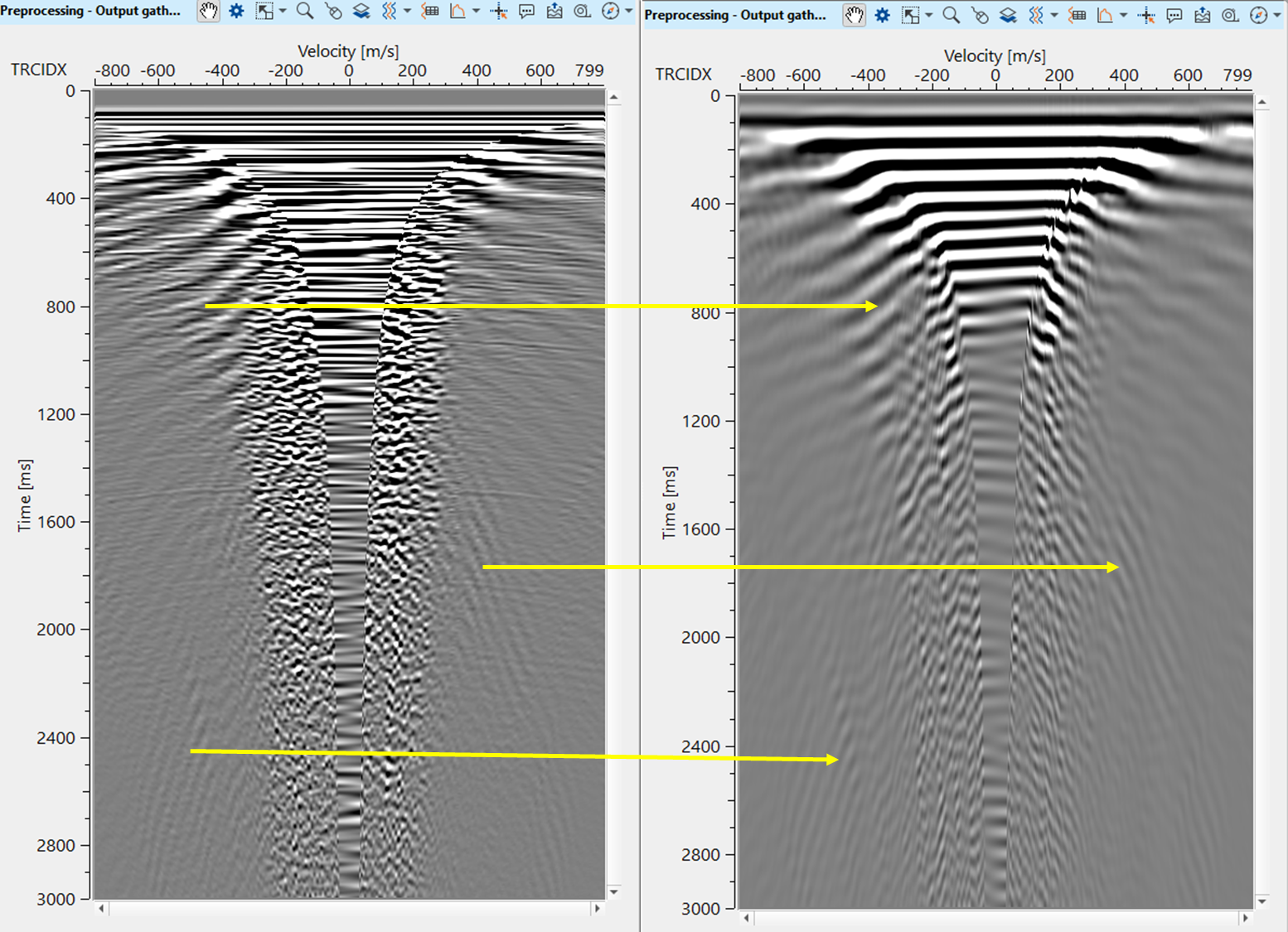
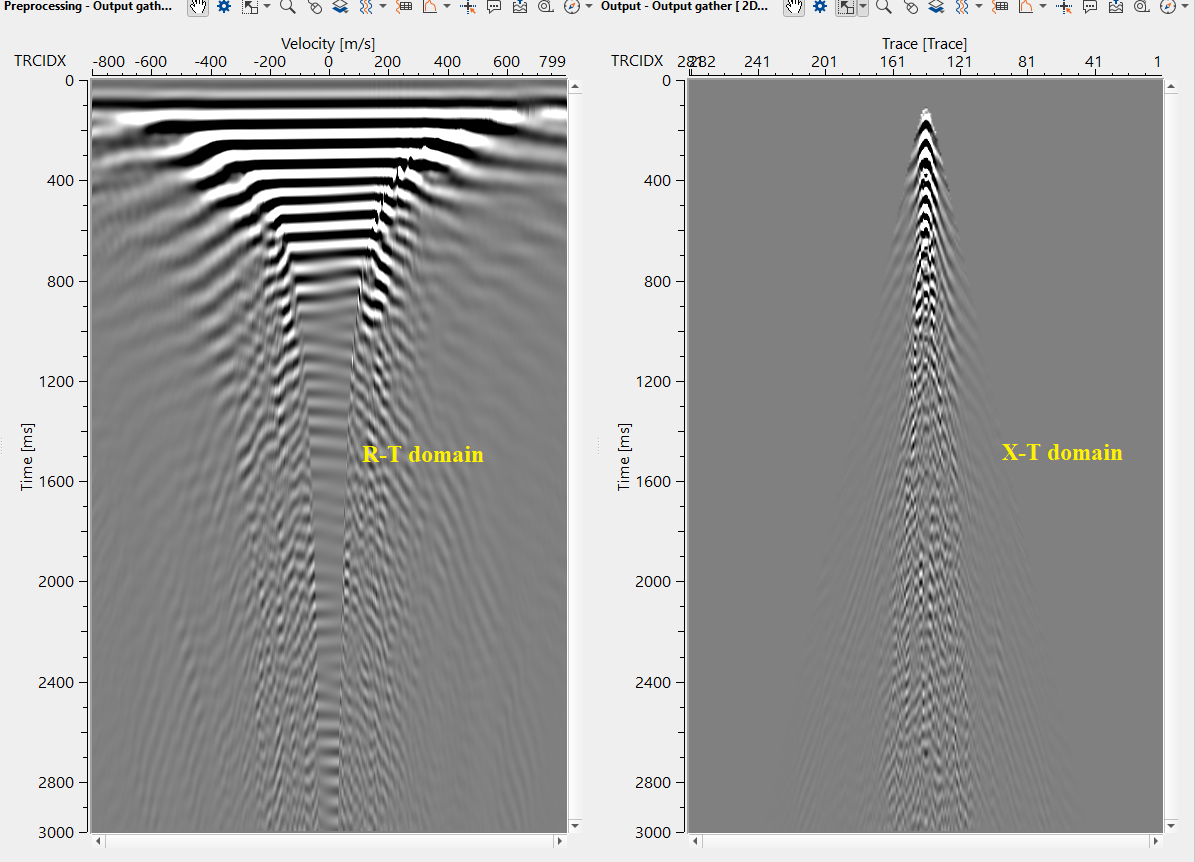
After transformed back from R-T domain to T-X domain, final output gather looks as shown below
Final output of the full gather should be shown in the below image after applying expression calculator procedure.
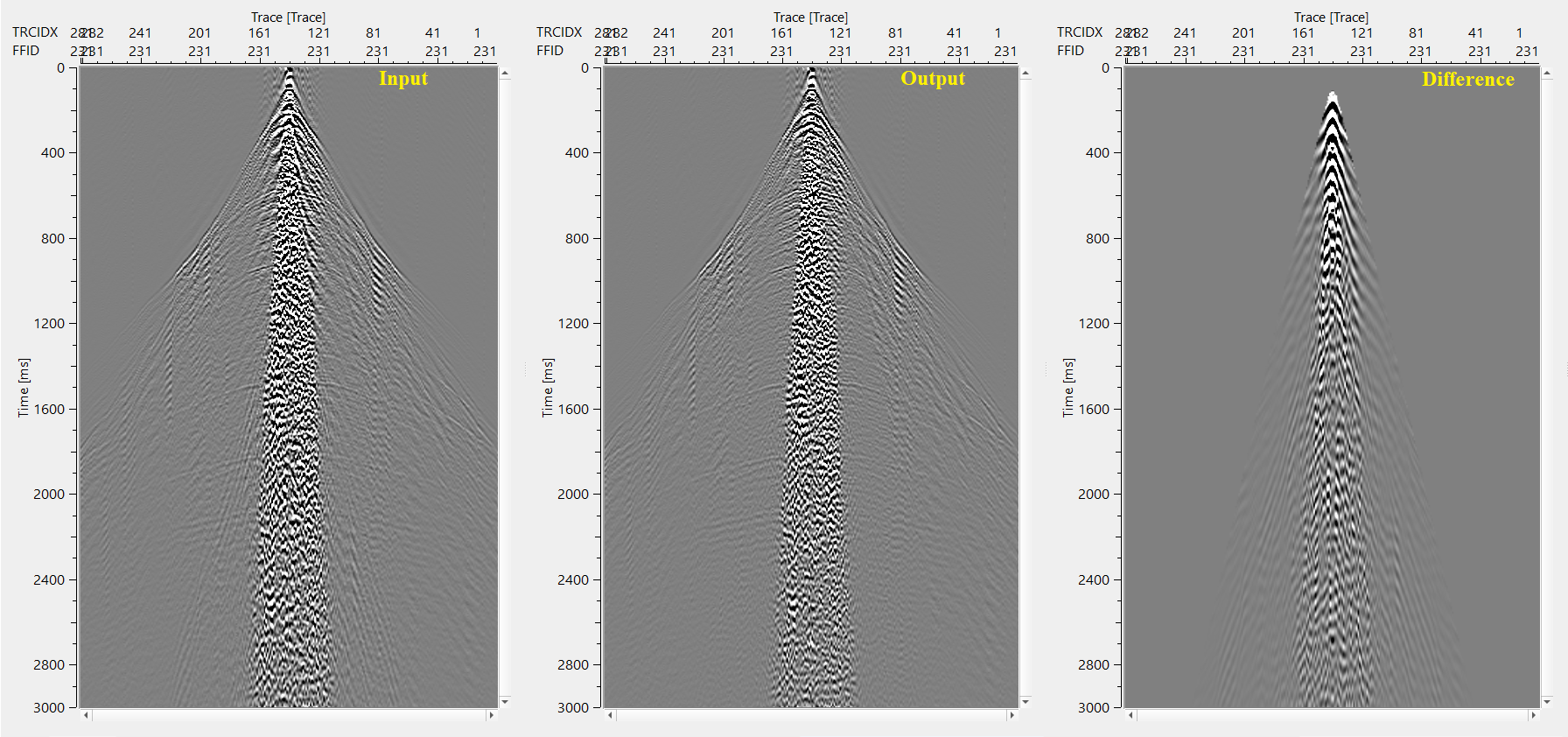
Expression calculator - In the 1st expression calculator, Output gather of Mute by velocity is connected/referenced as Gather A and Difference gather of 2D radial trace denoise as Gather B. In the expression, we added (A+B) these two gathers to get an output. 2nd Expression calculator is used to generate the difference for QC purpose. Input of Mute by velocity is connected/referenced as Gather A and Output from Expression calculator is connected/referenced as Gather B. In the expression field, subtract (A-B) one from the other to generate the difference gather.
Actions
There are no action items available for this module so the user can ignore it.
Video lesson
YouTube video lesson, click here to open [VIDEO IN PROCESS...]
Related articles
Yilmaz. O., 1987, Seismic data processing: Society of Exploration Geophysicist
 * * * If you have any questions, please send an e-mail to: support@geomage.com * * *