NMO
Normal Move Out (NMO) correction applied to seismic data to remove the offset dependent travel time delay.
Theory
Normal Moveout (NMO) is a seismic processing correction that compensates for the increase in reflection travel time with source–receiver offset. For a given reflector, traces recorded at larger offsets arrive later than the zero-offset trace due to longer ray paths. NMO correction flattens these reflection events using a velocity model (typically NMO or stacking velocity) so that traces can be accurately stacked and further processed.
NMO assumes hyperbolic moveout, which is valid for horizontally layered media and moderate offsets. Incorrect velocities result in under-correction or over-correction, causing residual curvature and potential stretch distortion at shallow times.
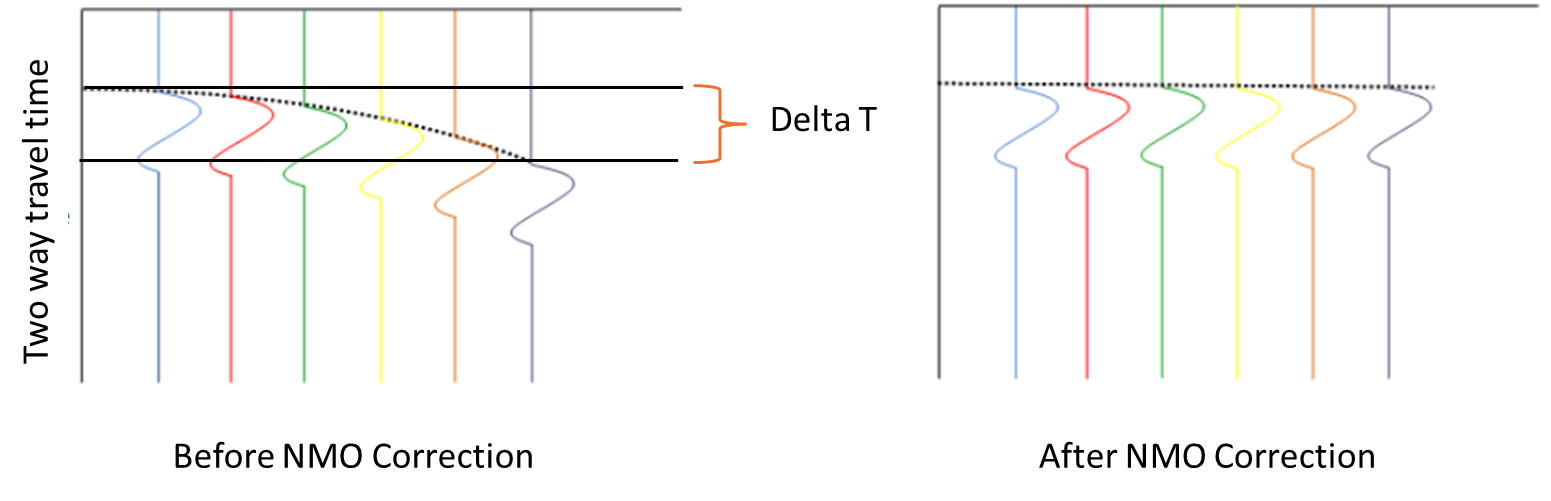
CMP gather before NMO
- Reflection event curves with offset
- Shape is approximately hyperbolic
- Traces cannot be stacked directly
CMP gather after NMO
- Reflection event flattened
- All offsets aligned at t0
- Data is ready for stacking
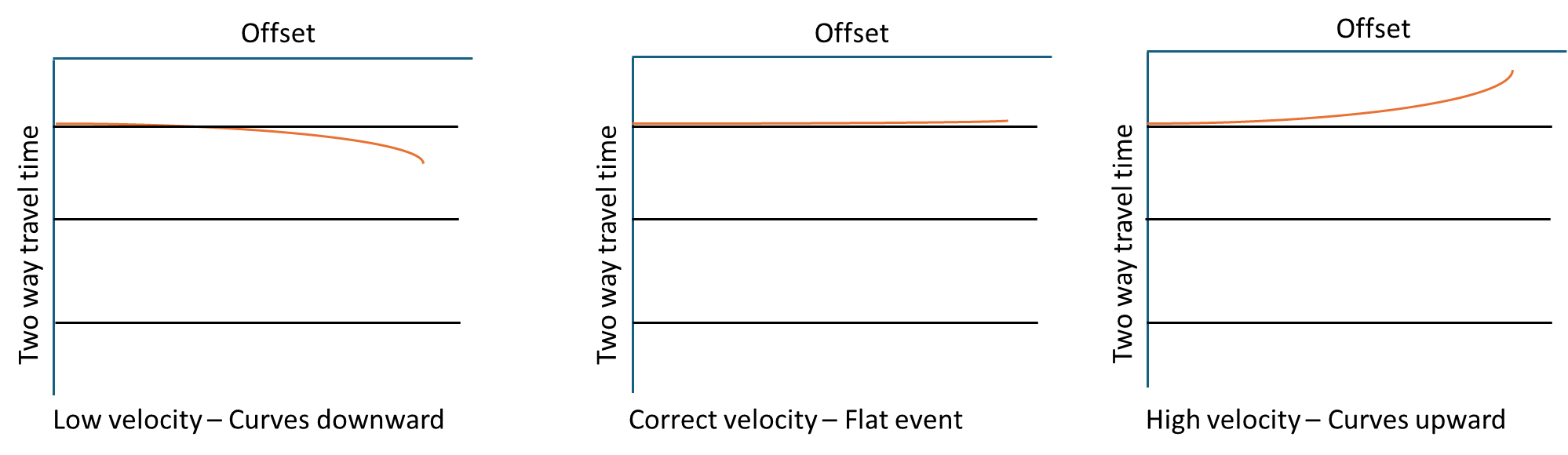
Effect of wrong velocity
- Low velocity - event still curves downward (under corrected)
- Correct velocity - flat event
- High velocity - event curves upward (over corrected)
NMO stretch
- Large time shifts stretch wavelets
- Distorts amplitudes and frequencies
- Can be controlled by using stretch mute
This procedure applies normal move out corrections for seismic traces. Seismograms before stacking with non-zero offset, became to seismograms before stacking with zero offset according to Dix formula below. This formula is used by the NMO program:
\increment t = \sqrt{t_{0}^2+\frac{x^2}{V_{nmo}^2}} - t_{0}
Where
t0 - travel time at zero offset
x - is offset
Vnmo - NMO Velocity
There is also an option to take the topography into consideration during the velocity input. In this case the formula will be as following:
\increment t = \frac{1}{2}\sqrt{t_{0}^{2}+\frac{x^2}{V_{nmo}^2} - \frac{(D_{s}-D_{b})}{V_{0}}}+ \frac{1}{2}\sqrt{t_{0}^{2}+\frac{x^2}{V_{nmo}^2} - \frac{(D_{r}-D_{b})}{V_{0}}}
Where
t0 - travel time at zero offset
x - is offset
Ds - Elevation of the source
Dr - Elevation of the receiver
Db - Elevation of the bin
V0 - Datum or replacement velocity
Vnmo - NMO Velocity
Input data
Input DataItem
Input gather
provide the input gather that needs to be corrected by using a Vrms velocity model. Connect/reference to the output gather.
Input velocity type - Selects the type of velocity information used for NMO correction. By default, Vrms model.
Input velocity type { Vrms model, Constant velocity }
select the input velocity type from the drop down menu. By default, Vrms model.
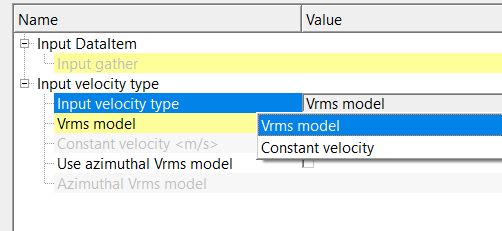
Input velocity type - Vrms model
Uses a time-varying RMS velocity function for NMO correction.
Vrms model
connect/reference to the Vrms velocity model. This is usually the Output gather or Output velocity model.
Input velocity type - Constant velocity
Uses a single constant velocity value for all times and offsets.
Constant velocity
provide a constant velocity value that will be applied uniformly during NMO correction.
Use azimuthal Vrms model
Enables azimuth-dependent RMS velocities for azimuthal NMO correction. By default, FALSE (Unchecked).
Use azimuthal Vrms model - true
Azimuthal Vrms model
Uses azimuthal-dependent RMS velocities when enabled.
Parameters
NMO direction { Forward, Reverse } - defines whether NMO should be applied or removed.
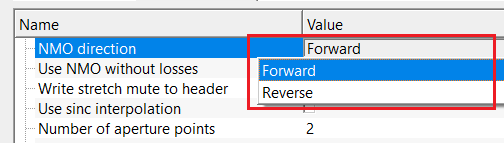
NMO direction - Forward
applies NMO correction.
Datum
reference elevation or time datum used for NMO and datum corrections.
Use NMO without losses - preserves original amplitudes and avoids trace truncation during NMO. By default, FALSE (Unchecked).
Write stretch mute to header - writes stretch-mute information to trace headers for later use or QC. By default, FALSE (Unchecked).
Use sinc interpolation - uses for higher-accuracy NMO correction. By default, FALSE (Unchecked).
Number of aperture points - used in the interpolation aperture. By default, 2
Stretching parameters - group of parameters controlling NMO stretch handling.
Stretch factor
maximum allowable relative stretch; samples exceeding this limit are muted. By default, 100%
Smoothing parameter Y velocity
vertical (time-direction) smoothing applied to the velocity function used for NMO.
Use stretch limiting
enables muting of samples that exceed the stretch factor. By default, FALSE (Unchecked).
Resample for NMO - resamples data to improve accuracy of NMO.
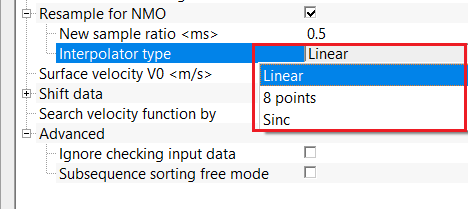
New sample ratio
ratio between original and resampled time intervals. By default, 0.5. The lesser the sample interval, the lesser output gather.
Interpolator type { Linear, 8 points, Sinc }
selects the interpolation method used during NMO. Select the appropriate interpolator type from the drop down menu. By default, Linear.
Interpolator type - Sinc
uses sinc interpolation for maximum time-shift accuracy.
Aperture in samples
defines the interpolation window size in samples.
Surface velocity V0 - replacement (datum) velocity used for surface-consistent time shifts.
Shift data
applies time shifting based on datum..
Shift to/from constant datum
shifts data between acquisition elevation and a constant processing datum.
Search velocity function by { Auto, Source, Receiver, Bin } - defines how the velocity function is selected for each trace or gather.
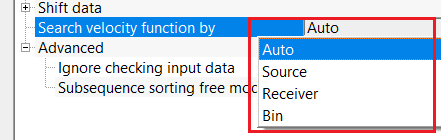
- Auto – automatically selects the most appropriate velocity
- Source – velocity selected by source location
- Receiver – velocity selected by receiver location
- Bin – velocity selected by CMP/bin location
Advanced
this section deals with additional parameters which check whether the input data is sorted or not.
Ignore checking input data
by default, FALSE (Unchecked). This option allows the user to ignore checking input data for sorting related issues if checked (TRUE).
Sub-sequence sorting free mode
by default, FALSE (Unchecked). This option will ignore the sorting
Settings
Auto-connection
By default, TRUE(Checked).It will automatically connects to the next module. To avoid auto-connect, the user should uncheck this option.
Bad data values option { Fix, Notify, Continue }
This is applicable whenever there is a bad value or NaN (Not a Number) in the data. By default, Notify. While testing, it is good to opt as Notify option. Once we understand the root cause of it,the user can either choose the option Fix or Continue. In this way, the job won't stop/fail during the production.
Notify
It will notify the issue if there are any bad values or NaN. This will halt the workflow execution.
Fix
It will fix the bad values and continue executing the workflow.
Continue
This option will continue the execution of the workflow however if there are any bad values or NaN, it won't fix it.
Number of threads
One less than total no of nodes/threads to execute a job in multi-thread mode. Limit number of threads on main machine.
Skip
By default, FALSE(Unchecked). This option helps to bypass the module from the workflow.
Output data
Output DataItem
Output gather
generates NMO corrected gather as an output gather.
Output Vrms gather
outputs Vrms gather as a vista item. This can be saved as an output Vrms gather as well.
Output not stretched gather
outputs non-stretched NMO gather also as a vista item.
Information
There is no information available for this module.
Examples
In this example workflow, we are using a Vrms velocity model and Denoise shot gathers as two inputs for applying NMO.
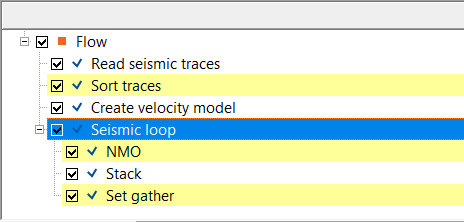
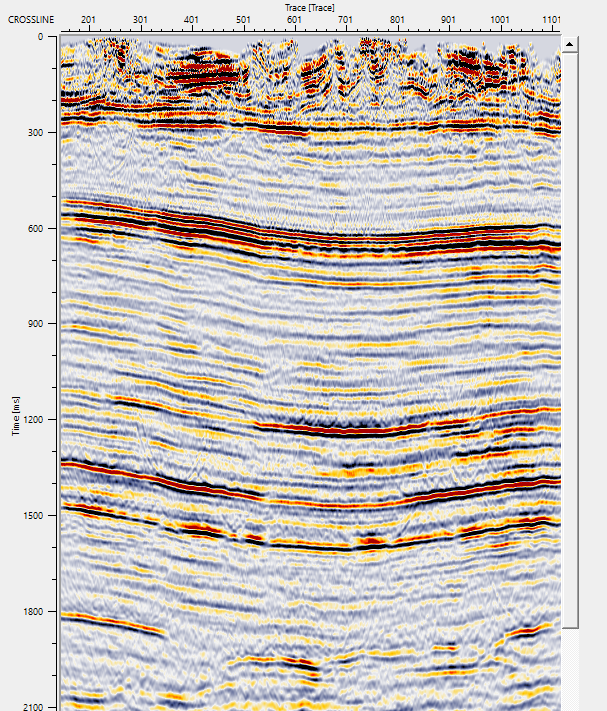
We sorted the data in CDP - Offset as Grouping and Sorting. We've added NMO inside the Seismic loop followed by Stack. Finally Set gather is added into the seismic loop to get a stack section.
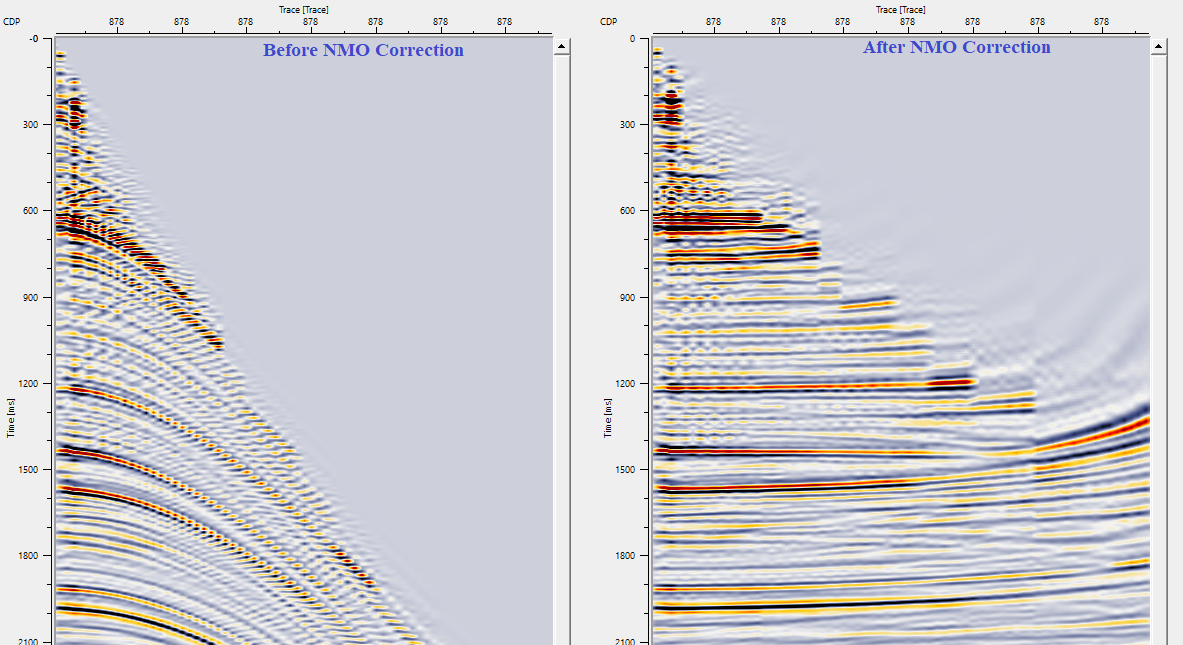
Take NMO corrected gathers and create a stack by using Stack and Set gather module within the Seismic loop module. In order to get the stack section, the user should select Seismic loop module and click on "Execute all modules" icon. 
Actions
There are no action items available for this module so the user can ignore it.
Video lesson
YouTube video lesson, click here to open [VIDEO IN PROCESS...]
Related articles
Yilmaz. O., 1987, Seismic data processing: Society of Exploration Geophysicist
Devitoproject.org for image
 * * * If you have any questions, please send an e-mail to: support@geomage.com * * *