Smooth velocity model
Theory
The velocity model(s) represents the spatial and temporal distribution of seismic velocities derived from velocity analysis. Although this model honors picked velocities, it often contains short-wavelength, non-geological variations caused by noise, picking inconsistencies, limited fold, and acquisition footprint effects (especially in 3D data).
To ensure stability and geological realism in subsequent processing steps such as NMO correction, stacking, and migration, the velocity model must be smoothed.
Purpose of Smoothing the Velocity Model
The main objectives of smoothing the velocity model are:
- To remove random and acquisition-related velocity fluctuations
- To enforce lateral and vertical continuity of velocities
- To ensure physically realistic velocity variations
- To stabilize velocity-sensitive processes such as migration
- To suppress inline and crossline footprint in 3D velocity volumes
Velocity smoothing improves the numerical robustness and imaging quality of the seismic data without destroying true geological velocity trends.
Input data
In velocity model
specify the input velocity model that needs to be smoothed. Connect/reference Output velocity model from Create velocity model module or similar.
Parameters
Smooth window - specify the smoothing window parameter. This is the vertical extent(samples) of the smoothing operator applied to the velocity model. Removes short-wavelength vertical velocity variations.
Settings
Number of threads
One less than total no of nodes/threads to execute a job in multi-thread mode. Limit number of threads on main machine.
Skip
By default, FALSE(Unchecked). This option helps to bypass the module from the workflow.
Output data
Out velocity model
outputs smoothed velocity model.
Information
There is no information available for this module.
Examples
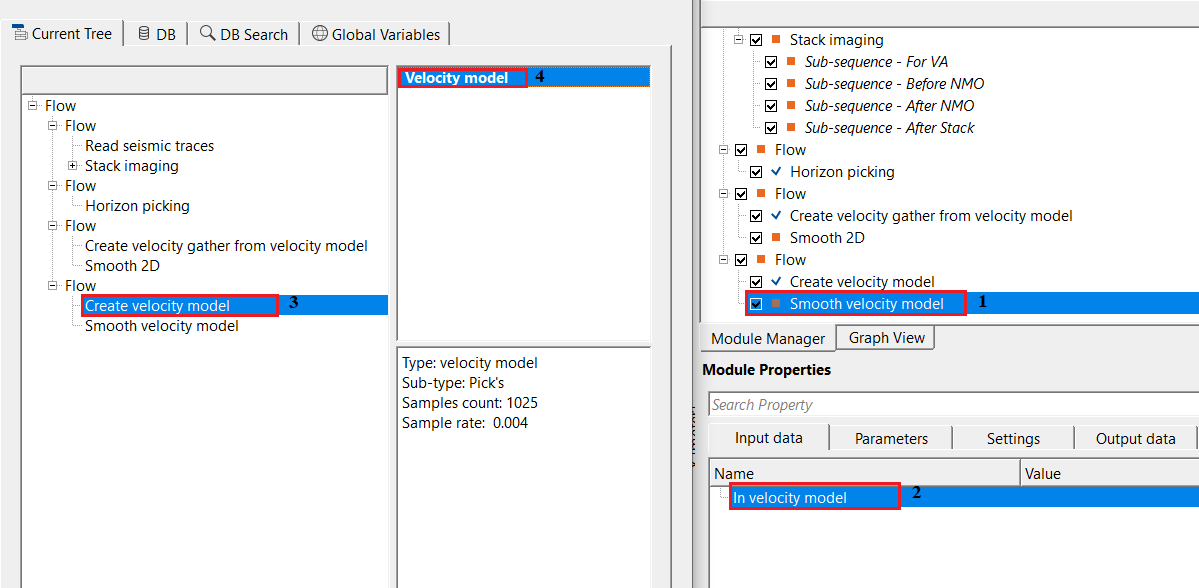
In this example workflow, we smooth the input velocity model generated/created by Create velocity model module.
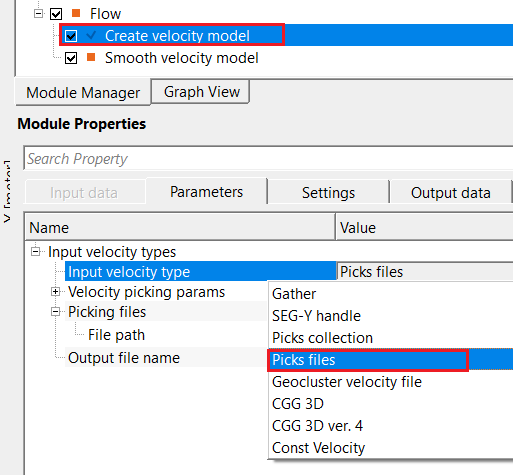
In Create velocity model module, we've chosen Picks file as input velocity.
Connect/reference the Velocity model from Create Velocity model to In velocity model of Smooth velocity model module.
Adjust the parameters like smooth window (samples). This is a one dimensional parameter smoothing only where the user should provide number of samples to consider in the smoothing. This is also known as vertical window. By default, it is 50 samples. If it is translates into milliseconds (ms), 50 is divided by the sample interval. For this particular dataset, sample interval is 4ms, so, it is 50/4 = 12.5 ms.
There are no vista items available for this module to visualize the smoothed output velocity model.
Actions
There are no action items available for this module so the user can ignore it.
Video lesson
YouTube video lesson, click here to open [VIDEO IN PROCESS...]
Related articles
Yilmaz. O., 1987, Seismic data processing: Society of Exploration Geophysicist
 * * * If you have any questions, please send an e-mail to: support@geomage.com * * *