Resample
Resampling the seismic data
Theory
Resample module changes the sampling rate of seismic or velocity data by interpolating the input gathers onto a new time, depth, or frequency grid. It is used to make datasets compatible for further processing, improve numerical stability, or match required sampling for specific algorithms.
During the seismic data acquisition we record the data at sample interval say 2ms and we want to resample the data to 4ms for various reasons. By re-sampling we can reduce the number of samples that way we can minimize our data size without compromising the primary properties of seismic wavelet i.e., amplitude, frequency and phase. Re-sampling is beneficial up to certain sampling interval, above that it will degrade the seismic data by introducing aliasing. Resampling can be done in Frequency domain or using “sinc” function(sampling function).
Input data
Input DataItem
Input gather
the input gather can be a pre-stack or post-stack gather. Connect/reference to Output gather.
Parameters
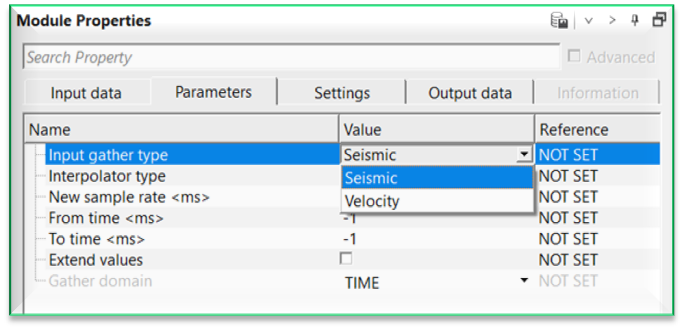
Input gather type { Seismic, Velocity }
select the input gather type from the drop down menu. By default, Seismic.
Seismic - resamples the input seismic gather amplitudes
Velocity - resamples the input velocity model or functions.
Interpolator type { Linear, 8 points, Sinc }
select the interpolation method used for resampling. By default, Linear.
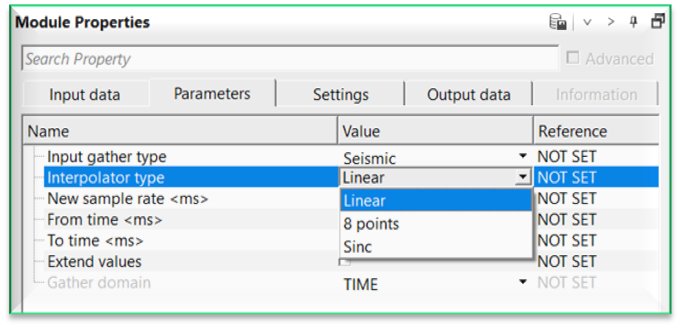
Linear - Fast, simple interpolation
8 points - Higher-order interpolation using neighboring samples
Sinc - High-fidelity band-limited interpolation
Interpolator type - Sinc
uses sinc interpolation for accurate amplitude and phase preservation, especially suited for seismic data.
Aperture in samples
defines the number of neighboring samples used by the interpolator. Larger aperture leads to higher accuracy but slower performance. Whereas, Smaller aperture gives faster results but less accurate.
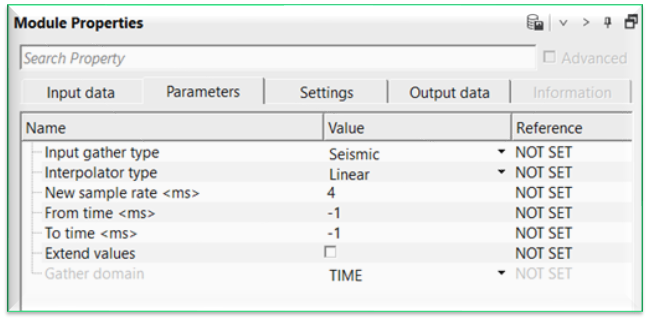
New sample rate - specifies the target sampling interval for the output data. By default, 4 ms.
From time - defines the starting time/depth/frequency for resampling. By default, -1 ms.
To time - defines the ending time/depth/frequency for resampling. By default, -1 ms.
Extend values - controls how values outside the original data range are handled. By default, FALSE (Unchecked) which means out-of-range samples may be set to zero or ignored. When enabled, boundary values are extended.
Gather domain { TIME, DEPTH, FREQUENCY } - Specifies the domain in which resampling is performed. By default, TIME. It automatically detects the input gather and accordingly changes the gather domain display.
Settings
Auto-connection
By default, TRUE(Checked).It will automatically connects to the next module. To avoid auto-connect, the user should uncheck this option.
Bad data values option { Fix, Notify, Continue }
Bad value fix - This is applicable whenever there is a bad value or NaN (Not a Number) in the data. By default, Notify. While testing, it is good to opt as Notify option. Once we understand the root cause of it, the user can either choose the option Fix or Continue. In this way, the job won't stop/fail during the production.
Notify
It will notify the issue if there are any bad values or NaN. This will halt the workflow execution.
Fix
It will fix the bad values and continue executing the workflow.
Continue
This option will continue the execution of the workflow however if there are any bad values or NaN, it won't fix it.
Number of threads
One less than total no of nodes/threads to execute a job in multi-thread mode. Limit number of threads on main machine.
Skip
By default, FALSE(Unchecked). This option helps to bypass the module from the workflow.
Output data
Output DataItem
Output gather
outputs resampled gather as an output gather.
Information
There is no information available for this module.
Examples
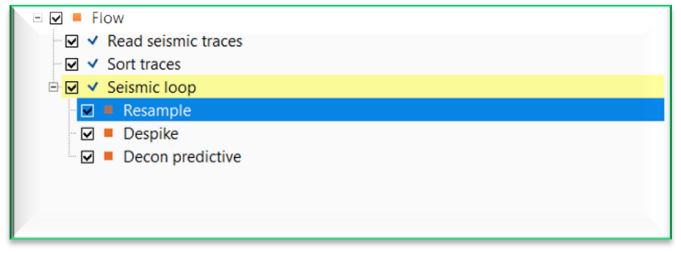
In this example workflow, we are resampling a pre-stack gather. The original sample interval of the input gather is 4ms and we are going to resample the input gather from 4 ms to 2 ms.
Actions
There are no action items available for this module.
Video lesson
YouTube video lesson, click here to open [VIDEO IN PROCESS...]
Related articles
Yilmaz. O., 1987, Seismic data processing: Society of Exploration Geophysicist
 * * * If you have any questions, please send an e-mail to: support@geomage.com * * *