Comparator
Theory
Comparator is a quality-control module that checks whether two data items connected to a workflow are structurally identical. It compares the items you provide and raises an error (or a warning) if they differ, allowing you to catch data incompatibilities before they propagate into downstream processing steps. The module is primarily used for quality control (QC), data validation, and pre-processing checks before applying further seismic processing steps.
The module accepts any two data items of the same kind and compares them according to their type. For seismic gathers, it verifies that both gathers have the same number of traces, the same number of samples per trace, and the same sample interval. For gather-index vectors (sort/grouping tables), it checks that the trace-grouping keys, sort order, bin counts, step values, and min/max ranges are all equal. For scalar or header values, it performs a direct equality check. If any comparison fails, the module reports "Comparator returned FALSE."
Typical use cases include verifying that a resampling or editing step has not altered the trace count or record length, confirming that two branches of a split workflow produce geometrically compatible gathers before merging them, and ensuring that input geometry tables are consistent between processing runs. The Comparator helps the user to:
- Verify structural consistency between two data items (trace count, sample count, sample interval, bin geometry)
- Detect mismatches caused by resampling, muting, editing, or format conversion
- Prevent processing errors due to incompatible data geometry or sampling when merging two workflow branches
- Safeguard multi-stage QC checkpoints in long processing flows without producing any output data of its own
Input data
Input item 1
provide the 1st gather for comparison
Connect the first data item you want to check. This can be a seismic gather, a gather-index (sort/grouping) table, a trace vector, or a scalar value. The module automatically detects the data type and applies the appropriate comparison rules. Typically this is the output of one branch of your workflow — for example, the gather produced by a processing module whose result you want to validate.
Input item 2
specify the 2nd gather for comparison
Connect the second data item to compare against Input item 1. Both inputs must be of the same data type; if they differ in type, the comparison evaluates their string values directly. Typically this is the reference item — for example, the original gather before processing, or the output from a parallel branch that should match Input item 1 exactly in structure. The module checks that the two items are structurally identical: for gathers this means equal trace count, equal number of samples per trace, and equal sample interval; for geometry index tables this additionally covers bin counts, step sizes, and value ranges.
Ignore fail state when inputs are not equal
by default, FALSE(Unchecked). This option allows the user to ignore the warning messages or stop the program from proceed further.
Controls what happens when the two inputs do not match. Default: unchecked (FALSE). When unchecked, a mismatch causes the workflow to stop with a hard error, preventing any downstream modules from executing. This is the recommended setting for strict QC gates where data incompatibility must be caught and corrected before processing continues. When checked (TRUE), a mismatch is recorded in the log as a warning message but the workflow continues running. Use this softer mode when you want to monitor potential inconsistencies without interrupting a long automated processing sequence.
Parameters
There are no parameters available for this module.
Settings
Skip
By default, FALSE(Unchecked). This option helps to bypass the module from the workflow.
Output data
There are no output data from this module.
Information
The Comparator produces no output data of its own. Its sole function is to validate and gate the workflow. The comparison is performed on the structural metadata of the data items, not on sample amplitude values — so passing the Comparator does not guarantee that the waveforms are numerically identical, only that the two items have compatible geometry and dimensionality.
For seismic gathers, the checks performed are: (1) number of traces in the gather, (2) number of samples per trace, and (3) sample interval. For geometry index (sort/grouping) tables, the checks additionally cover: trace-grouping key definitions, trace-sorting key definitions, the number and identity of populated bins, and for each bin the list of trace indices it contains. This makes the Comparator suitable for verifying that two geometry-sorting operations applied to the same dataset have produced identical binning results.
The module has no configurable parameters beyond the two input connections and the fail-state toggle. It runs quickly because it only inspects metadata — it does not read or process trace sample data.
Examples
In this example, we are reading two input gathers which got same number of traces and same number of samples and sample interval. In another workflow, we change the no of traces, no of samples and sample interval and execute the workflows.
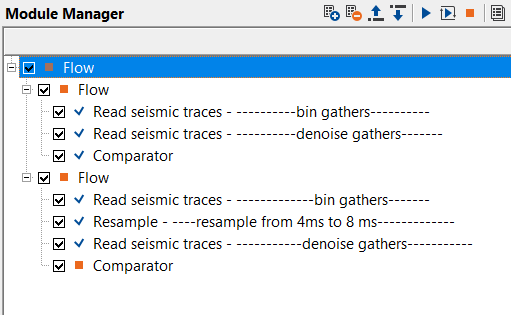
In the 1st instance, we directly compare two gathers i.e. bin gathers and denoise gathers. Both of them are having same no of traces, sample interval and no of samples. When we execute the module we should expect that there shouldn't be any warning messages.
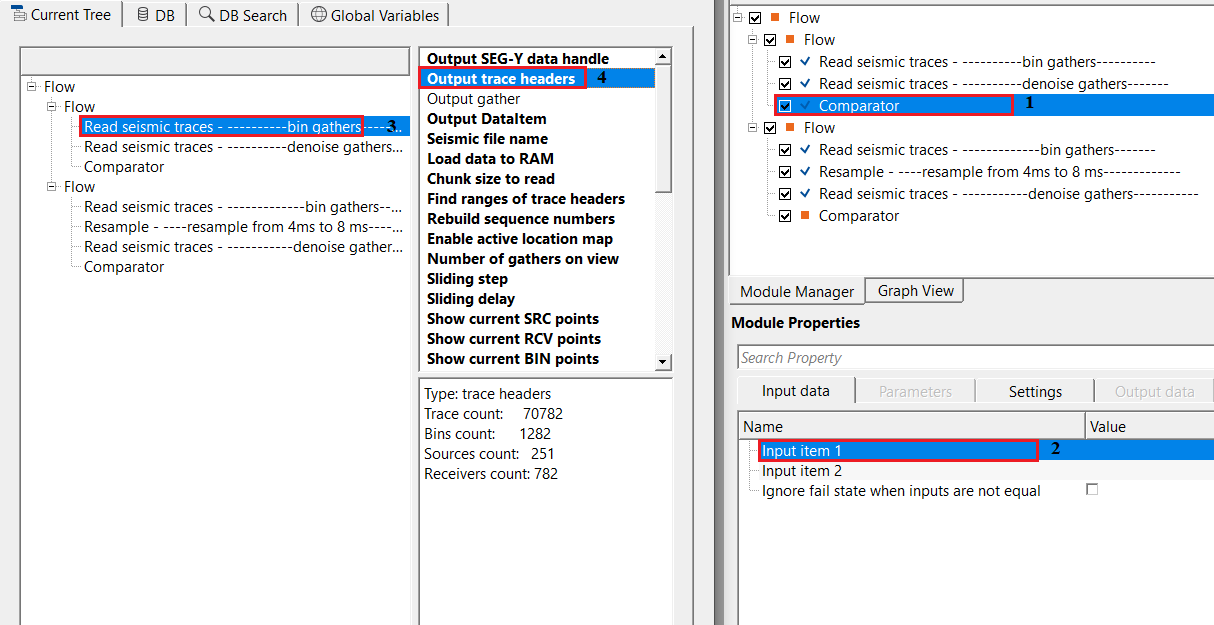
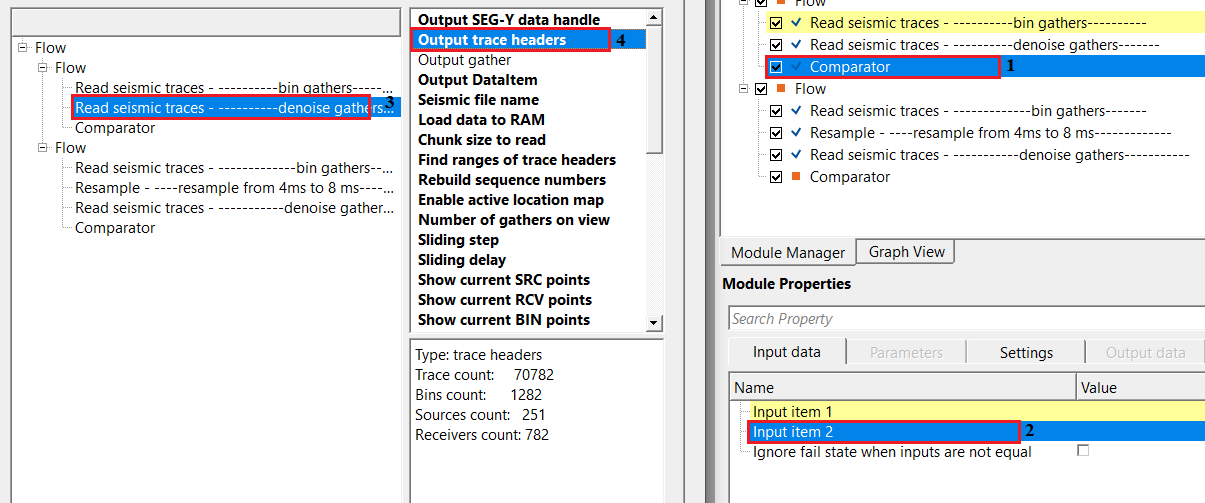
In the 2nd instance, we resample bin gathers from 4ms to 8ms. So total number of samples will not be equal to the denoise gathers which has 4ms sample interval. Now connect/reference the sample interval of resample gather output to comparator Item 1 & denoise gathers sample interval to Input item 2 of Comparator module and execute the module.
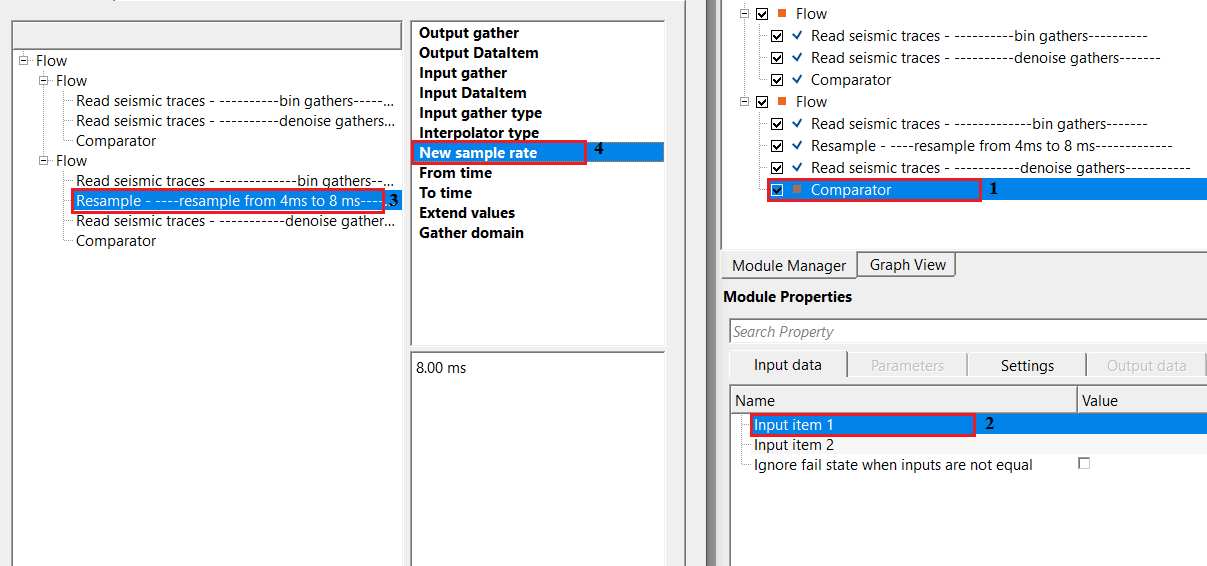
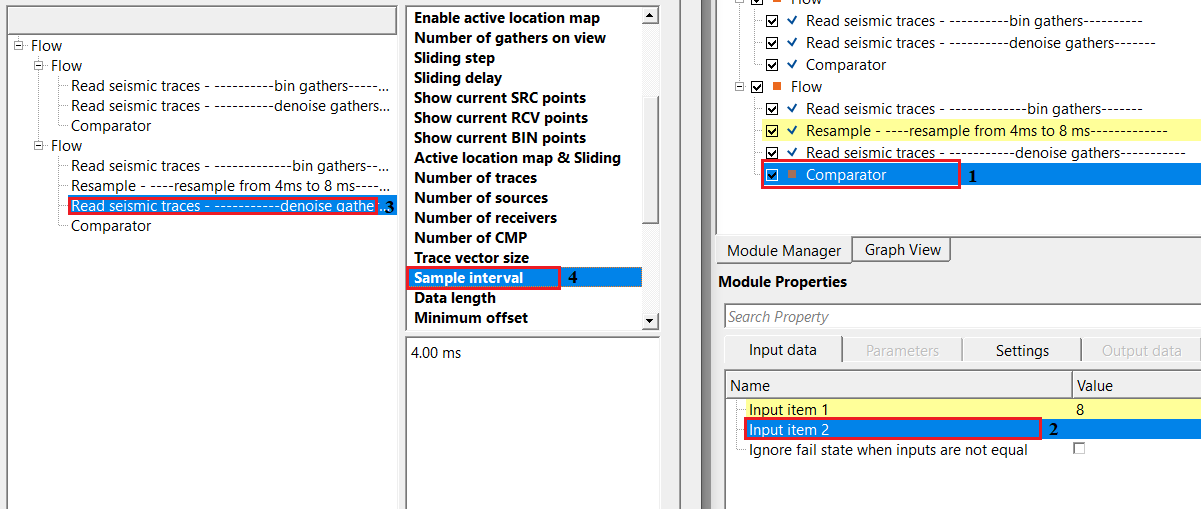
Now execute the Comparator module.
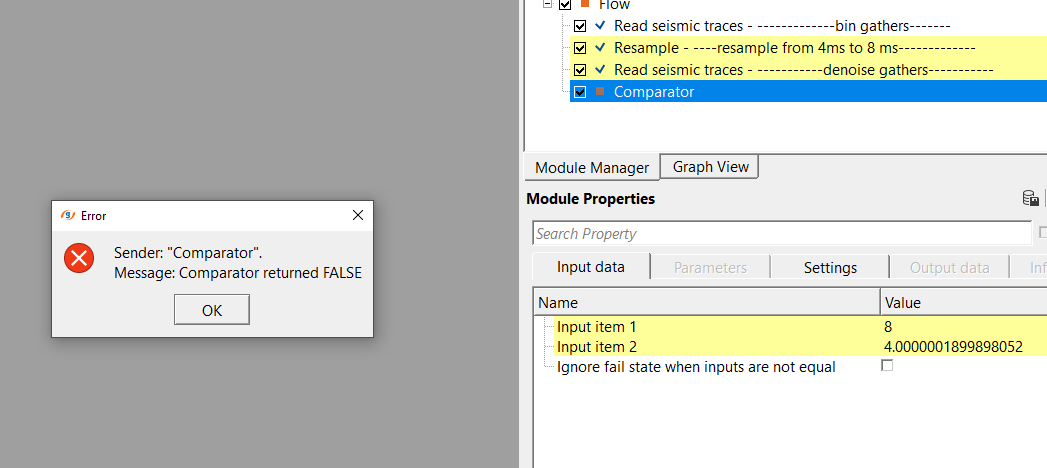
Look at the Error message. The module is telling us that both the inputs are not the same. Likewise, the user can use this module to QC the output gathers at different stages of the processing to make sure that the input and output gather at each stage are correct with respect to no of traces, samples, sample interval, record length etc.
Actions
There are no action items available for this module.
Video lesson
YouTube video lesson, click here to open [VIDEO IN PROCESS...]
Related articles
Yilmaz. O., 1987, Seismic data processing: Society of Exploration Geophysicist
 * * * If you have any questions, please send an e-mail to: support@geomage.com * * *
