Module name Save SEG-Y
Save SEG-Y module is used to save both internal and external dataset(s) in SEG-Y format.
Below will be shown the two scenarios of saving the data in SEG-Y format.
Scenario 1:
User reads the external dataset in SEG-Y format and performed some operation (it can be anything like modifying the trace/text/binary header or applied a bandpass filter etc) and wants to output in SEG-Y format.
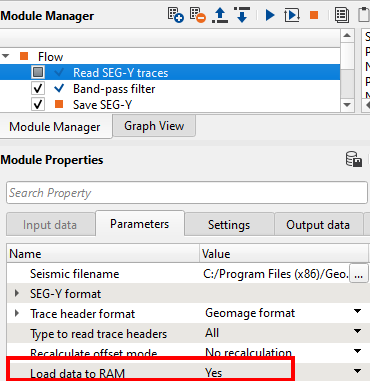
To read any external (SEG-Y) format, we must use "Read SEG-Y traces" module. In this example, we are applying a band pass filter to the input dataset and save the output dataset.
Inside Read SEG-Y module parameters we must change the option of "Load data to RAM" from No to YES. This is mandatory since the Save SEG-Y accepts the input data as "Input gather".
Parameters
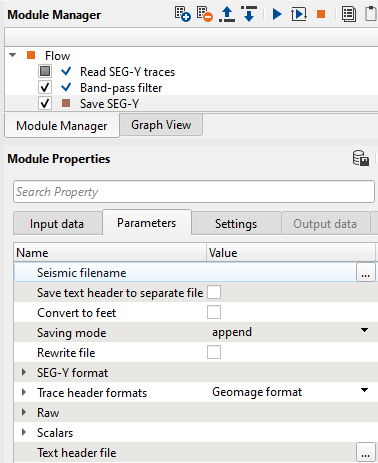
Seismic file name |
Define the path and give an output file name with an extension of .sgy or .segy |
Save text header to separate file |
This will save the text/EBCDIC header as a separate file |
Convert to feet |
It converts from Metric to Imperial measurement system |
Saving mode |
Select append/direct. By default "append" |
Rewrite file |
By default unchecked |
SEG-Y format |
This is the place where the user should select the available Data sample formats i.e Int4/Float4/IBM/IEEE etc |
Trace header formats |
By default Geomage format. If user wants to save it a customized format then refer to "Read SEG-Y traces" module |
Raw |
It has many options to either to use or not to use raw headers |
Scalars |
These are scalars for coordinates, elevation and SP. By default -100 i.e. 100 cm or 10-2 |
Text header file |
The user can to import the text/EBCDIC file so that this file can be incorporated into text headers |
Scenario 2:
Saving an internal file into external file using "Save SEG-Y" module.
In this example, we are going to apply some post stack processing on a stack and save the output.
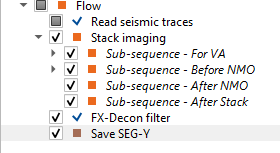
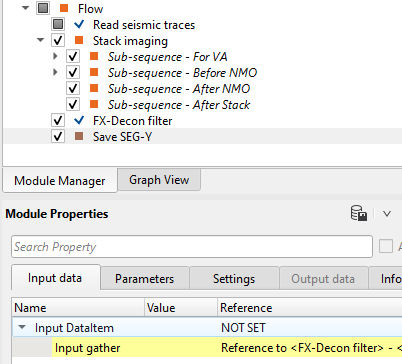
FX-Decon filter output will be referenced/connected to Save SEG-Y as Input gather. In the parameters, give the Seismic file name and define other parameters as explained above.