Module name Save seismic
Save seismic module is used to save any external data into g-Platform™ internal format. This module must be used inside the Flow only (User unable to use this module inside the Seismic loop).
The internal format dataset consists of two files. They are
•line123.gsd
•line123.gsd.sgy
In the first file line123.gsd, we have all the trace headers information with respect to g-Platform™ processing suite.
Whereas the second file line123.gsd.sgy stores all the seismic data information.
This file can be used in any external software as a SEG-Y file however pay attention to the Trace headers & EBCDIC/text headers since these are generated by using the Geomage trace header format. Geomage trace header format is a SEG standard format.
An example workflow with Save seismic module and it's Input data requirements are as shown below.
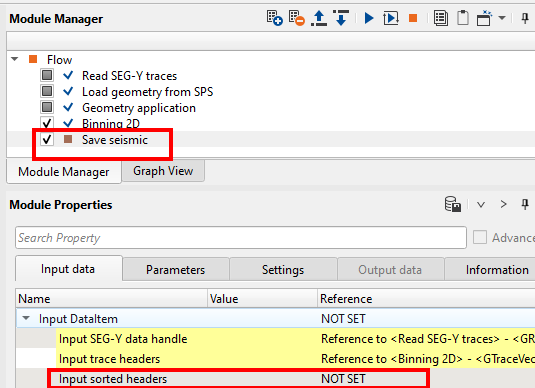
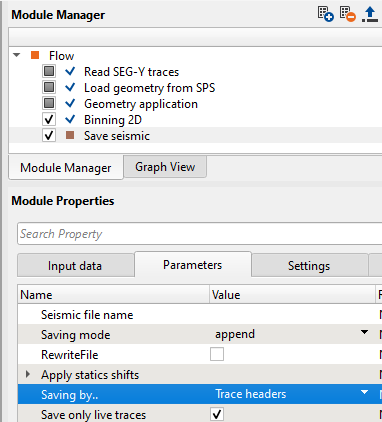
After executing the workflow, take a look at the Information tab of Save seismic module. It will show the total number of traces written. This is a good QC tool.
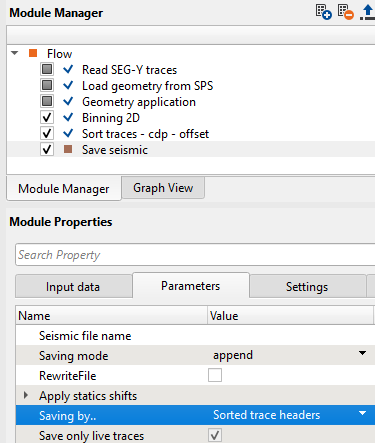
If we observe, we didn't make the reference/connection to "Input sorted headers". The workflow still works without fail however if the user wants to sort the data in any specific order then they must make this reference/connection. There is an option in Parameters whether the data should be "Saving by" Trace headers or Sorted trace headers.
To sort the data prior to saving, the user must add Sort traces module to the existing workflow.
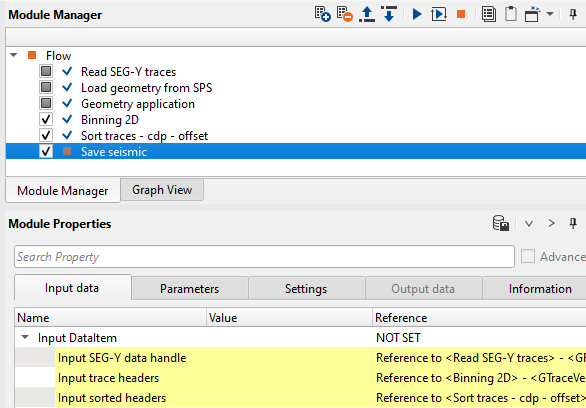
Parameters:
Seismic file name |
Provide the output dataset name |
Saving mode |
By default append. Second option is direct |
RewriteFile |
Append - If the user didn't check the RewriteFile option, then the dataset will be appended as many times as the user executes the Save seismic module or the entire workflow. Direct - In this mode, it will ignore all the sorting inside the workflow and output the data in the sorting of the input data. In other words, write the trace to the position that it was taken from. |
Apply statics shifts |
Source and Receiver statics can be applied(forward) or removed(reverse) as per user choice |
Saving by |
Choice of saving the data by trace headers or sorted trace headers |
Save only live traces |
By default checked. Again it's user preference to check/uncheck this option to save all or only live traces |