Extract 3D seismic data
Extracts free line (user selected arbitrary line) from the 3D seismic data
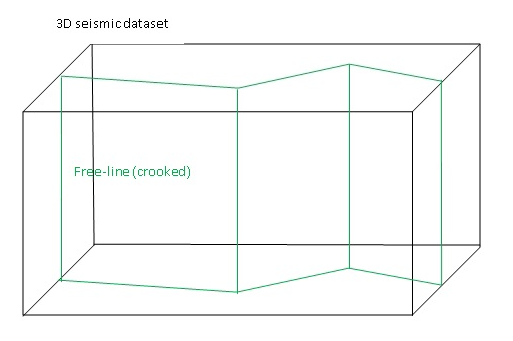
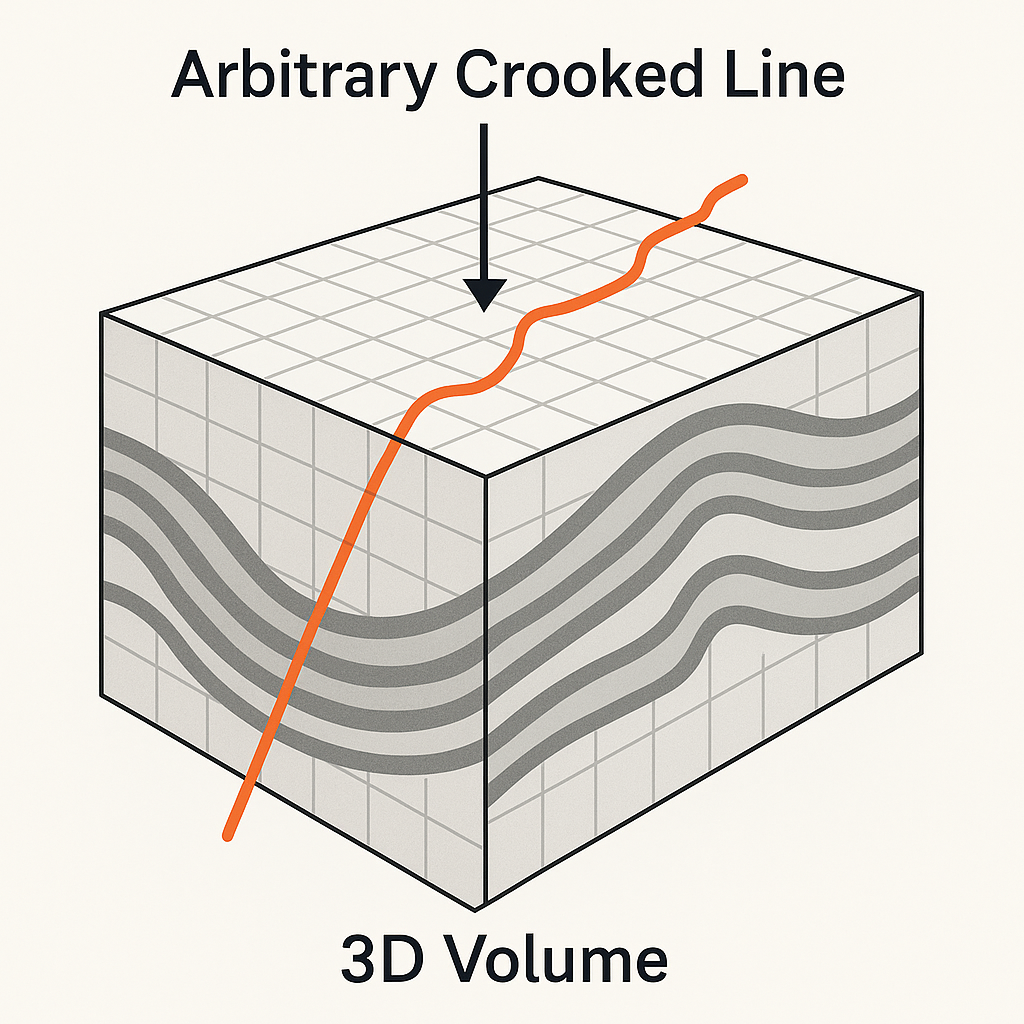
The Extract 3D seismic data module extracts an arbitrary free-line (also called a crooked line) from a 3D pre-stack or post-stack seismic dataset. This is useful when you need to create a 2D pseudo-section along a user-defined path — for example, along a planned well trajectory, a road, a river, or any non-regular survey line that does not follow the 3D inline or crossline grid.
The free line is described by an ASCII file containing a sequence of XY waypoints (the crooked line). For each waypoint, the module searches the 3D dataset and selects all traces whose shot, receiver, or CMP position (depending on the chosen Extraction Type) falls within the specified Point Distance from that waypoint. An additional offset range filter (Minimum offset to Maximum offset) is applied to control which offsets are included. All qualifying traces are collected and written to a new output file in g-Platform internal format (.gsd).
Theory
The module performs free-line selection from input 3D seismic dataset. Free-line described by input crooked line. Also extract seismic data has the following requirements for selection:
1. Distance from source/receiver/CMP to the given crooked line is less or equal to the given Point Distance.
2. Offset value is between the given Min offset and Max offset
Input data
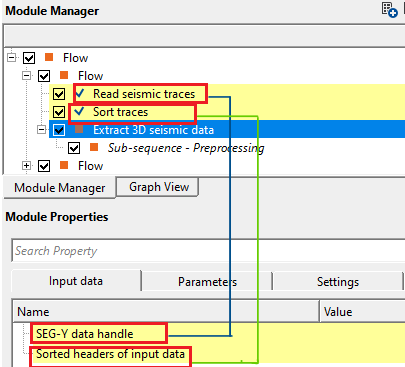
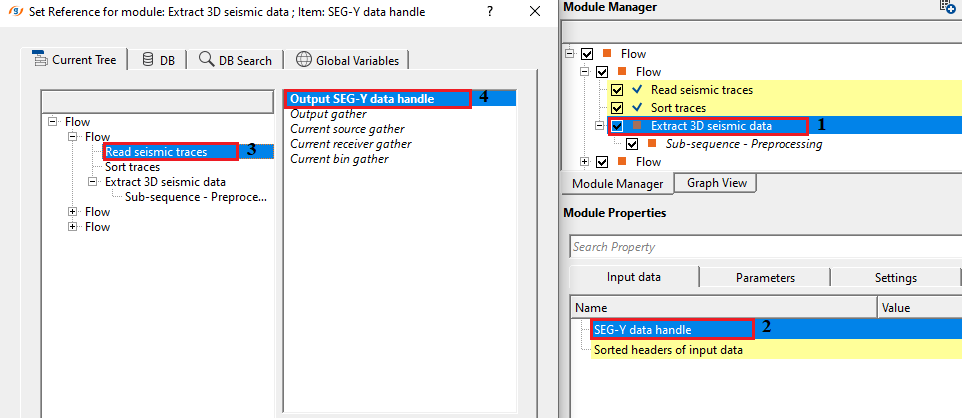
SEG-Y data handle
connect/reference to the Output SEG-Y data handle. This input data can be either a prestack/post stack data.
Connect this input to the SEG-Y data handle (or g-Platform internal format handle) that points to your 3D seismic volume. Both pre-stack and post-stack datasets are supported. The module reads trace amplitudes and header information directly from this source when extracting the selected traces.
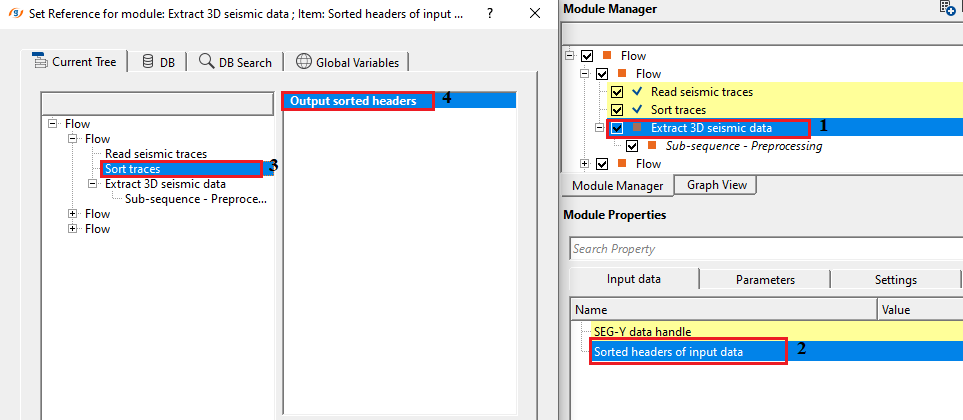
Sorted headers of input data
connect/reference to the Output sorted headers of the input data.
Connect this input to the sorted headers index that was produced by the sorting step in your workflow. The sorted headers allow the module to efficiently look up the spatial positions of all traces in the 3D dataset. For pre-stack data, the headers should be sorted in inline/crossline-offset order. The module uses the XY coordinates stored in these headers to build an internal spatial index (QuadTree) for fast proximity searching along the crooked line.
Parameters
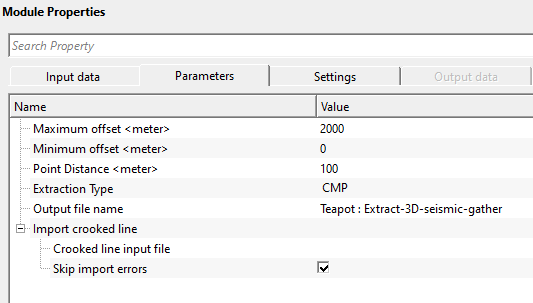
Maximum offset
Maximal offset requirement
Sets the upper limit on source-to-receiver offset (in metres) for traces to be included in the extracted section. Only traces whose offset is strictly less than this value will be written to the output file. Default value: 10000 m. Set this to match the maximum usable offset in your dataset, or reduce it to exclude far-offset noise or to create a near-offset stack section. This filter is applied after the spatial proximity search.
Minimum offset
Minimal offset requirement
Sets the lower limit on source-to-receiver offset (in metres) for traces to be included in the extracted section. Only traces whose offset is strictly greater than this value will be written to the output file. Default value: 0 m. Increase this value to exclude zero-offset or very near-offset traces, for example when you want to suppress the direct wave or surface-wave contamination near the source.
Point Distance - Maximal distance from the given crooked line
Sets the maximum allowed distance (in metres) between a trace's position (shot, receiver, or CMP — as controlled by Extraction Type) and the nearest waypoint on the crooked line. Only traces falling within this distance from any waypoint will be selected. Default value: 100 m. This is the key parameter controlling how wide a corridor of data is extracted around the free line. Use a value roughly equal to the 3D bin spacing or the CMP interval of your dataset. Increasing this value broadens the extraction corridor and includes more traces per waypoint, while decreasing it produces a narrower, more strictly on-line section.
Extraction Type { CS, CR, CMP } - Select the extraction type from the drop down menu i.e. CS, CR, CMP.
CS - Common Shot gather
CR - Common Receiver gather
CMP - Common Mid Point gather
Determines which XY position of each trace is tested against the crooked line for proximity. Default: CMP. Choose CMP (Common Mid Point) to extract traces whose midpoint between source and receiver lies near the line — this is the standard choice for post-stack or NMO-corrected data and gives the most geologically meaningful section. Choose CS (Common Shot) to select traces by their source location, which is useful when building shot-domain gathers along a line. Choose CR (Common Receiver) to select traces by their receiver location.
Output file name
Full name of output file
Specifies the full path and file name for the extracted dataset. The output is written in g-Platform internal seismic format (.gsd). All traces that pass both the proximity test and the offset range filter are written to this file. The output file retains the original trace headers, sample count, and sample interval from the input dataset. Since there are no output data connectors from this module, the output file name specified here is the only way to access the results — use a Load seismic data module in a subsequent workflow step to read the extracted section back into g-Platform.
Import crooked line
This group contains the settings for loading the free-line path from an external ASCII file. The crooked line defines the route along which seismic data will be extracted from the 3D volume. You must provide this file before the module can be executed.
Crooked line input file
Full name of input crooked line file
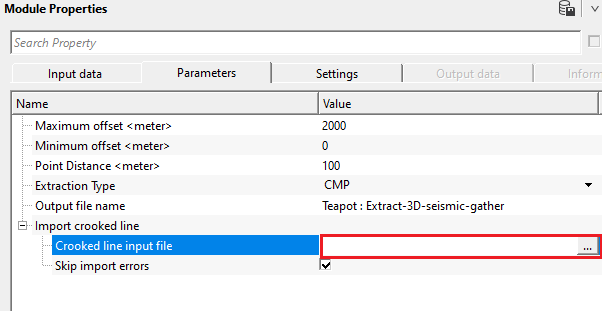
Specifies the full path to the ASCII file that defines the crooked line waypoints. Supported file extensions are .dat, .slalom, and .txt. The file must be space-delimited with no header line, and each row must contain exactly three values in the following order: sequence number (integer), X coordinate, Y coordinate. The coordinates must be in the same reference system as the trace headers of the input 3D dataset (typically survey metres or feet). If any two waypoints in the file share identical XY coordinates, the duplicate points are automatically removed before the extraction begins.
Skip import errors
If checked, errors of importing crooked line file are ignored
When enabled (default: enabled), any lines in the crooked line input file that cannot be parsed — for example, lines with missing columns or non-numeric values — are silently skipped, and the import continues with the remaining valid waypoints. When disabled, any parsing error in the file will cause the module to stop and report an error. It is recommended to keep this enabled during initial testing, then disable it once you have confirmed the file format is correct, to catch any accidental data corruption.
Settings
SegyCacheParams
- parameters for setting advanced parameters of reading seismic traces from disk:
This group provides advanced settings that control how seismic trace data is read from disk during processing. In most cases the defaults are appropriate and this group does not need to be changed. Adjust these settings only when working with very large datasets or when optimising performance for a specific storage configuration.
SegyReadParams
parameters for setting advanced parameters of reading seismic traces from disk:
Thread count (for SSD)
amount of treads for reading seismic traces from disk.
Controls how many parallel threads are used to read trace data from the storage device. This setting is particularly effective when the data resides on a Solid State Drive (SSD), which can handle many simultaneous read requests efficiently. On conventional spinning hard drives, using a high thread count may actually reduce performance due to seek contention. Leave at the default unless you are specifically tuning I/O performance on an SSD-based storage system.
Bulk size (traces)
size of a chunk (data portion) for reading seismic traces from disk.
Sets the number of traces that are read from disk in a single I/O operation (a chunk or batch). Larger values reduce the number of read operations and can improve throughput on fast storage, but also increase the memory used per read. The module writes the extracted traces to the output file in batches of up to 1000 traces at a time. Leave this at the default value unless memory or I/O performance is a concern.
Skip
By default, FALSE(Unchecked). This option helps to bypass the module from the workflow.
Output data
There is no output data vista items from this module so the user can ignore it. Final output file name should be mentioned in the parameters tab.
Information
This module has no custom action buttons. All processing is performed when the workflow is executed. To run the extraction, press the Execute button in the main workflow toolbar after setting all parameters and connecting the required input data items.
Examples
In this example workflow, we are extracting an arbitary line from the seismic data using the following workflow
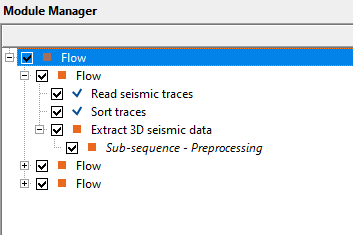
In the above workflow, we've loaded a 3D volume and sorted the data in Inline/crossline - Offset order. Later, we make the necessary connections/references to Extract 3D seismic data module.
The user should provide the parameters i.e. minimum and maximum offset that should be considered while extracting the seismic data from the 3D volume. Also, the distance from the free line/crooked line to be considered for extracting the seismic data.
Also, make sure to provide the crooked line input file. The file format should be in sequence number, x and y coordinates in space delimited format only. Also, there shouldn't be any headers in the text file. It should start directly from the values of sequence number, x and y coordinates.
There are no vista items to look for this module.
Actions
There are no action items available for this module.
Video lesson
YouTube video lesson, click here to open [VIDEO IN PROCESS...]
Related articles
Yilmaz. O., 1987, Seismic data processing: Society of Exploration Geophysicist
 * * * If you have any questions, please send an e-mail to: support@geomage.com * * *
