Extract sub gather
Extracts sub gather
Theory
This procedure gives possibility to extract sub gather according to the chosen parameters.
Extract sub gather retrieves a subset of trace headers from an existing seismic gather, making that subset available as a lightweight header collection for downstream modules. This is useful when only a portion of a large gather needs to be processed or routed further — for example, when selecting a specific shot gather by index, or when a prior selection step (such as Select Traces) has already identified the exact traces of interest. The module does not modify or copy the seismic amplitude data; it only extracts and forwards the relevant trace header records.
Two operating modes are available. In By sorted headers mode, the module receives a sorted headers index (from a Binning or Sort module) and selects one or more consecutive gathers by their sequential position in that index. In By selected headers mode, the module accepts an already-filtered trace header collection (typically from a Select Traces module) and passes it through, optionally renumbering the record indices from 1. After execution, the selected trace headers are visualised on the map as CMP midpoints, source locations, and receiver locations.
Input data
Input gather
connect/reference to the Output gather (seismic data).
Connect this input to the seismic gather output from the upstream module (such as a SEG-Y reader or a Binning module). The module reads the trace headers from this gather to populate the output header collection. This connection is required in both selection modes.
Parameters
Selection type { By sorted headers, By selected headers } - Select the available options from the drop down menu. By default, selected headers
Controls how the trace subset is selected. Choose By sorted headers when you want to access a specific gather by its sequential number within a sorted headers index — for example, to navigate through shot gathers one at a time inside a loop. Choose By selected headers when a separate Select Traces module has already filtered the traces and you want to pass that pre-filtered collection directly into the workflow. The two modes expose different sets of sub-parameters, described below. Default: By selected headers.
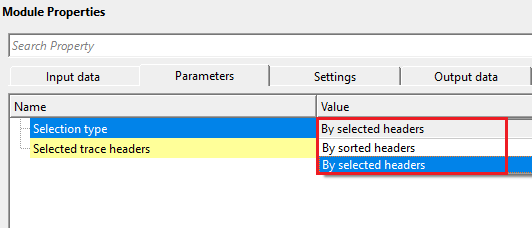
Selection type - By sorted headers
Sorted headers
connect/reference to the output sorted headers
Connect this input to the sorted headers output of a Binning or Sort module. The sorted headers index defines the complete list of gathers and their associated trace records. This connection is mandatory when Selection type is set to By sorted headers. Once connected, the module automatically determines the valid range for the Sequential gather number parameter.
Seq. gather increment
Number of gathers to be read per iteration. Default: 1
Specifies how many consecutive gathers are merged together and returned as a single output per iteration. When set to 1 (the default), exactly one gather is extracted at a time. Setting this to a higher value, such as 3 or 5, causes the module to collect that many adjacent gathers (centred around the current gather number) and concatenate their trace headers before passing them to the next module. This is useful when downstream processing benefits from a wider neighbourhood of traces, for example when computing surface-consistent statistics. Default: 1.
Sequential gather number
Current iteration number. Default: 1
Sets which gather in the sorted headers index to extract, counted from 1. When Sorted headers are connected, the valid range is automatically set to 1 through the total number of gathers in the index. Inside a processing loop, this value is typically driven by the loop counter so that each iteration advances to the next gather. When used interactively (outside a loop), change this value to jump directly to any gather by position. Default: 1.
Selection type - By selected headers
Selected trace headers
connect/reference to the selected trace headers
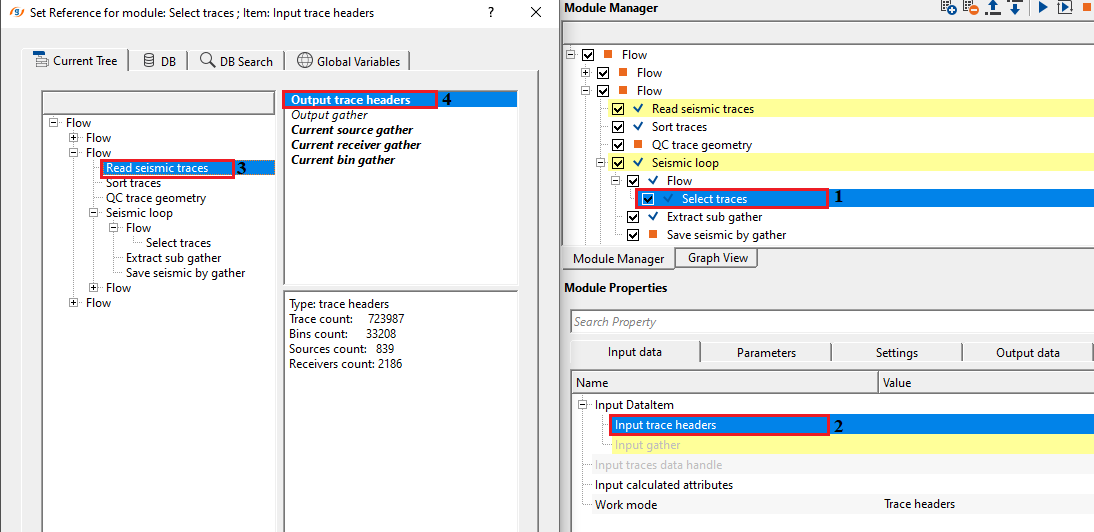
Connect this input to the trace header output of a Select Traces module or any other module that produces a filtered GTraceVectorItem. The entire pre-filtered header collection is passed directly to the output without further filtering. This connection is mandatory when Selection type is set to By selected headers. The Input gather connection is still required so the module can associate amplitudes with the selected headers.
Reset start record index
This function gives possibility to reset record index. Record index for each gather will be renumbered from 1. Default: False
When enabled, the internal record index of each gather in the selected header collection is renumbered starting from 1. This is useful when the original record indices from the source data are large or non-contiguous and downstream modules expect indices to start from 1. When disabled (the default), the original record indices are preserved exactly as they appear in the source headers. Default: False.
Settings
Skip
By default, FALSE(Unchecked). This option helps to bypass the module from the workflow.
When checked, this module is completely bypassed and the input gather is passed through to the output unchanged. Use this during workflow development or testing to temporarily disable sub-gather extraction without removing the module from the flow. Default: False (extraction is active).
Output data
Output gather
generates output gather as vista item as well as output gather for saving the data.
The extracted sub-gather is made available here as a standard seismic gather for viewing and downstream connection. Connect this output to any module that accepts seismic gather data, such as a filter, a mute, or a display module. The gather contains only the traces corresponding to the selected header subset; all other traces from the input are excluded.
Trace headers
generates output trace headers
The trace header collection corresponding to the extracted sub-gather is produced here as a GTraceVectorItem. Connect this output to modules that require trace geometry information, such as Binning or any module that needs source, receiver, and CMP positions for the selected traces. After execution, the CMP, source, and receiver positions of the selected traces are visualised on the map in the Location Map vista.
Information
This module is marked as EPROCEDURE_DETAILS_SIMPLE and does not expose execution settings such as GPU, distributed processing, or thread count. All processing runs on the CPU in a single-threaded sequential mode. No additional execution settings are required.
Examples
In this example workflow, we are extracting a small portion of the seismic gather by using selected trace headers.
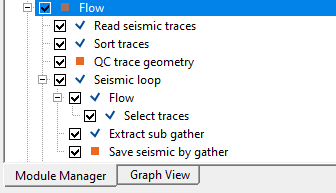
Selection type - By selected trace headers
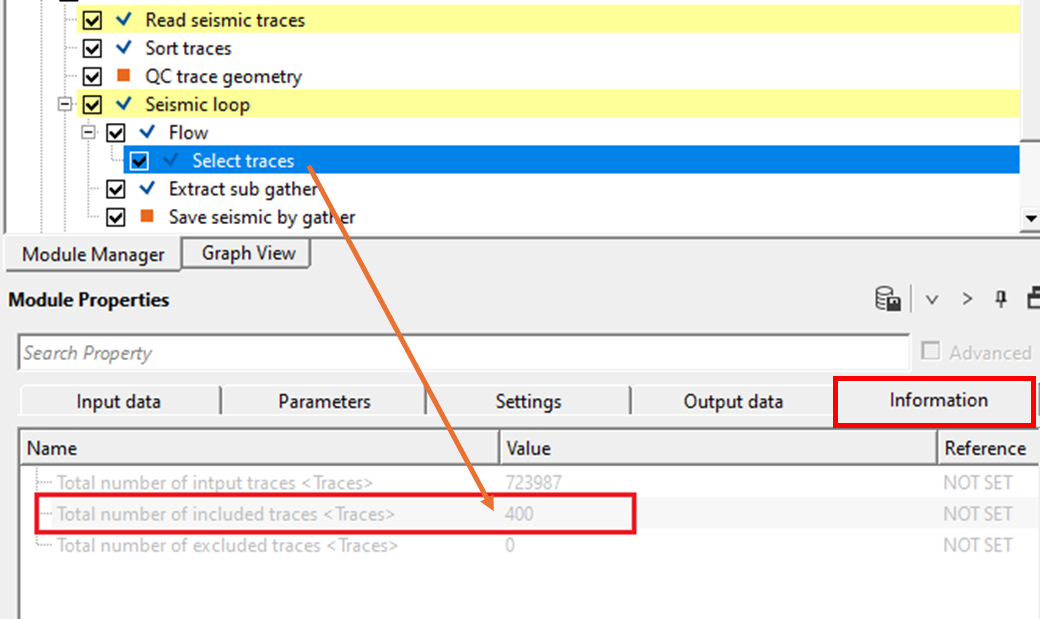
We've included select traces inside the seismic loop. Output from this select traces will be connected/referenced to Extract sub gather module.
Inside the select traces parameters, we've selected FFID 181 and Channels from 1 to 400.
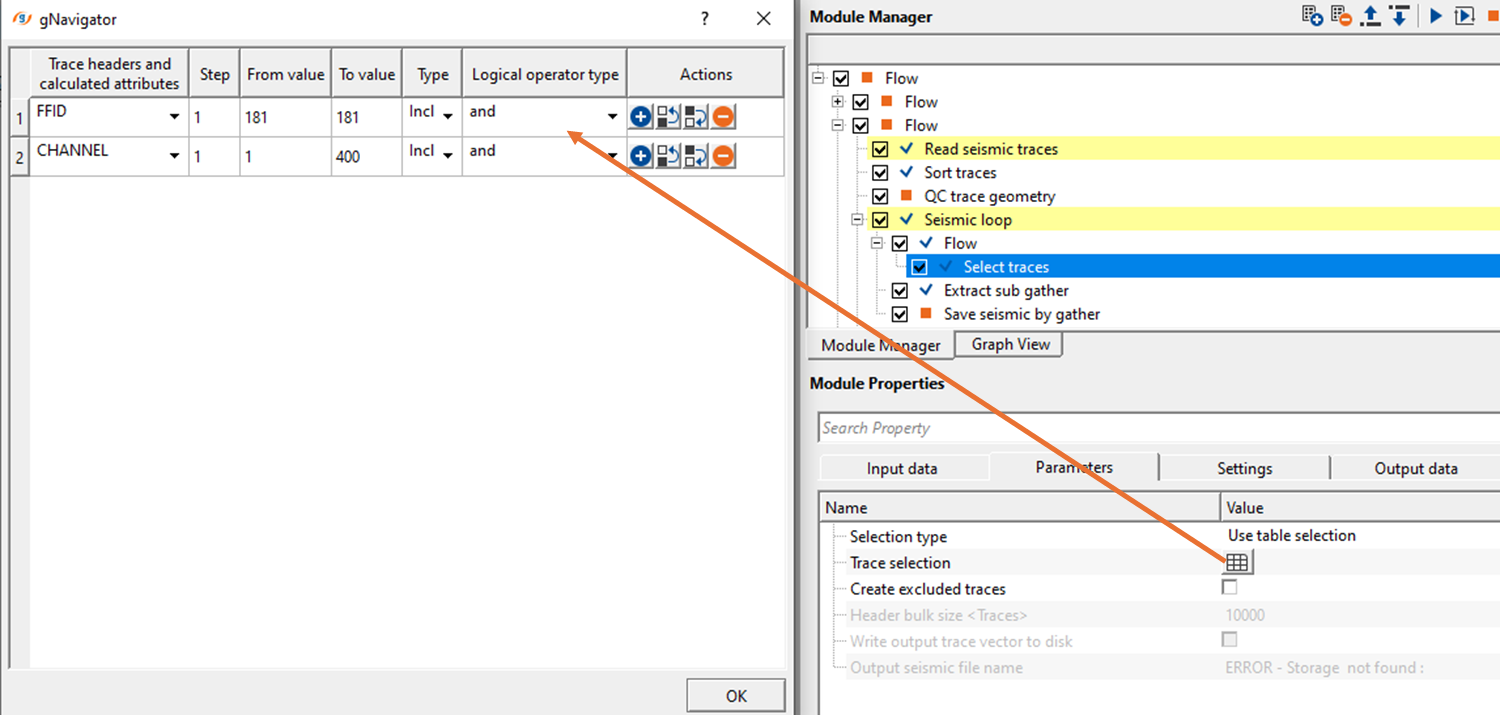
Output gather from the select traces will have CHANNELS only from 1 to 400.
Actions
There are no action items available for this module.
Video lesson
YouTube video lesson, click here to open [VIDEO IN PROCESS...]
Related articles
Yilmaz. O., 1987, Seismic data processing: Society of Exploration Geophysicist
 * * * If you have any questions, please send an e-mail to: support@geomage.com * * *
