Convert SEG-B to SEG-Y
Converting legacy magnetic-tape recorded SEG-B format data to the modern SEG-Y format.
Theory
What Is SEG-B?
SEG-B is an early digital seismic data format developed by the Society of Exploration Geophysicists (SEG) in the 1960s–70s for magnetic tape recording of seismic traces.It was one of the first standardized formats used for exchanging seismic data between acquisition and processing systems — the predecessor to the modern SEG-Y format (introduced in 1975).
Basic Characteristics of SEG-B
|
Feature |
Description |
|
Medium |
Magnetic tape (9-track reel) |
|
Structure |
Sequential blocks (records) containing binary data |
|
Header Type |
Binary (no standardized ASCII textual header) |
|
Data Type |
Usually integer samples (12-, 16-, or 24-bit) |
|
Byte Order |
Big-endian (IBM mainframe convention) |
|
Record Type |
Each record = 1 seismic trace (header + samples) |
|
Time Stamp |
Includes shot number, trace number, and time info in header |
|
Velocity / geometry |
Usually stored separately in navigation or field files |
File Structure (Simplified)
Each SEG-B record consisted of:
- Record Header – Binary identification info (trace number, sample rate, etc.)
- Trace Samples – Seismic amplitude values in integer form.
- End-of-record marker (tape block boundary).
There was no standardized reel header — only per-trace records.This made it hard to merge or interpret without acquisition documentation.
Why SEG-B Became Obsolete
- Lack of human-readable metadata (no textual header).
- Fixed magnetic tape block structure — not compatible with modern disk-based systems.
- Non-standard header definitions between contractors.
- Limited portability and flexibility.
Hence, in 1975, the SEG-Y format was introduced — adding:
- A 3200-byte ASCII textual header,
- A 400-byte binary reel header,
- Fully defined trace headers (240 bytes),
- Support for multiple data types and storage media.
Converting SEG-B → SEG-Y
To migrate legacy SEG-B tapes/files into a modern, readable SEG-Y format without losing any header or trace information.
General Workflow
|
Step |
Description |
|
1. Read SEG-B data |
Specialized software reads binary tape blocks, detects record boundaries, and extracts trace samples + headers. |
|
2. Decode headers |
Parse trace header bytes (shot number, channel, record length, sample rate). |
|
3. Build new SEG-Y headers |
Create SEG-Y standard headers (textual + binary + 240-byte trace headers) based on SEG-B info. |
|
4. Reformat sample data |
Convert from 12/16/24-bit integers to standard SEG-Y format (often IEEE floating-point). |
|
5. Write output SEG-Y file |
Using modern structure — 3200-byte textual header, 400-byte binary header, 240-byte per-trace header, followed by trace samples. |
|
6. QC verification |
Verify number of traces, sample rate, amplitudes, and timing integrity. |
Why Conversion Is Necessary
- To recover and preserve legacy data recorded in SEG-B format.
- To make data compatible with modern seismic software.
- To standardize metadata (headers, geometry, sample interval).
- To QC and process historical surveys for reprocessing or reimaging.
Key Challenges in Conversion
|
Issue |
Explanation |
|
Non-standard SEG-B variations |
Header definitions differ between contractors — need metadata to decode. |
|
Bit depth variations |
12-bit, 16-bit, or 24-bit integers require specific unpacking. |
|
Endianness mismatch |
Old IBM big-endian vs modern little-endian systems. |
|
Missing textual headers |
Must be created manually during conversion. |
|
Tape read errors |
Physical degradation of old magnetic tapes. |
Input data
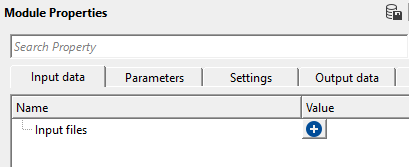
Input files
Specify the list of SEG-B source files to convert. You may add one or multiple files — all files in the list are processed sequentially and written into a single output SEG-Y file. To add files, click the + icon to open the file browser. Accepted file extensions are defined by the selected file format (e.g., .segb). Ensure the files were recorded with the correct SEG-B variant before selecting the format below.
Parameters
Output file
This section controls where the converted data is saved and how the output SEG-Y file is structured. Set the output file path and select the appropriate trace header format to ensure compatibility with your downstream processing software.
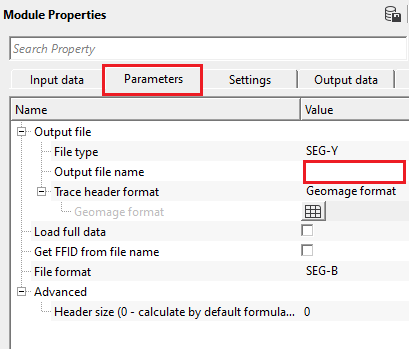
File type
Selects the output file format. Currently only SEG-Y is available. Default: SEG-Y.
Output file name
Specify the full path and filename for the output SEG-Y file. Accepted extensions are .sgy or .segy. All input SEG-B files are written sequentially into this single output file.
Trace header format
Defines the byte-location mapping for trace header fields in the output SEG-Y file. Available options include Geomage format, SegFormat, Seg-Y rev.1 2002, Geomage Office Post, Coordinates Only, Constant Elevation, VSP format, and others. Default: Geomage format.
The Geomage format is Geomage's internal header layout, which is fully compatible with the SEG-Y rev.1 2002 standard. Select a different format only when the output file needs to be read by software that uses a non-standard trace header mapping.
Load full data
When checked, clicking a file row in the Common Information table loads all seismic traces from that file into the Current SEG-B file vista display. Useful for QC but can be slow for large files. Default: unchecked (false).
Get FFID from file name
When checked, the module parses the Field File Identification Number (FFID) directly from the input file name rather than from the binary header. Enable this option when the FFID is encoded in the file naming convention used during field acquisition and the binary header does not contain a reliable FFID value. Default: unchecked (false).
File format
Selects which variant of the SEG-B format the input files use. Available options:
GSegBSn339 — A well-defined SEG-B variant (SN-338/339 series) where the header size and layout are fully known. This is the recommended default for most legacy datasets. Default: GSegBSn339.
SEG-B — The generic SEG-B format where the header size may vary by contractor or acquisition system. When this variant is selected, the Advanced > Header size parameter becomes active, allowing you to specify the header size manually if known.
Advanced
Header size
Available only when File format is set to SEG-B. Specifies the size of the binary trace header in bytes. Set to 0 to let the software calculate the header size automatically using the default formula. Provide the exact value only when you have the original acquisition documentation specifying the header size used on the recording system. Units: bytes. Default: 0 (auto-calculate).
Settings
Skip
When checked, this module is bypassed during workflow execution and no processing or output is performed. Use this option to temporarily disable the conversion step without removing the module from the workflow. Default: unchecked (false).
Output data
Current SEG-B file
A seismic gather vista display showing all traces from the currently selected SEG-B input file. This item is populated when you click a row in the Common Information table with Load full data enabled, or after running Read headers. Use this display to visually QC the raw field data before conversion.
Current SEG-B trace
A wiggle-trace vista display showing the single trace selected in the Traces information table. Click any row in the Traces information table to load and display that trace. Use this view to inspect individual trace amplitudes and timing before committing to the full conversion.
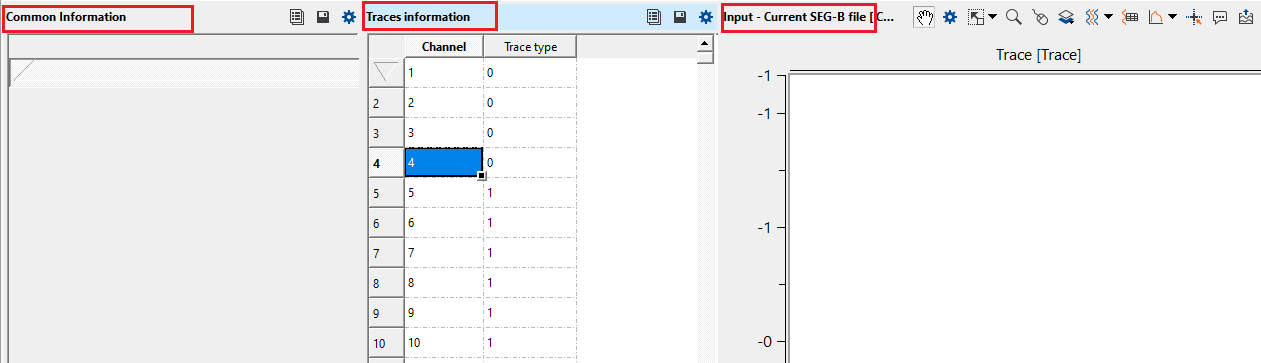
Common Information
A summary table listing one row per input SEG-B file. For each file it shows the file name, total number of traces, format version (338), number of samples per trace, and sample interval. Use this table to verify that all input files have consistent acquisition parameters before running the conversion.
Traces information
A per-trace header table for the file currently selected in the Common Information table. Each row corresponds to one trace and shows the channel number and trace type (seismic or auxiliary). Clicking a row in this table loads and displays that trace in the Current SEG-B trace vista.
Information
There is no information available for this module so the user can ignore it.
Examples
In this example workflow, we are adding a single SEG-B file. To add any input files, click on  icon. It will open a new window. Click on icon again. It will allows the user to browse and provide the input SEG-B file(s).
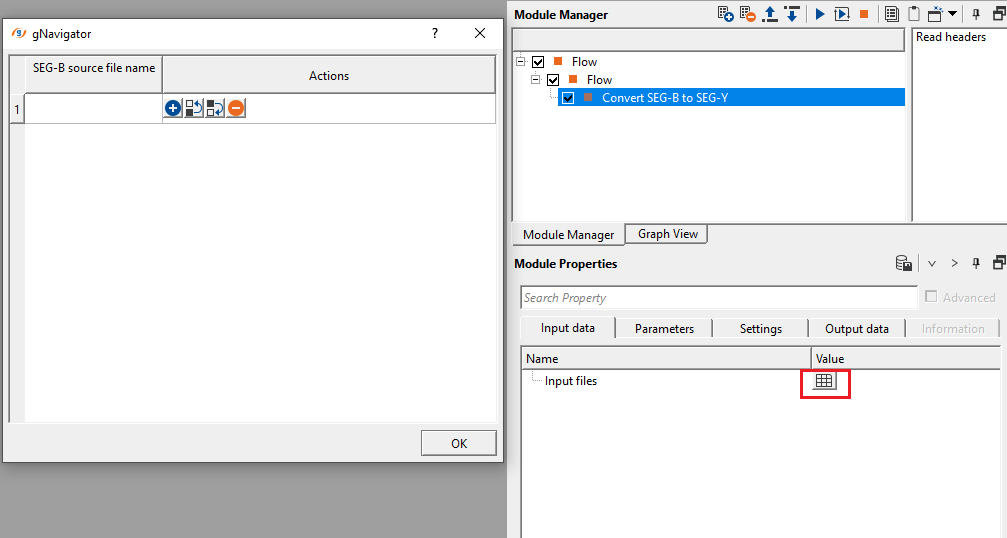
Click on Read headers action item and add Vista items by right clicking on the Convert SEG-B to SEG-Y module and add Vista Groups-> All Group-> In new window.
Actions
Read headers
Scans all input SEG-B files and reads their binary headers without performing the full conversion. After execution, the Common Information and Traces information vista tables are populated with file statistics and trace header values. Run this action first to verify that the input files are valid and that the acquisition parameters (number of traces, sample interval, channel numbers) are as expected before running the full conversion workflow.
Video lesson
YouTube video lesson, click here to open [VIDEO IN PROCESS...]
Related articles
Yilmaz. O., 1987, Seismic data processing: Society of Exploration Geophysicist
 * * * If you have any questions, please send an e-mail to: support@geomage.com * * *
