Velocity smoothing
Smoothing of velocity gather with different smoothing types in X & Y directions
Theory
Velocity smoothing is applied to seismic velocity functions to remove unrealistic short-wavelength variations caused by noise, picking errors, or limited semblance resolution. The goal is to produce a geologically reasonable, laterally and vertically consistent velocity field that improves NMO correction, stacking, and migration stability, while preserving genuine velocity trends related to stratigraphy and structure.
Input data
Input DataItem
Input gather
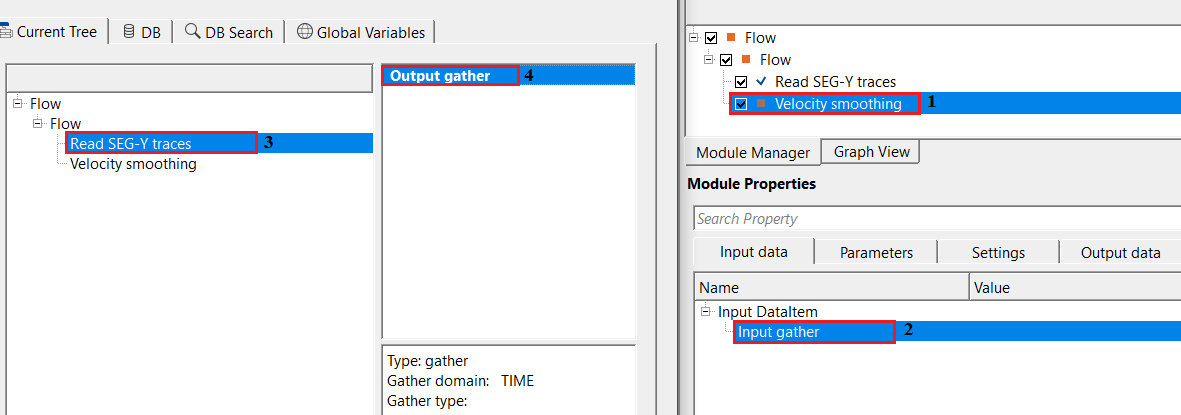
specify the input velocity gather/model that needs to be smoothed. Connect/reference to the Output gather. It could be from Read SEG-Y traces module, Vrms inline/Xline from Stack Imaging or any other output gather which is a velocity gather or model.
Parameters
Velocity smoothing type { Standard, With velocity factor }
there are different types are available for velocity smoothing. Select the smoothing type from the drop down menu.
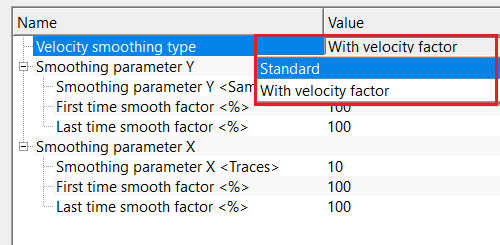
Velocity smoothing type - With velocity factor
- Smoothing strength varies with time. Uses first and last time smoothing factors to gradually change the smoothing intensity. Preserves higher resolution at shallow times and increases stability at deeper times where picks are less reliable. It is used when areas with strong near-surface detail and noisy deep velocities.
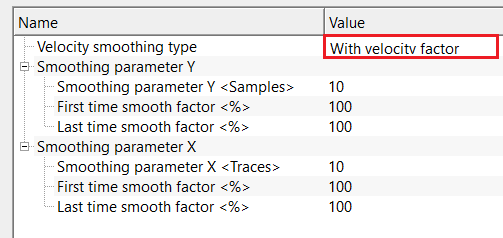
Smoothing parameter Y
Smoothing parameter Y
Number of samples in the time (vertical) direction used to smooth each velocity function. Larger values mean stronger vertical smoothing.
Last time smooth factor
Percentage of the Y-smoothing applied at the start time of the velocity function. Lower values preserve fine shallow velocity detail.
First time smooth factor
Percentage of the Y-smoothing applied at the end time of the velocity function. Higher values stabilize deeper velocities where semblance is noisier.
Smoothing parameter X
Smoothing parameter X
Number of samples (CDPs/ensembles) in the lateral direction over which velocities are smoothed. Controls lateral continuity of velocity trends.
First time smooth factor
Percentage of the X-smoothing applied at the start time. Helps retain lateral velocity variations near the surface.
Last time smooth factor
Percentage of the X-smoothing applied at the end time. Enforces stronger lateral consistency at deeper levels.
Velocity smoothing type - Standard
- Applies a uniform smoothing operator (moving average or weighted filter). Same smoothing strength is applied over the entire time/depth range. Simple and robust, but may over-smooth shallow sections or under-smooth deeper, noisier picks. This is used where clean datasets with consistent pick quality.
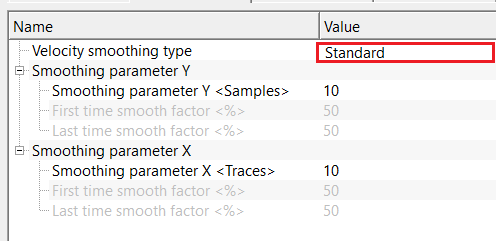
Smoothing parameter Y
Smoothing parameter Y
Number of samples in the time (vertical) direction used to smooth each velocity function. Larger values mean stronger vertical smoothing.
Smoothing parameter X
Smoothing parameter X
Number of samples (CDPs/ensembles) in the lateral direction over which velocities are smoothed. Controls lateral continuity of velocity trends.
Settings
Auto-connection
By default, TRUE(Checked).It will automatically connects to the next module. To avoid auto-connect, the user should uncheck this option.
Bad data values option { Fix, Notify, Continue }
This is applicable whenever there is a bad value or NaN (Not a Number) in the data. By default, Notify. While testing, it is good to opt as Notify option. Once we understand the root cause of it, the user can either choose the option Fix or Continue. In this way, the job won't stop/fail during the production.
Notify
It will notify the issue if there are any bad values or NaN. This will halt the workflow execution.
Fix
It will fix the bad values and continue executing the workflow.
Continue
This option will continue the execution of the workflow however if there are any bad values or NaN, it won't fix it.
Calculate difference
this option creates the difference display gather between input and output gathers. By default Unchecked. To create a difference, check the option.
Number of threads
One less than total no of nodes/threads to execute a job in multi-thread mode. Limit number of threads on main machine.
Skip
By default, FALSE(Unchecked). This option helps to bypass the module from the workflow.
Output data
Output DataItem
Output gather
generates the output smoothed velocity gather.
Gather of difference
it will generate the difference gather before and after velocity smoothing. By default, FALSE (Unchecked).
Information
There is no information available for this module.
Examples
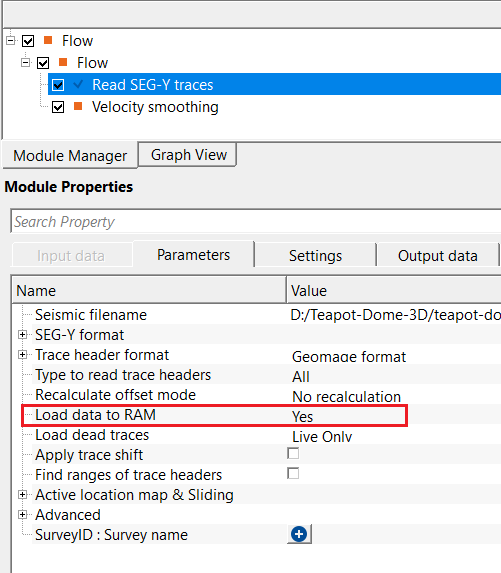
In this example workflow, we are reading a 3D velocity model by using Read SEG-Y traces module. In order to connect/reference to the Velocity smoothing module, the user should change the Load data to RAM to YES.
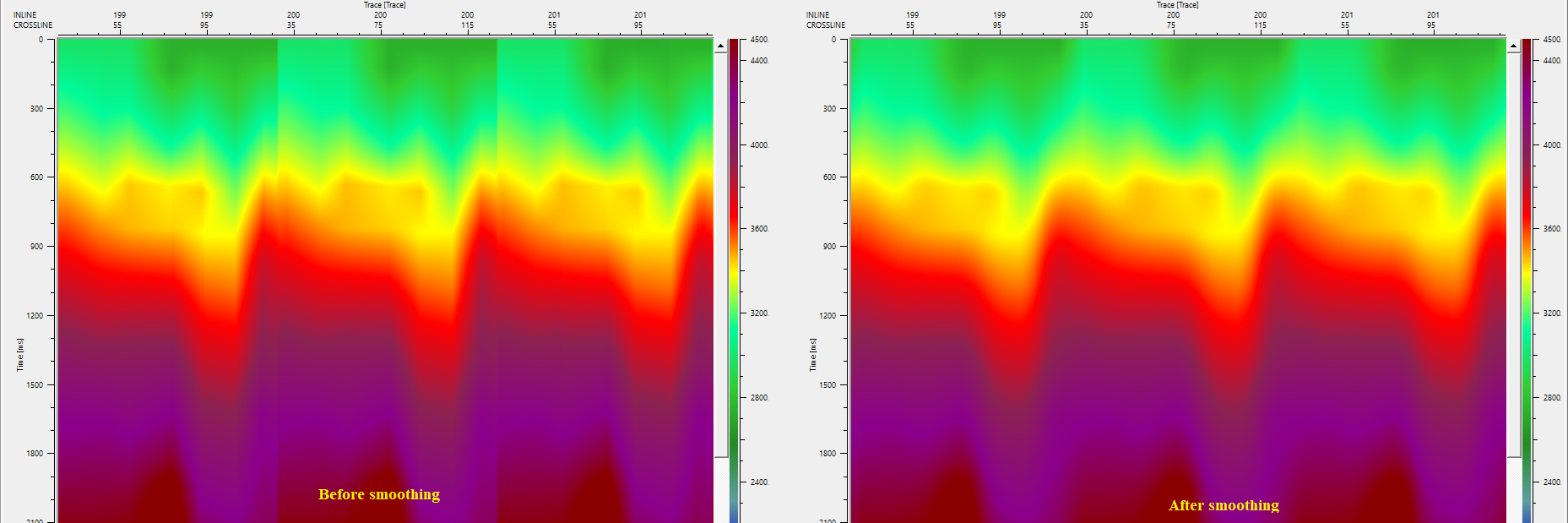
Adjust the parameters like type of velocity smoothing and number of samples in both X&Y directions etc. The following result is with the velocity smoothing type as "with velocity factor"
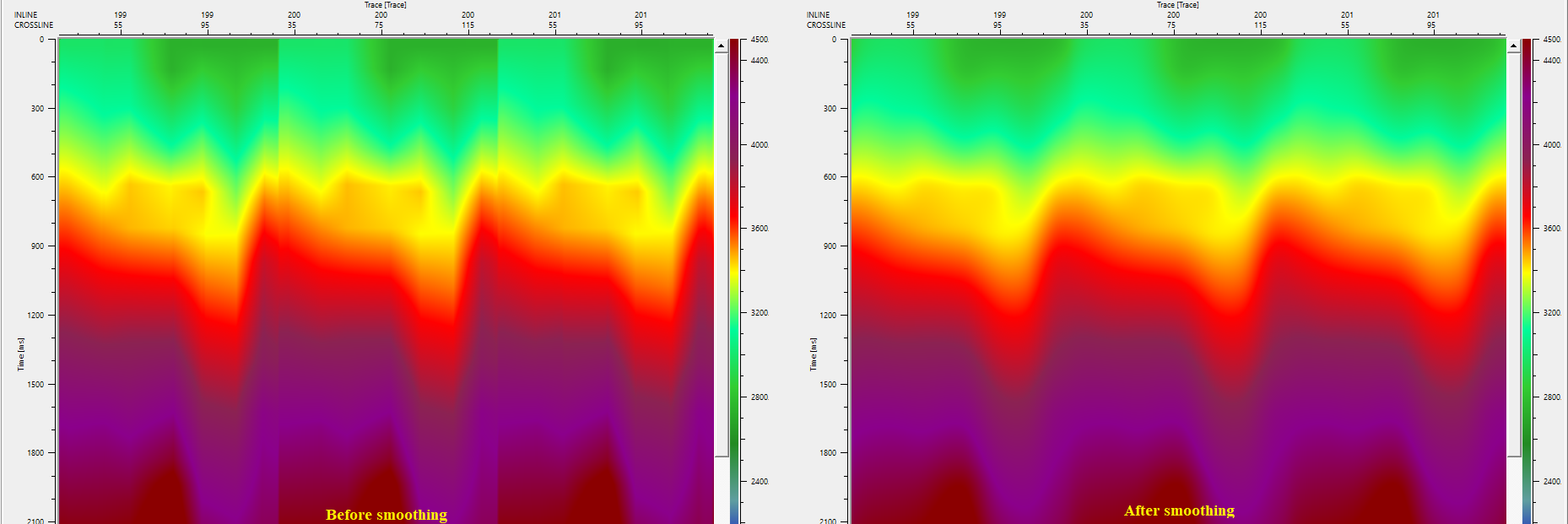
This is the result of the velocity smoothing with the "Standard" smoothing type
Actions
There are no action items available for this module so the user can ignore it.
Video lesson
YouTube video lesson, click here to open [VIDEO IN PROCESS...]
Related articles
Yilmaz. O., 1987, Seismic data processing: Society of Exploration Geophysicist
 * * * If you have any questions, please send an e-mail to: support@geomage.com * * *