RHO
Constant phase rotation
Theory
The RHO module is used to apply constant phase rotation to seismic traces in the frequency domain. It is typically used to correct residual phase errors, convert wavelets (e.g., minimum-phase ↔ zero-phase-like), and improve reflector symmetry and interpretability. The operation preserves relative timing while modifying the phase spectrum of the data in a controlled manner.
Mathematically, S'(f) = S(f) e^{i \phi (f)}
Where
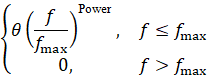
\phi(f) - phase shift applied at frequency f
\theta - phase shift angle (in degrees)
f_{max} - maximum frequency
Power - controls how smoothly the phase is increases with frequency
When Power = 0, there is no phase rotation.
When Power = 0.5, phase rotation near lower frequencies is stronger than the top where it is flatter.
When Power = 1, phase increase linearly with frequency
When Power = 2, phase rotation is gentler at lower frequencies and stronger at higher frequencies
How it works?
- Each input trace is transformed to the frequency domain using FFT.
- A frequency-dependent phase operator is applied up to a user-defined maximum frequency.
- The phase rotation is scaled by a power function to smoothly taper the effect with frequency.
- The modified spectrum is transformed back to the time domain using inverse FFT.
- Optional amplitude normalization is applied to preserve trace energy.
When & where do we apply?
- Residual phase correction after deconvolution
- Improving zero-crossing alignment for interpretation
- Wavelet phase conditioning before inversion
- AVO-sensitive workflows requiring consistent phase
Input data
Input DataItem
Input gather
provide the input gather (shot/receiver/cmp or stack). Connect/reference to Output gather.
Parameters
Max frequency - define the upper frequency limit (Hz) up to which the phase rotation is applied. Frequencies below Max frequency are phase-rotated & above Max frequency are left unchanged. Maximum frequency parameter prevents unstable phase manipulation at high frequencies dominated by noise. By default, 100 Hz.
Power - controls the frequency-dependent weighting of the phase rotation. Applies a power-law scaling to the phase operator. Low power value means nearly uniform phase rotation across the band & High power value provides phase rotation concentrated at lower frequencies, tapering toward Max frequency. By default, 1.
Shift phase angle - specifies the constant phase rotation angle applied to the trace spectrum. Positive phase angle rotates the wavelet in clockwise direction and negative phase angle rotates the wavelet in counter clockwise direction. By default, 0 (degrees).
Normalize amplitudes - this parameter controls whether trace amplitudes are rescaled after phase rotation. By default, TRUE (Checked) which means preserves the original RMS amplitude values.
Settings
Auto-connection
By default, TRUE(Checked).It will automatically connects to the next module. To avoid auto-connect, the user should uncheck this option.
Bad data values option { Fix, Notify, Continue }
Bad value fix - This is applicable whenever there is a bad value or NaN (Not a Number) in the data. By default, Notify. While testing, it is good to opt as Notify option. Once we understand the root cause of it,
the user can either choose the option Fix or Continue. In this way, the job won't stop/fail during the production.
Notify
It will notify the issue if there are any bad values or NaN. This will halt the workflow execution.
Fix
It will fix the bad values and continue executing the workflow.
Continue
This option will continue the execution of the workflow however if there are any bad values or NaN, it won't fix it.
Calculate difference
This option creates the difference display gather between input and output gathers. By default Unchecked. To create a difference, check the option.
Number of threads
One less than total no of nodes/threads to execute a job in multi-thread mode. Limit number of threads on main machine.
Skip
By default, FALSE(Unchecked). This option helps to bypass the module from the workflow.
Output data
Output DataItem
Output gather
outputs the phase rotated gather.
Gather of difference
outputs the difference
Information
There is no information available for this module.
Examples
In this example workflow, we do a phase rotation to a stack section. We read the stack by using "Read seismic traces" module and change the parameter settings of Load data to RAM as YES. This output gather will be connected/referenced to RHO module.
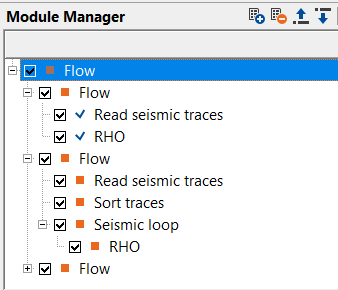
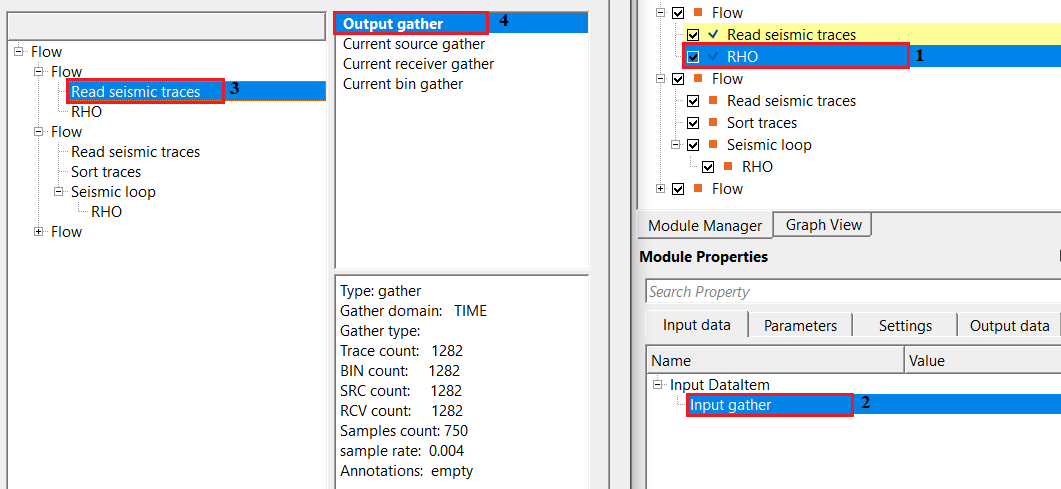
Adjust the parameters as per the data requirement.
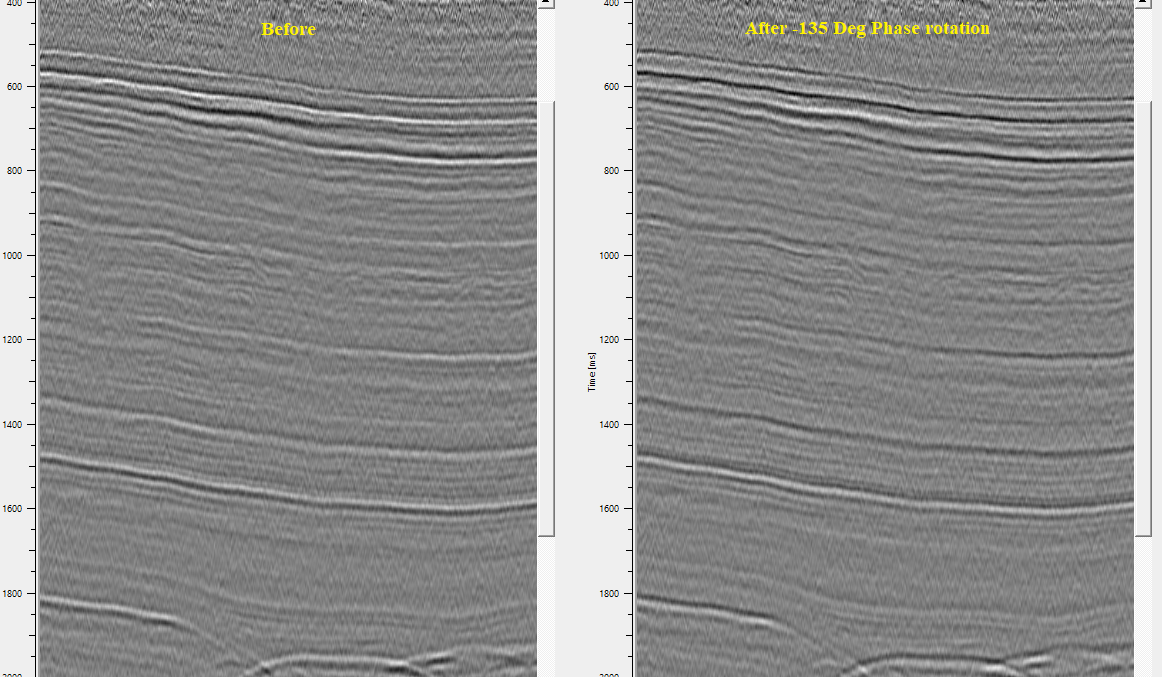
Actions
There are no action items available for this module so the user can ignore it.
Video lesson
YouTube video lesson, click here to open [VIDEO IN PROCESS...]
Related articles
Yilmaz. O., 1987, Seismic data processing: Society of Exploration Geophysicist
 * * * If you have any questions, please send an e-mail to: support@geomage.com * * *