Extending the gather record length and traces


This module is helpful in extending the gather both horizontally(traces) and vertically(time). Extending the gather is useful when doing filtering, interpolation etc.
Horizontal extension allows the data to avoid edge effects when performing filtering, FK and radon transformation. Whereas vertical extension of the gather allows not to create any artifacts top and bottom of the gather.
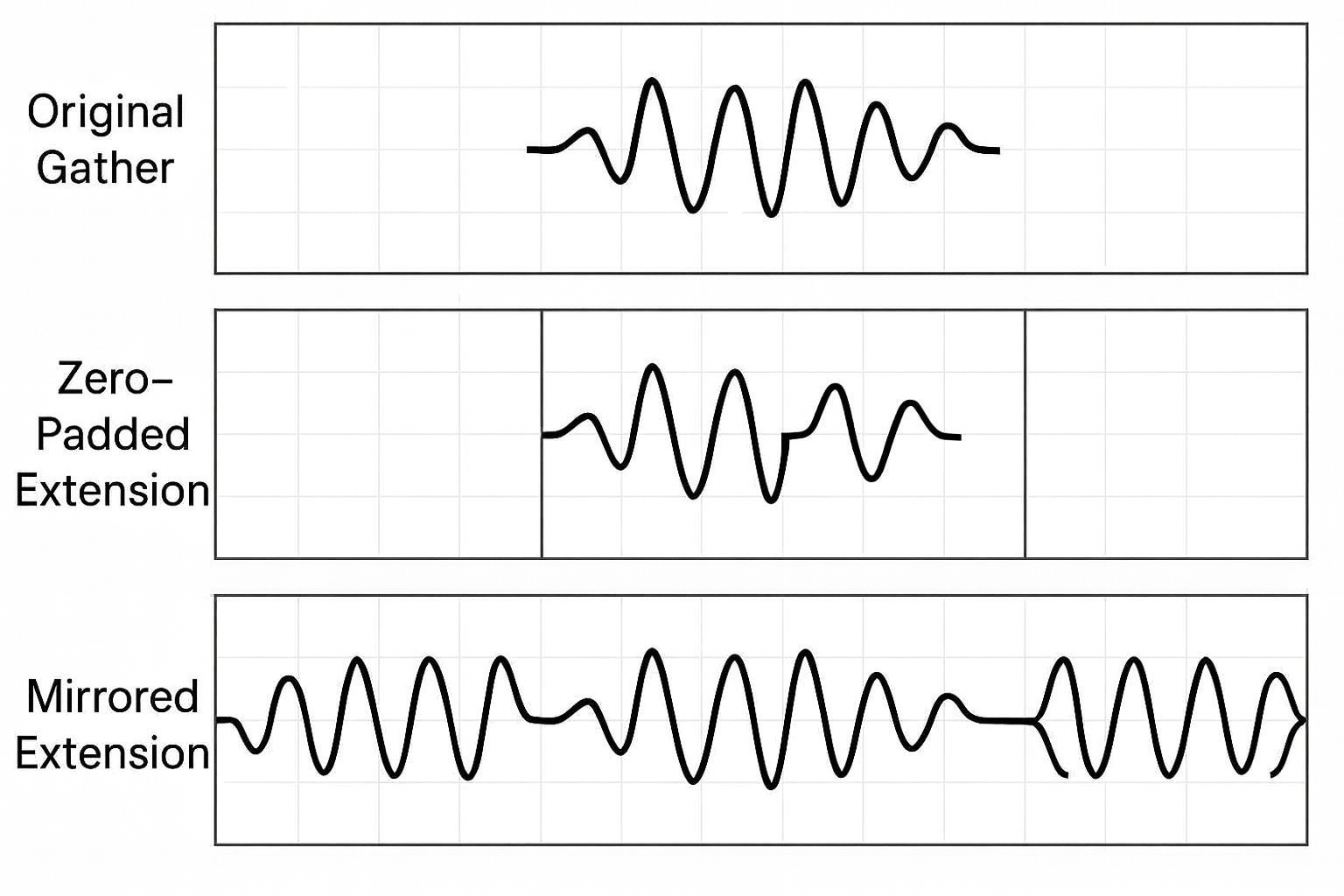
Why Do We Extend a Seismic Gather Horizontally?
Horizontal extension = adding traces on the left and right side of the gather.
To Avoid Edge Effects During Filtering
Many processing steps (FK filtering, Radon transform, deblending, interpolation) require operations in the frequency–wavenumber (f–k) or tau–p domain.
These transforms assume the data is continuous, but real gathers suddenly end at the boundaries → causing wraparound artifacts, edge noise, or Fourier ringing.
Extending the gather makes the edges “smoother,” reducing artifacts.
For Better Interpolation
If you want to fill missing traces or regularize spacing, algorithms behave better when they see more samples beyond the boundary.
For Accurate Tapering
We often apply cosine tapers at the edges.We cannot taper properly if there are no additional samples to taper into.
Horizontal extension provides a buffer zone.
Why Do We Extend a Seismic Gather Vertically?
Vertical extension = extending the gather in time/depth direction.
To Avoid Edge Effects in Time-Domain Filtering
Operations like:
•Band-pass filtering
•Wavelet shaping
•Deconvolution
•Tau-p transform
all assume longer time windows. Without extension, filters cause distortion at the top and bottom of the gather.
Allows Zero-Padding (Smooth FFT)
FFT-based algorithms need trace lengths that match power-of-two sizes (e.g., 1024, 2048, etc.).Vertical extension (padding) makes FFT faster and cleaner.
Improve Migration / Imaging
Imaging algorithms need more room beyond the recorded window to avoid artificial truncation of wavefields.
Why Do We Use “Mirroring” When Extending the Data?
Mirroring means copying the edges of a gather as reversed versions of itself.
Why not use zeros?
If you simply add zeros:
•The sudden jump from real amplitude → zero amplitude creates sharp discontinuities
•Fourier transform sees these as high-frequency edges
•Produces ringing and artifacts
Mirroring solves this.
Smooth Continuity at Boundaries
Mirroring ensures the ends look continuous, so filtering and FK transforms do not detect sharp breaks.
Prevents Aliasing and Wraparound
Mirrored edges behave more naturally when:
•Applying FK filters
•Running tau-p transforms
•Running Radon transforms
•Performing deblending
This reduces wraparound noise dramatically.
Preserves Local Wavefield Shape
Unlike zero-padding, mirroring preserves:
•Amplitude pattern
•Event curvature
•Frequency content
This is very important for inversion, migration, or interpolation.
Better for Slope-Based Processes
Algorithms that estimate slopes or moveout (e.g., curvature estimation) behave better when edges do not end abruptly.

Input DataItem
Input gather - connect/reference to the output gather which needs to be extended.

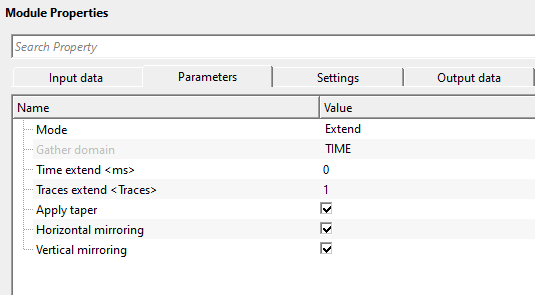
Mode { Extend, Revert } - choose the option from the drop down menu to perform the task. By default, Extend.
Extend — pads the gather by adding mirrored (and optionally tapered) samples above and below in the vertical direction, and by adding mirrored traces on both sides in the horizontal direction. The amount of extension is controlled by the Time/Depth/Frequency extend and Traces extend parameters.
Revert — strips the previously added extension from the gather, restoring it to its original dimensions. Use this option after the filtering or transform step to remove the padding and return the gather to its original record length and trace count. The same Time/Depth/Frequency extend and Traces extend values used during Extend mode must be set when reverting.
Gather domain { TIME, DEPTH, FREQUENCY } - sets the input gather domain. By default, Time. Depending on the input gather, it automatically selects the gather domain. The user has no control over it.
Gather domain - TIME
Time extend - specifies the amount of time (in ms) to add above and below the gather record in the time domain. By default, 0 ms (no vertical extension). The specified amount is added symmetrically: the same duration is appended at the top and at the bottom of every trace. If Vertical mirroring is enabled, the added samples mirror the existing edge samples; otherwise the extended region is filled with zeros.
Set this value to a time window that is at least as long as the filter operator (e.g., the wavelet length for deconvolution, or the maximum tau shift for a Radon transform). Typical values range from 100 ms to 500 ms, depending on the record length and the processing step that follows.
Gather domain - DEPTH
Depth extend - specifies the depth (in meters) to add above and below the gather in depth-domain gathers. By default, 0 m (no vertical extension). The extension is applied symmetrically at the top and bottom of each trace. Use this parameter when working with depth-migrated gathers that need edge padding before further depth-domain processing or inversion.
Gather domain - FREQUENCY
Frequency extend - specifies the frequency bandwidth (in Hz) to add at both ends of the frequency axis when the input gather is in the frequency domain. By default, 0 Hz (no extension). Use this parameter when padding frequency-domain gathers before operations that are sensitive to boundary conditions in the frequency axis.
Traces extend - specifies the number of traces to add on each side of the gather (left and right). By default, 1 trace. The total number of traces in the output gather increases by twice this value. If Horizontal mirroring is enabled, the added traces mirror the outermost real traces; otherwise they contain zero amplitudes. Use this parameter to prevent edge effects during FK filtering, Radon transformation, or other operations that use all traces in the gather simultaneously.
A typical value is 10–50 traces. Set this to at least half the width of the filter or transform operator applied in the subsequent step. When using Revert mode after processing, set the same Traces extend value to restore the original trace count precisely.
Apply taper - when enabled, applies a linear amplitude taper across the extended (padded) region so that the amplitudes ramp smoothly from their mirrored values down to zero at the outermost boundary of the extension. By default, TRUE (enabled).
It is strongly recommended to keep this option enabled. The taper prevents any abrupt amplitude jump at the boundary between the real data and the padded extension, which would otherwise produce spectral leakage and ringing in the transform domain. Disabling it is only appropriate when the downstream algorithm explicitly requires an un-tapered extension.
Horizontal mirroring - when enabled, the traces added by the Traces extend parameter are filled by reflecting the outermost real traces back into the extended region (mirror padding). When disabled, the added traces are filled with zeros instead. By default, TRUE (enabled).
Mirror padding is preferred over zero-padding because it preserves local amplitude levels and wavefield curvature at the boundary, resulting in significantly fewer edge artifacts in FK or Radon transforms. Disable this option only if the algorithm that follows requires zero-valued boundary traces.
Vertical mirroring - when enabled, the samples added above and below each trace by the Time/Depth/Frequency extend parameter are filled by reflecting the edge samples of the real data back into the extended region (mirror padding). When disabled, the added samples are filled with zeros. By default, TRUE (enabled).
Mirror padding at the top and bottom of each trace prevents artificial discontinuities that would produce ringing when a band-pass filter, deconvolution, or FFT-based transform is applied to the trace. Keep this option enabled in virtually all typical workflows. Disable it only when applying an algorithm that explicitly handles boundary conditions differently.

Auto-connection - By default, TRUE(Checked).It will automatically connects to the next module. To avoid auto-connect, the user should uncheck this option.
Bad data values option { Fix, Notify, Continue } - This is applicable whenever there is a bad value or NaN (Not a Number) in the data. By default, Notify. While testing, it is good to opt as Notify option. Once we understand the root cause of it,
the user can either choose the option Fix or Continue. In this way, the job won't stop/fail during the production.
Notify - It will notify the issue if there are any bad values or NaN. This will halt the workflow execution.
Fix - It will fix the bad values and continue executing the workflow.
Continue - This option will continue the execution of the workflow however if there are any bad values or NaN, it won't fix it.
Number of threads - One less than total no of nodes/threads to execute a job in multi-thread mode. Limit number of threads on main machine.
Skip - By default, FALSE(Unchecked). This option helps to bypass the module from the workflow.

Output DataItem
Output gather - generates the extended gather as an output as well as vista item.

The Gather extend module produces a single output gather that can be displayed as a Vista item. The Vista display shows the full extended gather — including the mirrored and tapered border regions — so you can visually verify that the extension looks correct before passing the data to the next processing step. No additional Vista-specific settings are required for this module.

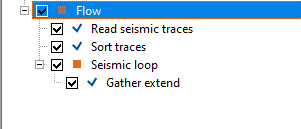
In this example workflow, we are extending a simple gather both horizontally and vertically. This gather extension can be performed inside the Seismic loop or outside of Seismic loop. It requires an input gather.
Let's add both horizontal and vertical extensions to the existing input gather and see how it looks like.
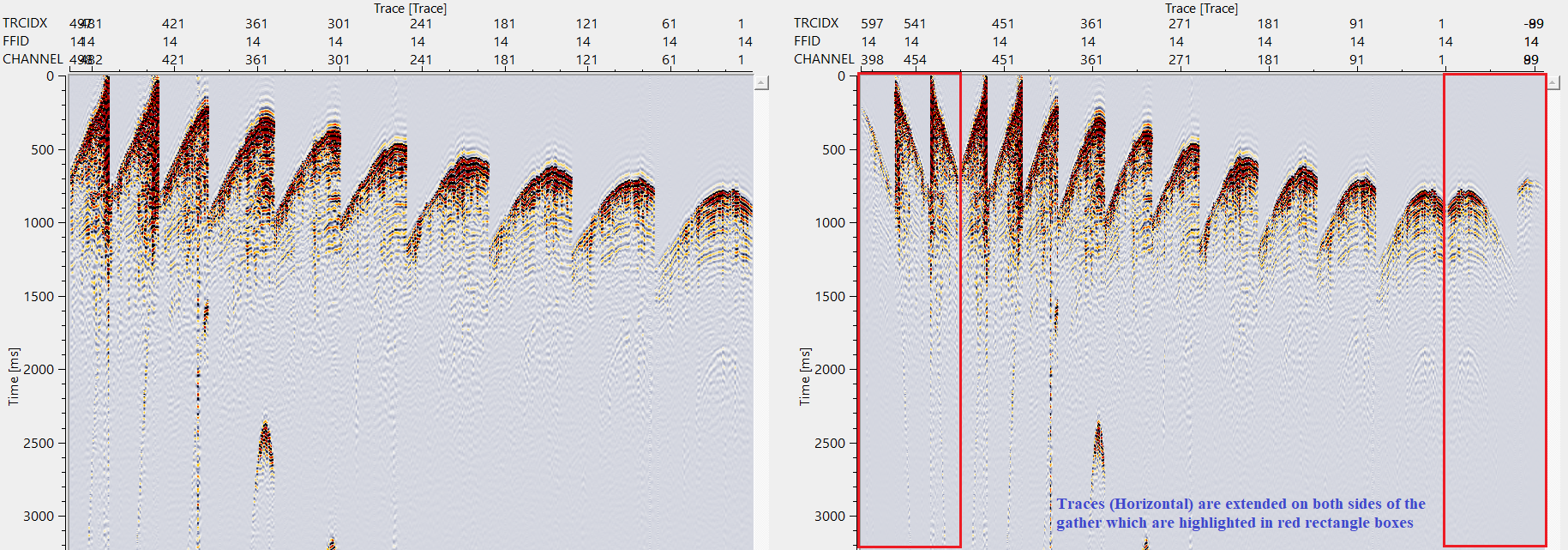
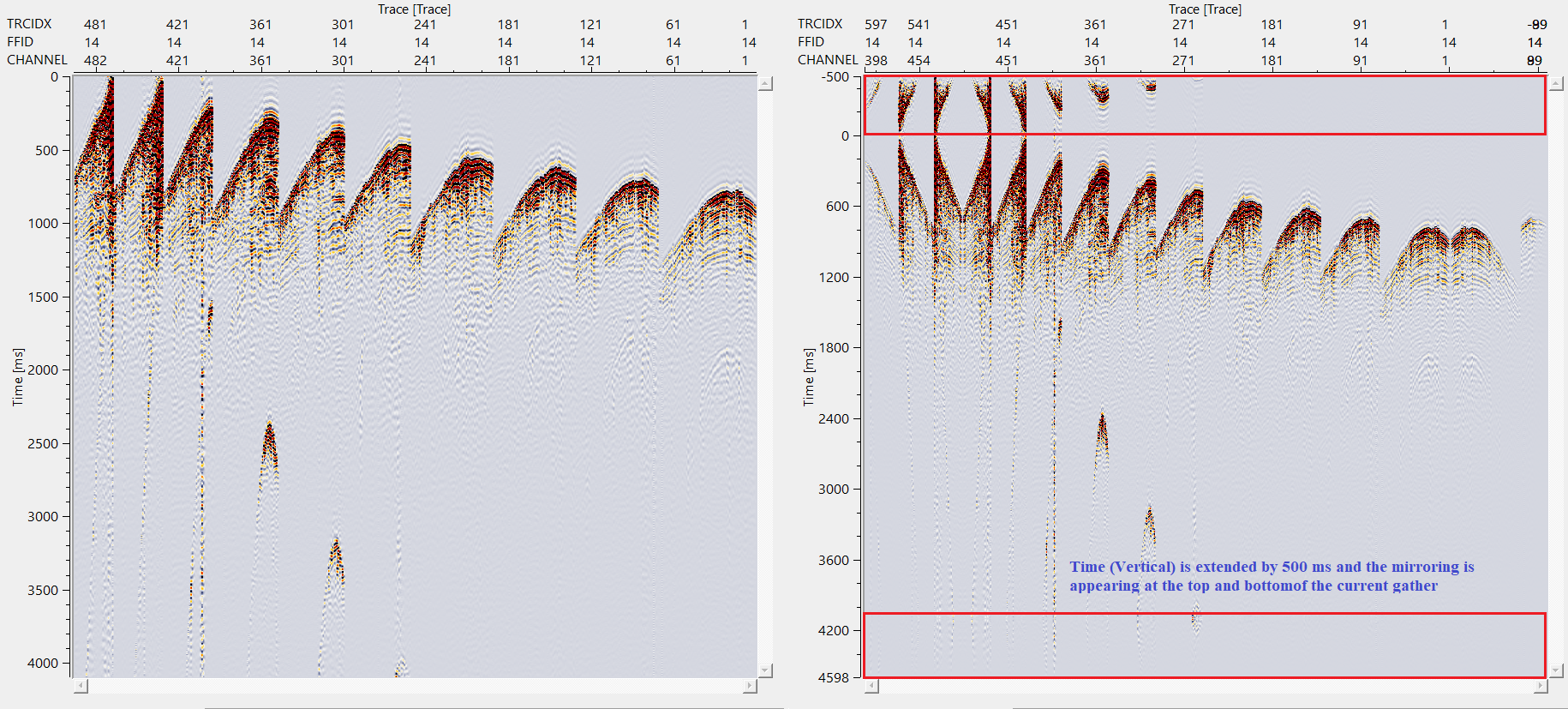
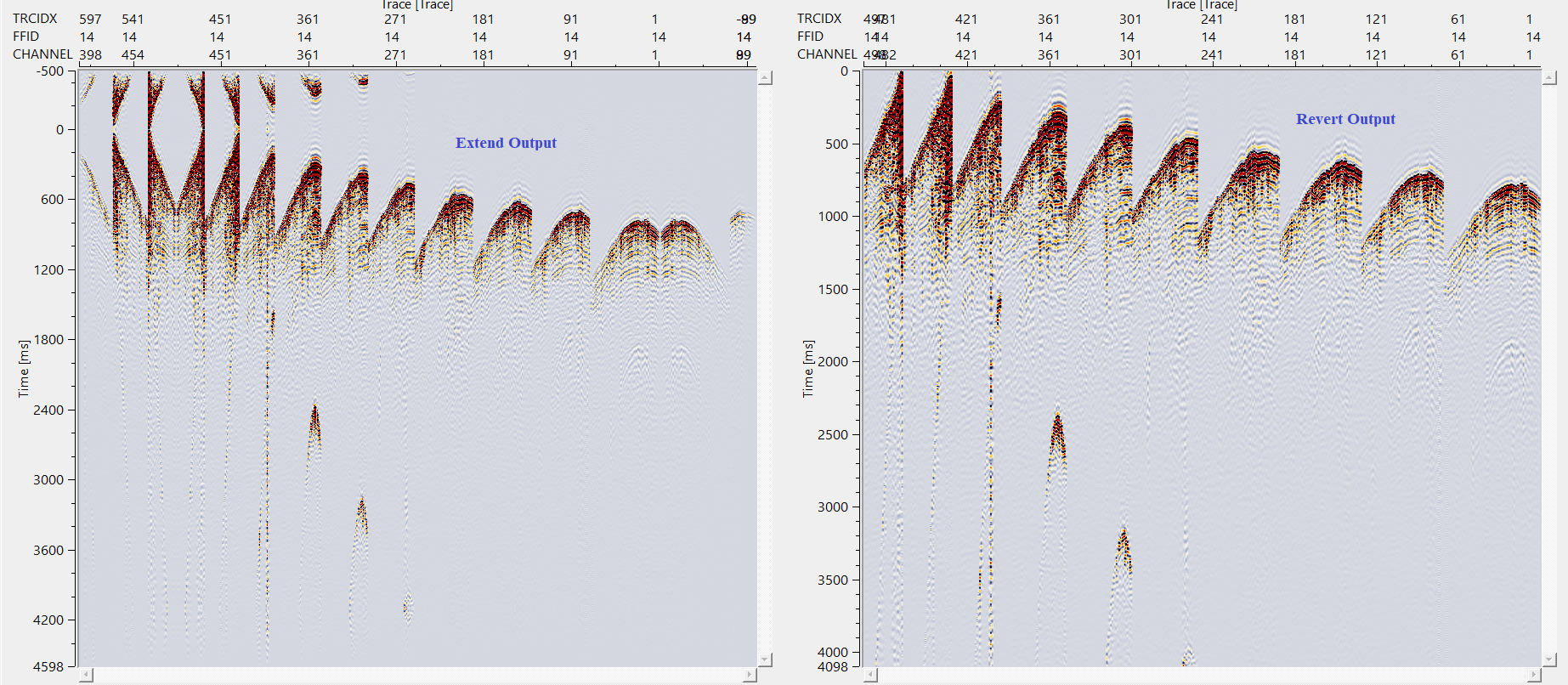
When we select "Revert" mode then everything reset to original input gather.
Apply the same parameters applied to gather extend is applicable to the gather revert also.


There are no action items available for this module.

YouTube video lesson, click here to open [VIDEO IN PROCESS...]

Yilmaz. O., 1987, Seismic data processing: Society of Exploration Geophysicist
 * * * If you have any questions, please send an e-mail to: support@geomage.com * * *
