The View Manager panel, located by default on the right side of the interface, organizes and manages different workspaces (equivalent to different desktops) and views for data visualization in g-Viewer.
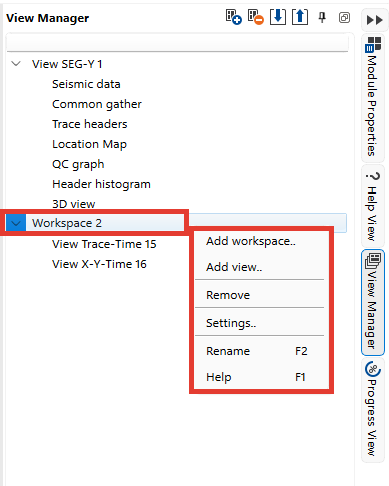
Key Functions:
•Adding a Workspace: Click the Plus (+) button at the top of the panel or right-click in the panel and select "Add workspace..".
•Adding a View: Use the Plus (+) button, right-click on a workspace, and choose "Add view..".
•Removing a View or Workspace: Right-click on the item and select "Remove".
•Settings and Customization: Access additional options via the "Settings.." menu.
•Renaming: Use F2 to rename a selected workspace or view.
•Help: Press F1 for further assistance.
The View Manager stores all available views for g-Viewer data visualization, such as seismic sections, gathers, attribute maps, and QC tools.