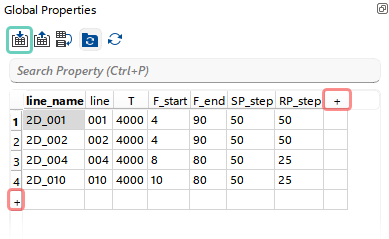
In the Global Properties spreadsheet, the user can add rows or columns using the “+” icon and enter values. Rows or columns can be removed via the Right-click menu or the Delete key. Columns can be renamed using the Right-click menu on the column header.
All values stored in the spreadsheet are treated as strings by default.
The most efficient way to create or modify the Global Properties spreadsheet is to import it from an existing *.csv file using the corresponding shorcut button  .
.
It is important to note that the first row of the CSV file must contain column headers. Otherwise, during import, the column headers in the Global Properties spreadsheet will be populated using the values from the first row of the CSV file.
In this example, the spreadsheet was imported from a CSV file containing descriptions of key parameters for a set of four 2D lines:
oLine_name – name of the line
oLine – line number
oT – record length
oF_start / F_end – start and end sweep frequencies
oSP/RP_step – spacing between source and receiver points
On disk, the data is organized as shown below. It consists of folders for four 2D lines, where each folder contains a SEG-Y file along with the corresponding SPS files (SPS, RPS, XPS):
D:\Geomage\
├───demodata
├───Poland_2D_Vibroseis_LINE_001
│ Line_001.RPS
│ Line_001.sgy
│ Line_001.SPS
│ Line_001.XPS
│
├───Poland_2D_Vibroseis_LINE_002
│ Line_002.RPS
│ Line_002.sgy
│ Line_002.SPS
│ Line_002.XPS
│
├───Poland_2D_Vibroseis_LINE_004
│ Line_004.RPS
│ Line_004.sgy
│ Line_004.SPS
│ Line_004.XPS
│
└───Poland_2D_Vibroseis_LINE_010
Line_010.RPS
Line_010.sgy
Line_010.SPS
Line_010.XPS