Variables defined in Global Properties spreadsheet are used within workflows.
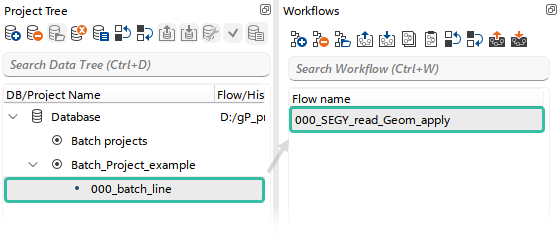
In this example project, Batch_Project_example, we will create a subproject (line) named 000_batch_line to organize and manage workflows for batch processing. We will then create the first workflow, 000_SEGY_read_Geom_apply, and configure it to read SEG-Y data and apply geometry from the SPS files to the trace headers in a Batch Mode.
Open this workflow in g-Navigator and begin using variables from the Global Properties.
Variables are typically implemented in the Module Properties section using the = and % symbols. The = symbol is placed at the beginning of a parameter, and the variable name — depending on the defined type (String, Integer, Float, etc.) of the parameter — is enclosed within % symbols inside the parameter value.
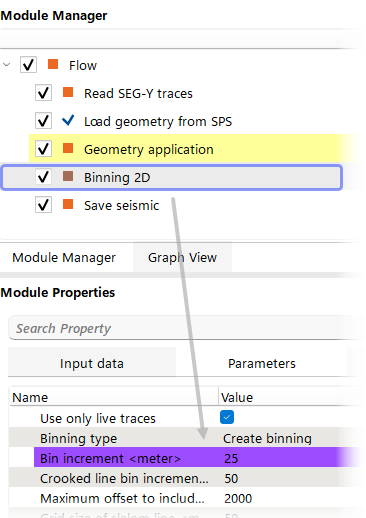
In our case, the workflow has the following structure:
Read SEG-Y Traces → Load Geometry from SPS → Geometry Application → Binning 2D → Save Seismic.
In this workflow, Global Variables from the Line and RP_step columns are used to configure the following parameters:
•Read SEG-Y Traces → Parameters → Seismic filename
=D:/Geomage/demodata/Poland_2D_Vibroseis_LINE_%line%/Line_%line%.sgy
•Load Geometry from SPS → Input data → Input S (R, X) file
=D:/Geomage/demodata/Poland_2D_Vibroseis_LINE_%line%/Line_%line%.SPS (RPS, XPS)
•Binning 2D → Parameters → Bin increment
=%rp_step% / 2
(according to the formula dCMP = dRP / 2)
•Save Seismic → Parameters → Seismic filename
=Line_%line%__000_geom
All parameters that use Global Variables are highlighted in purple.