The Templates panel of the main g-Platform Managing Workspace is used to manage predefined workflow templates and to create custom ones.
The Templates section consists of the following elements: shortcut buttons (1), search bar (2), and the template workflows list (3):
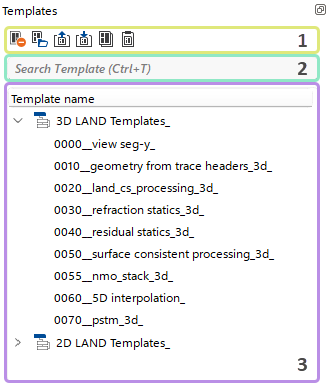
Shortcut buttons allow the user to quickly perform actions within the templates.

Each button provides a predefined set of actions.
 Delete selected Template flow (Delete Key).
 Open selected Template flow (and copy it) in any selected Project (Area, Line) - redirects the User to g-Navigator.
 Export selected Template flow to external storage.
 Import a Template flow from external storage.
 Copy selected Template flow to the Buffer (Ctrl + C).
 Paste the Template flow from the Buffer (Ctrl + V).
The Search bar allows the user to find any template within the Template section.

For quick access to the search bar, the user can press Ctrl + T.