The Workflows panel of the main g-Platform Managing Workspace is used to create and manage processing workflows within selected project (area, line).
The Workflows section consists of the following elements: shortcut buttons (1), search bar (2), and the workflows list (3):
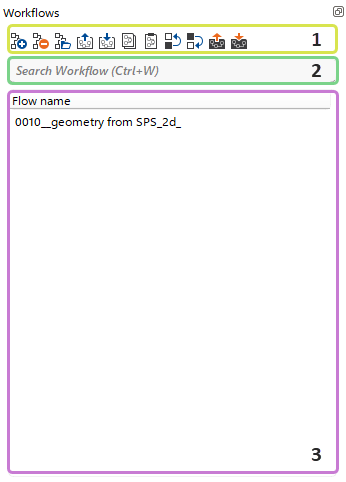
Shortcut buttons allow the user to quickly perform actions within the workflows.

Each button provides a predefined set of actions.
 Add (create) a New Flow (Insert Key).
 Delete selected Flow (Delete Key).
 Open selected Flow (redirects the User to g-Navigator).
 Export selected Flow (only structure) to external storage.
 Import a Flow (only structure) from external storage.
 Copy selected Flow to the Buffer (Ctrl + C).
 Paste the Flow from the Buffer (Ctrl + V).
 Move selected Flow Upward within the current list (if sorting by Flow name isn't active).
 Move selected Flow Downward within the current list (if sorting by Flow name isn't active).
 Export selected Flow to external storage with all the Data and Items referenced by the Flow.
 Import a Flow from external storage with all the Data and Items referenced by the Flow.
The Search bar allows the user to find any workflow within the Workflow section of the currently selected project (area, line).

For quick access to the search bar, the user can press Ctrl + W.