The Project Data panel of the main g-Platform Managing Workspace allows the user to view and manage datasets and other items—such as picking files, velocity tables, static corrections, horizons etc. — within the selected database.
The Project data section consists of the following elements: shortcut buttons (1), search panel (2), and the data list (3):

Shortcut buttons allow the user to quickly perform actions within the panel.

Each button provides a predefined set of actions.
 Import data from other Project/Database.
 Auto synchronize the Data list.
 Update the Data list.
 Request data size from S3 storage.
The Search panel allows the user to find any dataset or item within the database using search bar and built-in filters.

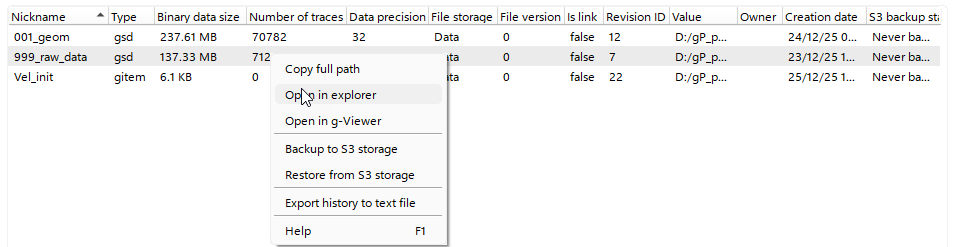
In the Data List, the user can view all relevant information about datasets, sort data using predefined columns, and perform additional actions on the selected dataset via the Right-Click context menu or keyboard shortcuts:
•Rename dataset (F2 Key).
•Delete dataset (Delete Key).
•Open in Explorer – Opens the dataset’s file location on disk.
•Open in g-Viewer – Opens the dataset in the g-Viewer application.
•Backup / Restore dataset.
•Export dataset history – Exports the history of the selected dataset to a TXT file in the dataset’s folder.