Adaptive ground roll attenuation
Ground roll attenuation using high resolution linear radon
Theory
This module is used for ground roll noise attenuation. It operates by modeling the ground roll in the radon domain and then performing an adaptive subtraction of this modeled noise from the input seismic data.
The input data must be sorted by SOURCE_SP and RECEIVER_LINE. The Radon transformation is performed on the area defined by “ Window section” and “ Radon aperture params”:
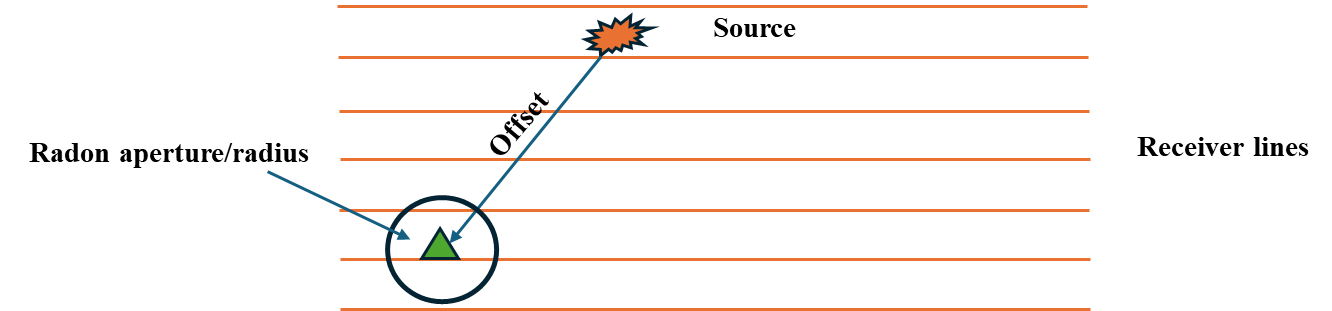
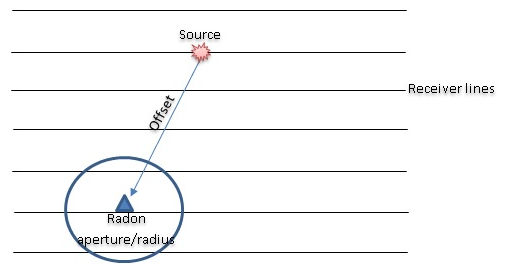
The user can define and test a particular aperture for each offset in order to find an effective parametrization for noise attenuation. All the traces are collected, and then put through the radon transformation, where the separation of the noise and the signal takes place. When the ground roll model is ready, it is converted to T-X domain. This model is then put through an adaptive subtraction with the input data (input data-noise model). The Noise model may be created via several iterations, as defined by the “ iteration”parameter.
The module reads in the entire seismic data set, and then writes out the final result after ground roll attenuation to the disk, in the internal .gsd format. It can also be run in distributed execution mode on a coalition server in the cluster version of the software.
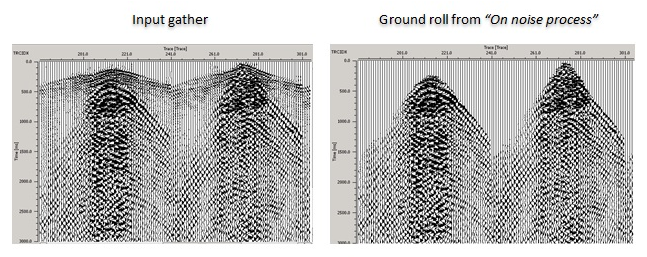
The procedure has three sub-sequences “ On input data”, “On noise process”, “On output data”.The user can add modules inside each of these sub sequences, to operate on the data before ground roll attenuation (on input), after the noise removal (on output) and on the noise model of the data (on noise).
 Recommendations:
Add “ Mute by velocity”module into the sub-sequence “On noise process”,so that only ground roll noise is included for this section. This will help to ensure no signal outside the ground roll area is attenuated:
Input data
Data handle
connect/reference to Output data handle.
Input sorted headers (of seismic data)
connect/reference to Output sorted headers of the seismic data.
Output file name
provide the output file name.
Parameters
Radon aperture params
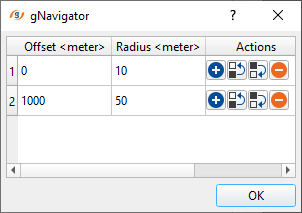
this section deals with Radon parameters. Inside this, the user should provide the offset and the corresponding aperture values.
Offset - specify the offset values that are participating in the radon transformation.
Radius - it is the offset data that is present within the CMP.
Window selection
this parameter ensures effective noise attenuation (ground roll). Provide the time window to be considered in the radon transformation process
Low Frequency1 - Lower frequency beyond which all frequencies are suppressed. Taper zone between F1-F2. This range F1/F2/F3/F4 used for attenuation, but other frequencies are remained.
Low Frequency2 - Lower frequency inside which all frequencies are passed (F2-F3)
High Frequency3 - Upper frequency inside which all frequencies are passed (F2-F3)
High Frequency4 - Upper frequency beyond which all frequencies are suppressed. Taper zone between F3-F4.
V1 - Lower velocity beyond which all velocities are suppressed. Taper zone between V1-V2. This range V1/V2/V3/V4 used for attenuation, but other velocities are remained
V2 - Lower velocity inside which all velocities are passed (V2-V3)
V3 - Upper velocity inside which all velocities are passed (V2-V3)
V4 - Upper velocity beyond which all velocities are suppressed. Taper zone between V3-V4
Delta Tau
Number of modeling waves
Number of iteration - Number of iterations the algorithm will execute in order to create a model of the noise
Write mode { Direct, Append }
Rewrite - If this check box is checked, then the file will be rewritten
Subtraction
Subtraction trace window
total number of traces participating in the subtraction. This acts as horizontal window.
Subtraction time window
total number of samples participating in the subtraction. This acts as vertical window.
Final adaptive subtraction
If this is set to TRUE (Checked), the program will perform an arithmetic subtraction otherwise it will perform an adaptive subtraction.
Calculation area
First chunk(-1 no limit)
First chunk for execution (according to sorting), all data by default (-1)
Last chunk(-1 no limit)
Last chunk for execution (according to sorting), all data by default (-1)
Settings
SegyCacheParams
SegyReadParams
parameters for setting advanced parameters of reading seismic traces from disk:
Thread count (for SSD)
amount of treads for reading seismic traces from disk.
Bulk size (traces)
size of a chunk (data portion) for reading seismic traces from disk.
Distributed execution
if enabled: calculation is on coalition server (distribution mode/parallel calculations).
Bulk size
chunk size is RAM in megabytes that is required for each machine on the server (find this information in the Information, also need to click on action menu button for getting this statistics).
Limit number of threads on nodes
limit numbers of of threads on nodes for performing calculations.
Job suffix
add a job suffix.
Set custom affinity
an axillary option to set user defined affinity if necessary.
Affinity
add your affinity to recognize you workflow in the server QC interface.
Run scripts - it is possible to use user's scripts for execution any additional commands before and after workflow execution:
Script before run
path to ssh file and its name that will be executed before workflow calculation. For example, it can be a script that switch on and switch off remote server nodes (on Cloud).
Script after run
path to ssh file and its name that will be executed before workflow calculation.
Skip
By default, FALSE(Unchecked). This option helps to bypass the module from the workflow.
Output data
There will not be any output data as a Vector however the output file will be generated in the Parameters tab.
Information
There is no information available for this module so the user can ignore it.
Examples
Actions
Create maps
Video lesson
YouTube video lesson, click here to open [VIDEO IN PROCESS...]
Related articles
Yilmaz. O., 1987, Seismic data processing: Society of Exploration Geophysicist
 * * * If you have any questions, please send an e-mail to: support@geomage.com * * *
Radon aperture params
Table of radon aperture for particular offset
Offset– offset for aperture
Radius– aperture for offset
Actions– add/remove a row
Window selection
Defines time window for further Radon transform
Write mode
Saving mode:
- direct- write a trace to the position that it was taken from
- append- add/write to existing file
Rewrite
References
Trad, D., Ulrych, T., and Sacchi, M., 2003, Latest views of the sparse Radon transform: Geophysics, 68, 386-399.
Verschuur, D. J., Berkhout, A. J., and Wapenaar, C. P. A., 1992, Adaptive surface-related multiple elimination: Geophysics, 57, 1166-1177.