In the Batch Queue tab of the Batch Manager section, the user can execute, manage, and monitor workflows submitted in Batch mode.
The Batch Queue tab consists of the following sections: shortcut buttons (1), search bar (2), and the list of workflows submitted in batch mode (3).
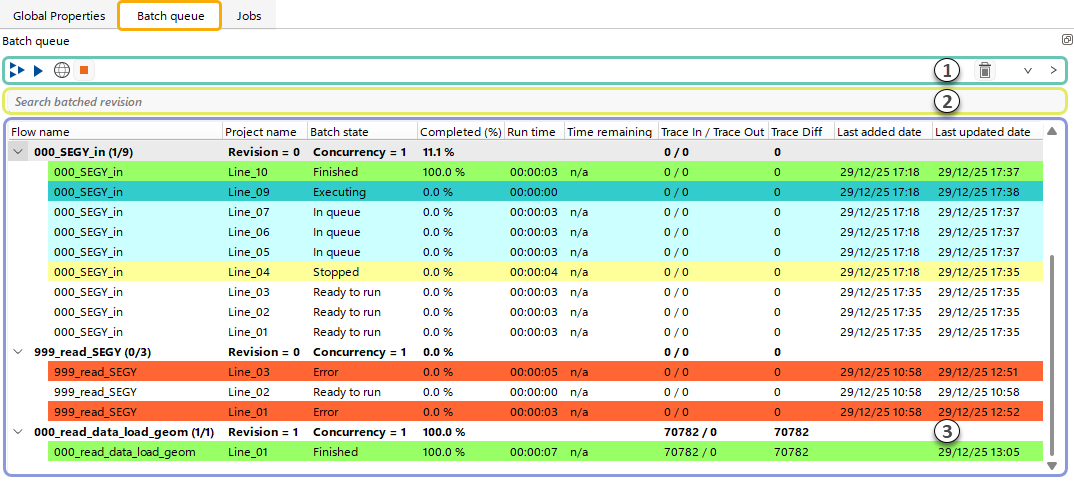
In the List of workflows (3) created with the Batch Manager, the user can monitor the status of submitted workflows, including creation and last update dates, completion percentage, current state, and more.
Workflow statuses are highlighted with corresponding colors:
•Ready to run – Workflow is created but not yet submitted.
•Executing – Workflow is currently running.
•In queue – Workflow is waiting in the queue for execution according to the defined run parameters.
•Stopped – Workflow execution was interrupted by the user.
•Finished – Workflow completed successfully.
•Error – Workflow did not complete successfully.
The user can perform actions on the selected workflow(s) tasks or batch workflow group using Shortcut buttons (1)  and
and  .
.
 Execute not finished workflow(s) for the selected batch group.
 Execute selected workfkow(s) or batch workflow group.
 Execute selected workfkow(s) or batch workflow group to the Remote Distribution.
 Interrupt selected workfkow(s) or batch workflow group.
 Delete selected workfkow(s) or batch workflow group.
 Expand all batch workflow lists.
 Collapse all batch workflow lists.
The user can also use the Search bar (2) to search within the created tasks.