In the Create Batch Flows dialog from the Global Properties section, the user can generate and submit workflows from a template using global variables to the desired destination.
The dialog window can be functionally divided into the following sections: Project Tree preview (1), Global Properties spreadsheet (2), and Hierarchical Constructor for workflow creation logic (3).
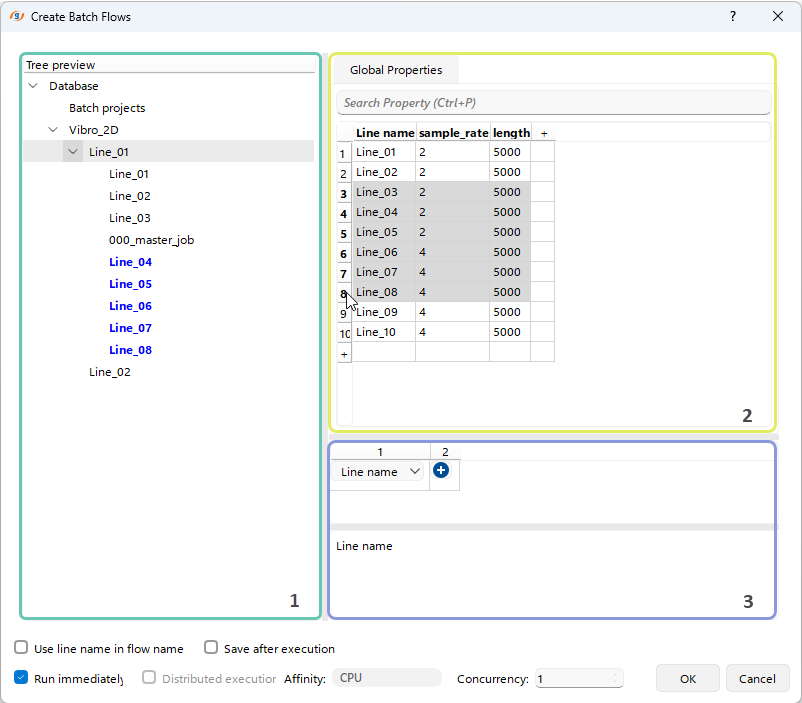
In the Project Tree Preview panel (1), the user can select the hierarchical level (highlighted in gray) from which to create workflows using the current logic from the hierarchical constructor (3) and Global Properties spreadsheet (2). The created project structure elements will be highlighted in blue.
From the Global Properties section (2), the user can select rows for workflow creation using Left-click along with the Shift and/or Ctrl keys.
In the Hierarchical Constructor (3), the user can define the logic for creating workflows within the Project Tree using the Global Variables. To add the next hierarchical level, the user can click the  button and Double-Left Click the Line Name field to restore the default logic using the Line Name column.
From this dialog window, the user can also select additional options by checking the appropriate boxes  during workflows creation.