Base properties
The Base properties module provides a set of fundamental calculations commonly used in petrophysical and geomechanical analysis.
Each tab represents an individual calculator that generates a new log curve for the selected well or a batch of wells.
The module allows users to specify input parameters, define a calculation interval, and visualize the resulting curve before saving it to the project.
Use Run to calculate the current tab, Save to store its result, or Save to workflow to add the configured calculation to the project Workflow.
Hydrostatic Pressure
Calculates the hydrostatic pressure as a function of depth using the selected fluid density.
The relationship is defined by:
Phyd(z) = ρw · g · z
where
- ρw – fluid density,
- g – gravitational acceleration,
- z – depth.
Input parameters:
- Fluid density (g/cc or lb/ft³)
- Gravity constant (m/s² or ft/s²)
- Measured depth range and step
Output: Hydrostatic pressure curve (MPa or psi)
Temperature Gradient
Computes the temperature distribution with depth using a constant surface temperature and geothermal gradient.
The formula applied:
T(z) = Tsurface + G · z
where
- Tsurface – surface temperature,
- G – geothermal gradient,
- z – depth.
Input parameters:
- Surface temperature (°C or °F)
- Temperature gradient (°C/m or °F/100ft)
- Depth step
Output: Temperature Gradient curve
Overburden Stress
Estimates the vertical stress resulting from the weight of the overlying sediments.
The calculation integrates the rock bulk density curve over depth:
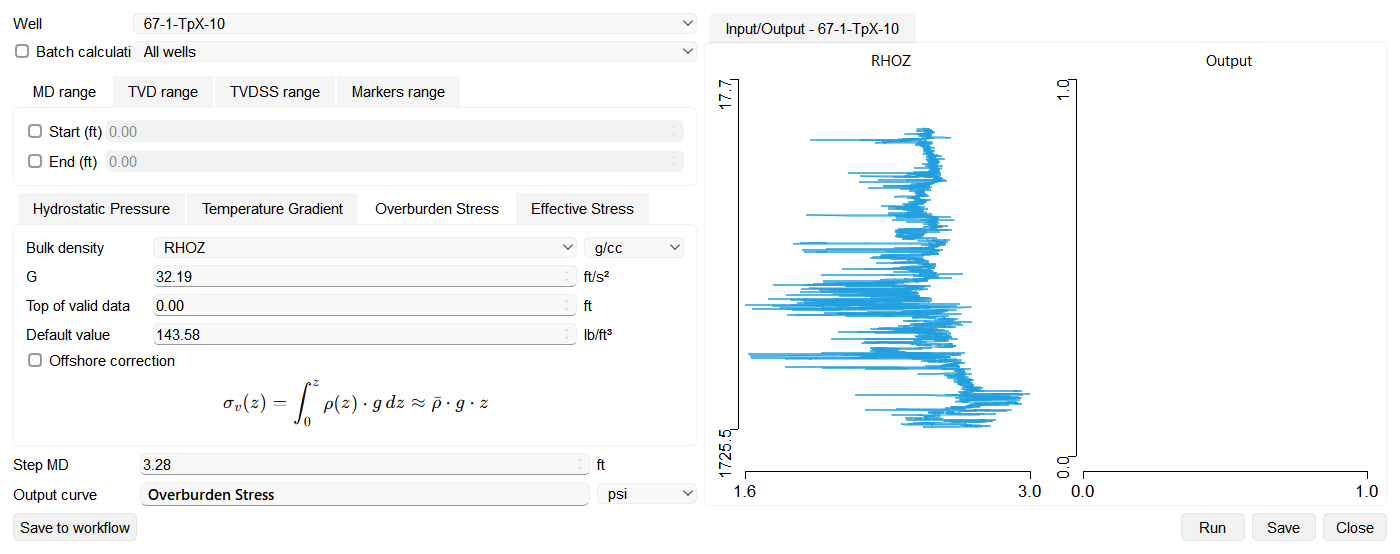
With Offshore correction enabled, the wizard uses σv(z) = ρw · g · zw + ∫zw^z ρ(z) · g dz, where ρw is Water density and zw is Water depth.
where
- ρ – bulk density,
- g – gravitational acceleration.
At each output depth the result uses the average bulk density from the top of the well down to that depth. Above Top of valid data the Default value density is used in place of the log. When you press Run, the Default value density also replaces any depth at which the bulk density log has no valid value, so intervals without a valid reading are still included in that average and the result curve stays continuous.
Input parameters:
- Bulk density log and unit (kg/m³, g/cc, or lb/ft³); default and water-density values use g/cc in Metric projects or lb/ft³ in Imperial projects
- Gravity constant
- Depth interval and step
- Top of valid data and Default value (the bulk density used above that depth)
Output: Overburden stress curve (MPa or psi)
Effective Stress
Determines the effective stress by subtracting pore pressure from total overburden stress:
σeff = σv − Pp
where
- σv – overburden stress,
- Pp – pore pressure.
Input parameters:
- Overburden stress curve
- Pore pressure curve
Output: Effective stress curve (MPa or psi)