Global Variables are defined in the Global Properties section in the main g-Platform managing window.
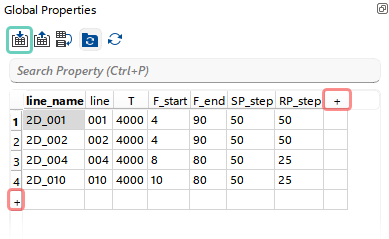 The user can add rows or columns using the “+” icon and enter values. Rows or columns can be removed via the Right-click menu or the Delete key. Columns can be renamed using the Right-click menu on the column header.
The most efficient way to create or modify the Global Properties spreadsheet is to import it from an existing *.csv file using the corresponding shorcut button  .
.
It is important to note that the first row of the CSV file must contain column headers. Otherwise, during import, the column headers in the Global Properties spreadsheet will be populated using the values from the first row of the CSV file.
Global Variables are implemented in the Module Properties section using the = and % symbols. The = symbol is placed at the beginning of a parameter, and the variable name is enclosed within % symbols inside the parameter value.
All values stored in the spreadsheet are treated as Strings by default and it is in some cases useful option to reassign the type of a Global Variable by mapping it to a Local Variable.