The first iteration of multiple attenuation should be not very harsh, because the second iteration will be after migration step due to the fact that multiples are focused after PSTM/PSDM process. g-Platform provides several radon modules and we are going to use Radon multiple attenuation (high resolution Radon).
Keep in mind that you have several radon modules with a bit different functionality and results:
•Radon multiple attenuation: vista views: input, output, difference gathers, user-defined time curves on gather;
•Radon - TauP - High resolution: vista views: input, output, difference gathers, Tau-P domain, interactive curve on gather;
•Radon - TauP: vista views: input, output, difference gathers, Tau-P domain, interactive curve on gather;
•Radon multiple attenuation by velocity: vista views: input, output, difference, NMO-corrected gathers, interactive velocity spectrum for constrain-polygon picking;
•Radon - by picking: vista views: input, output, difference gathers, interactive Tau-P domain for constrain-polygon picking.
The user always has the option to select the appropriate module or combine multiple modules to create a complex workflow.
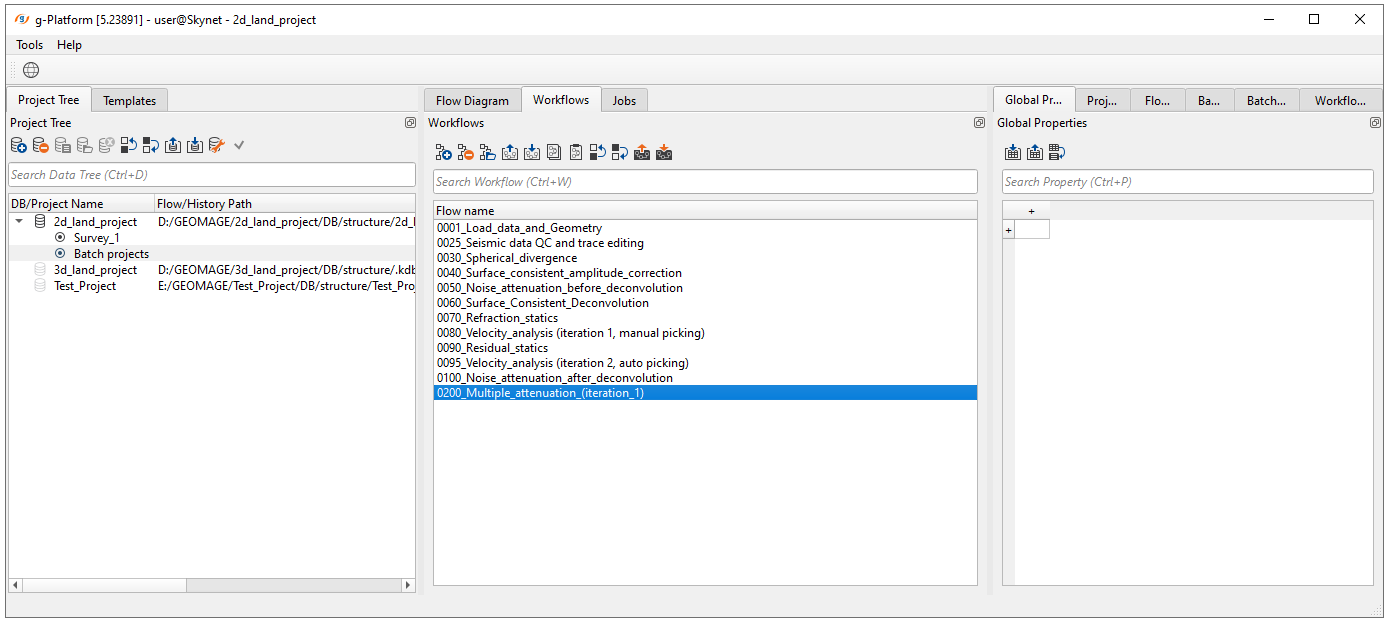
Create a new workflow 0200_Multiple_attenuation_(iteration_1):
Add all necessary modules to the workflow:
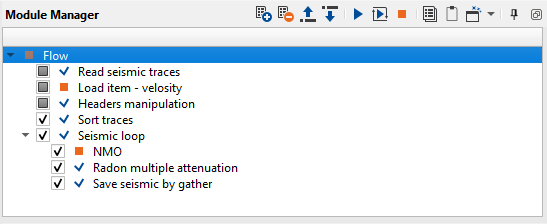
1.Read seismic traces - load traces after noise attenuation after deconvolution
2.Load item - velocity - load stacking velocity
3.Header manipulation - change offsets (make it positive only)
4.Sort traces - sort traces by CMP
5.Seismic loop - process every sorted gather in a loop (one by one)
6.NMO - apply normal move out correction
7.Radon multiple attenuation - remove multiples
8.Save seismic by gather - save seismic traces
1)Read seismic traces. Load data set from the previous step on multiple attenuation 0100_Denoise2.
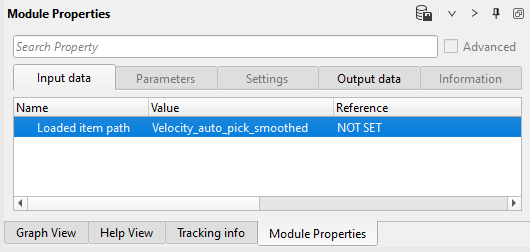
2)Load item - velocity. Load stacking velocity (library) from DB:
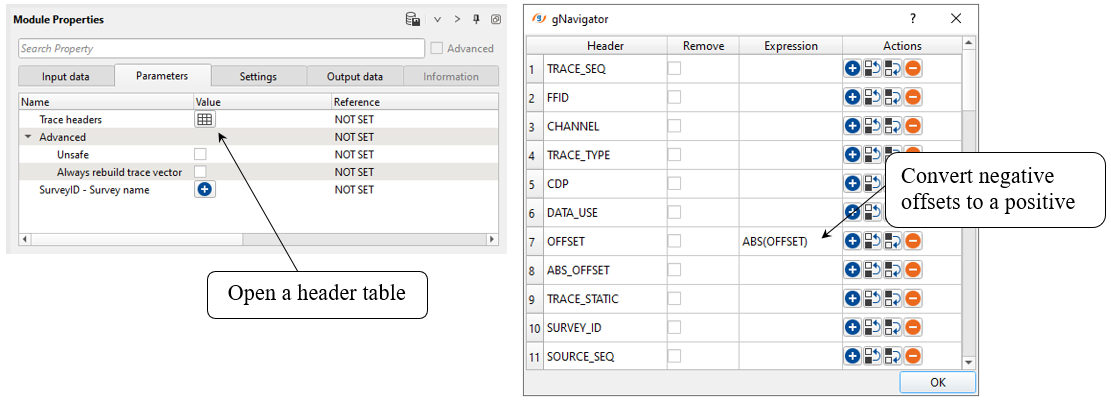
3)Headers manipulation. We can modify trace headers. Headers Manipulation module can be useful in doing all sorts of mathematical operations by means of mathematical expressions for changing/manipulating trace headers.
We can use any of the following mathematical operations to create our own equation/expression.
g-Platform uses following mathematical expressions in designing your equation.
• Mathematical operators (+, -, *, /, %, ^)
• Functions (min, max, avg, sum, abs, ceil, floor, round, roundn, exp, log, log10, logn, root, sqrt, clamp, inrange)
• Trigonometry (sin, cos, tan, acos, asin, atan, atan2, cosh, cot, csc, sec, sinh, tanh, d2r, r2d, d2g, g2d, hyp)
• Equalities, Inequalities (=, ==, <>, !=, <, <=, >, >=)
• Assignment (:=, +=, -=, *=, /=)
• Boolean logic (and, nand, nor, not, or, xor, xnor, mand, mor)
• Control Structures (if-then-else, ternary conditional, switch case)
• Loop Structures (while loop, for loop, repeat until loop, break, continue)
Modify OFFSET header -> convert negative values to positive:
4)Sort traces. Sorting by CDP - OFFSET:
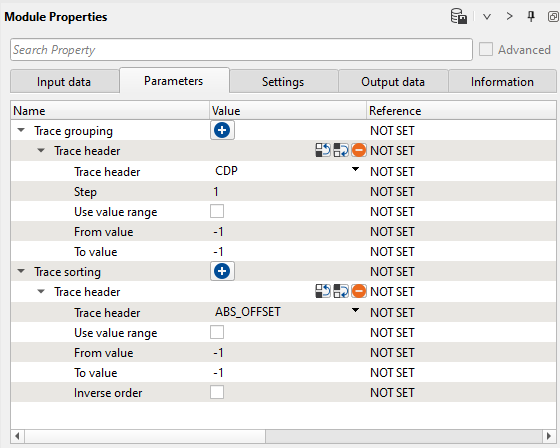
Execute those modules.
5)Seismic loop. Put two modules inside: Radon multiple attenuation and Save seismic by gather.
6)NMO - apply normal move out correction by using stacking velocity. Define an input data parameters: get Vrms model from Load item - velocity.
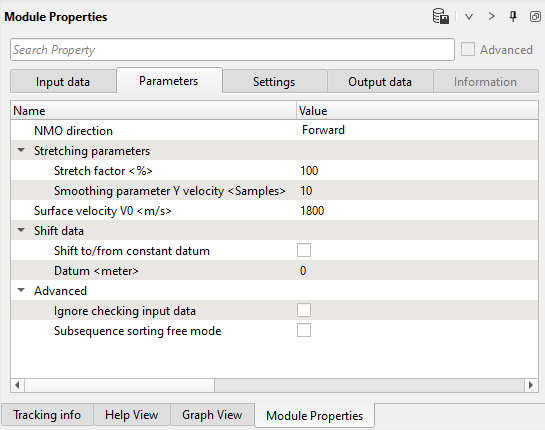
--------------------------------------------------------------------------------------------------------------------
 IMPORTANT! We must apply NMO corrections on gather which was sorted by CDP.
--------------------------------------------------------------------------------------------------------------------
7)Radon multiple attenuation. This module transforms seismic traces into Tau/P (intercept time and slowness dt/dx = p) domain where we can easily separate multiples and primaries. Such separation allows to attenuate energy of multiple waves before reverse transformation into time domain (T-X). Basic idea is separation primaries and multiples by their velocity (moveout). Input traces are decomposed so hyperbolic events map to elliptical curves in Tau-P domain.
Input seismic gather must be sorted by Common Middle Point (CMP) - Offsets and the primaries should be flattened by applying Normal Move Out (stack velocity) correction before Radon transform. In this case the primary energy will be near P=0, which produces difference in moveout makes it possible to flatten the primary reflections while leaving the multiples under-corrected with a moveout approximately parabolic.
Slowness = 1 / Velocity
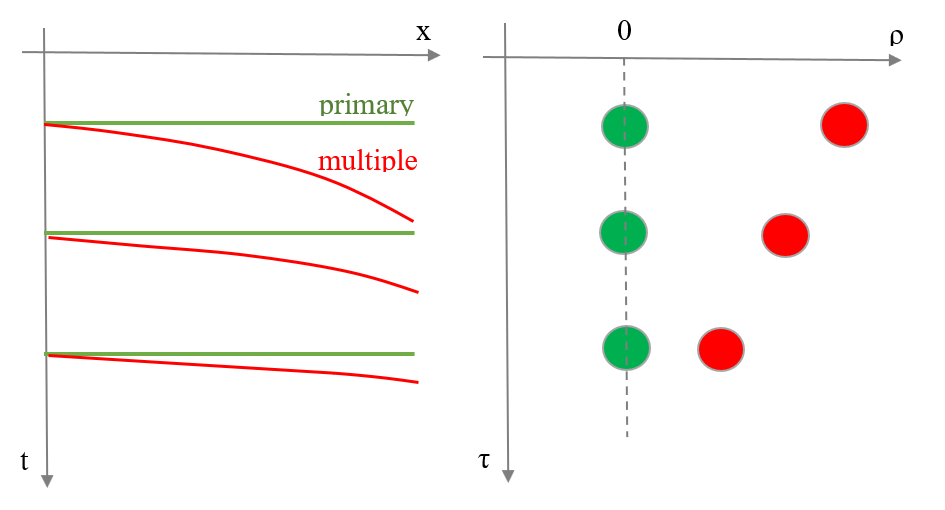
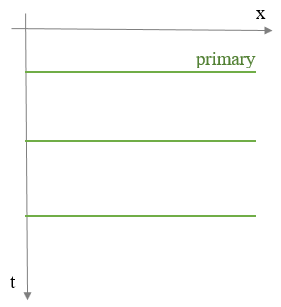
Model of CMP gather: 1) Time domain (T-X): Primaries+Multiples;
2) Tap-P domain: Primaries+Multiples:
3) Time domain (T-X): Primaries.
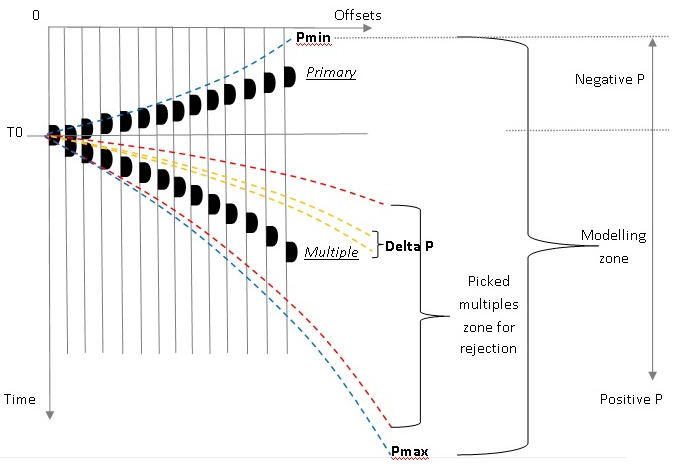
The module performs a model of primary and multiple events. This computation is based on data decomposition into user-defined parabolas and calculated by high-resolution algorithm, de-aliased least-squares method in the frequency space domain for every frequency of the pass-band which is defined by frequency min (Hz) and frequency max (Hz) parameters. Events corresponding to parabolas with a bigger curvature are considered as multiples. Events corresponding to parabolas smaller than this constrain are primary events. The area limits between primaries and multiples is user defined parametrization.
Parameters:
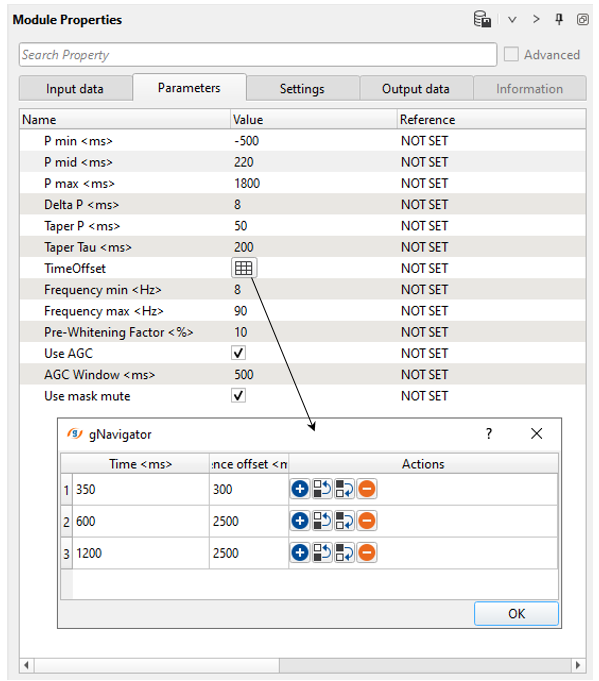
P min
Minimum p-value for transform data from t-x into tau-p domain.
P mid
Middle p-value for transform data from t-x into tau-p domain.
This parameter is start for modeling multiple waves.
P max
Maximum p-value for transform data from t-x into tau-p domain.
(Choose this parameter with care because run time for this process increases with the square of the number of P-values).
Delta P
Amount of modeling waves.
Should be approximately equal signal response time interval.
Taper P
Taper zone between P min/mid/max-values.
Taper Tau
Taper zone between start time - filtered - end time.
TimeOffset
Time varying reference offset for multiple modeling.
Time – time.
Reference offset– reference offset.
Frequency min
Minimum frequency for filtering
Frequency max
Maximum frequency for filtering
Pre-Whitening Factor
Pre-whitening factor for stabilizing tau-p to t-x transformation.
Use AGC
Apply automatic gain control pre radon filtering and remove after radon filtering.
AGC Window
Window for automatic gain control.
Execute the module and open all vista windows:
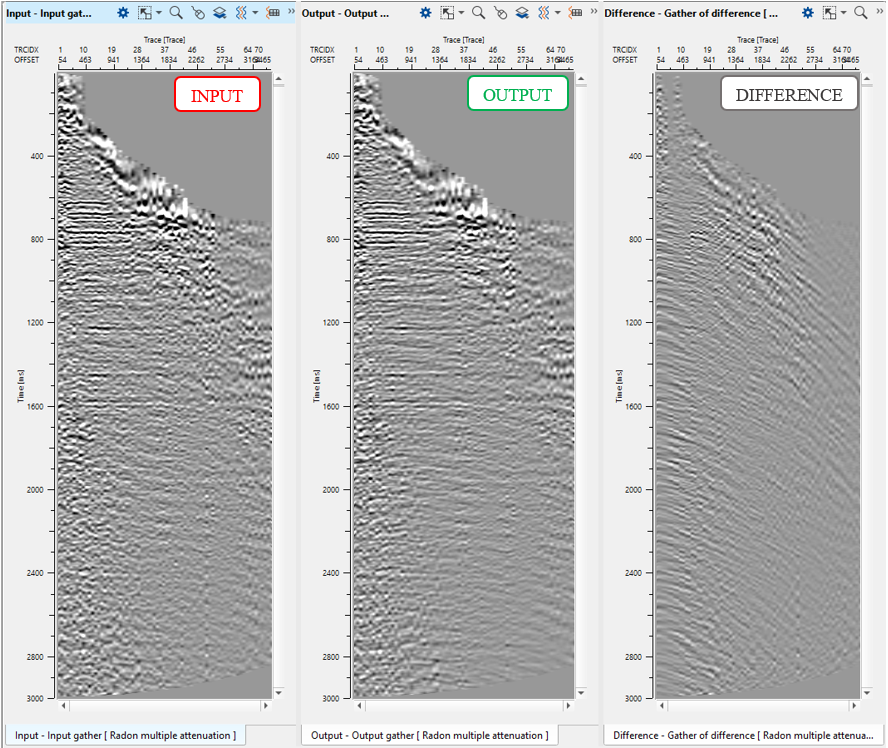
8)Save seismic by gather. Define an output file 0200_DEMULTIPLE1 name and execute calculations for the entire data set.