The Seismic Loop module enables interactive testing of processing parameters for the modules included within it. The basic principles of interactive actions in g-Navigator are described in the chapter g-Navigator → Client Area → Main Actions.
The example below illustrates the general approach to interactive processing parameter testing using the Seismic Loop module.
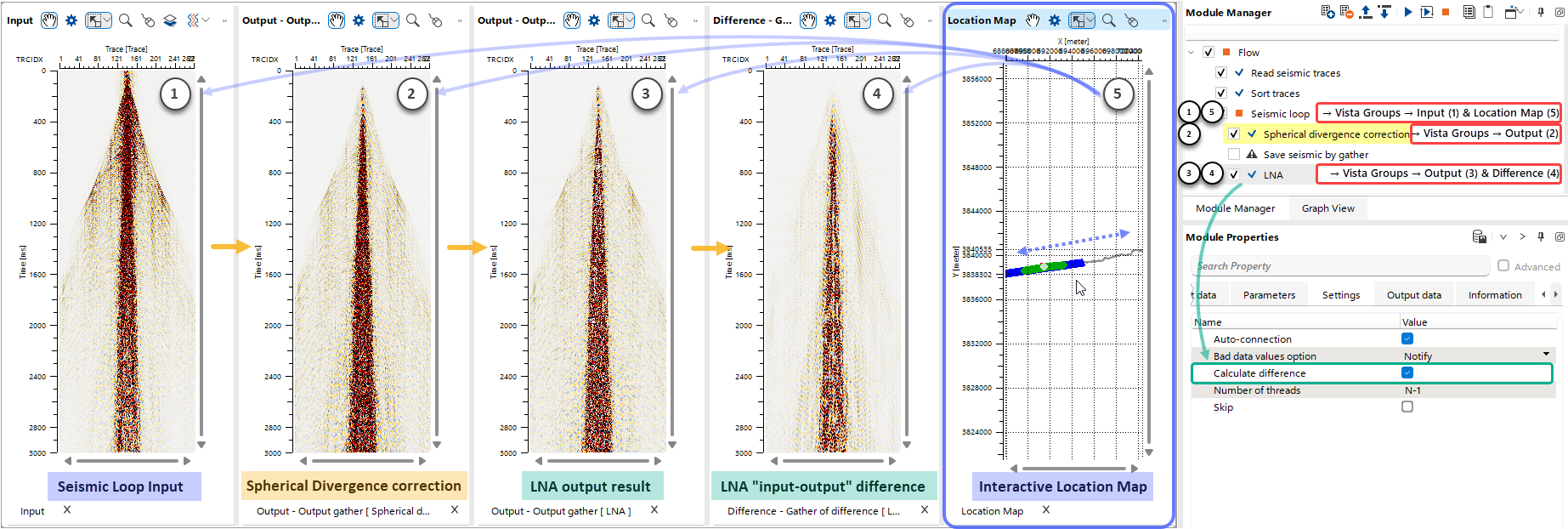
To enable interactive gather selection, the Location Map Vista (5) from the Seismic Loop must be opened in the workspace. In this example, the Input Gathers Vista (1) from the Seismic Loop is also opened.
Next, the Output Gathers Vista (2) after Spherical Divergence correction is added to the workspace. Finally, the Output Gathers (3) and the Difference Gathers (4) (between input and output for the module) for the LNA module are added to the workspace. The Calculate Difference option is available for most modules in the Settings section of the Module Properties.
To ensure reliable interactive testing, it is recommended to synchronize all Vista Views  and their View Settings
  .
.
With this setup, the user can interactively switch between gathers using the Location Map (5) to evaluate processing parameters in different areas of the survey. Any changes made to processing parameters of a module in the Module Properties section are immediately reflected in the corresponding open Vistas.