Actions
Actions panel allows to see all available processes that can be executed in g-Space
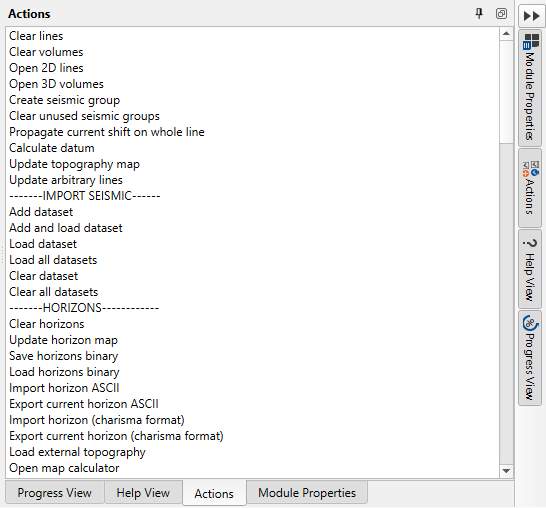
All these actions are mostly duplicated by another button, toolbar or tool, but some of them can still only be found in the Actions panel, especially new features.
|
Function Name |
Explanation |
|
SEISMIC DATA | |
|
Clear lines |
Removes all loaded 2D seismic lines from the project |
|
Clear volumes |
Removes all loaded 3D seismic volumes from the project |
|
Open 2D lines |
Navigate 2D seismic lines for loading into the project |
|
Open 3D volumes |
Navigate 3D seismic volumes for loading into the project |
|
Create seismic group |
Creates a new group to organize multiple seismic datasets (for example PSTM, PostSTM etc.) |
|
Clear unused seismic groups |
Deletes seismic groups that are not currently in use |
|
Propagate current shift on whole line |
Applies the current time or depth shift across the entire seismic line |
|
Calculate datum |
Computes the reference level or datum for seismic data |
|
Update topography map |
Refreshes the topography map with the latest seismic data |
|
Update arbitrary lines |
Updates user-defined arbitrary seismic lines with the latest data |
|
Create 3D geological model |
Generates a 3D geological model |
|
Import seismic data from ASCII |
Imports seismic data from an ASCII file |
|
Seismic calculator |
Opens a tool for performing calculations on seismic data |
|
Workflows |
Opens the workflows tool for building and running processing sequences |
|
IMPORT SEISMIC |
|
|
Add dataset |
Adds a new seismic dataset to the project without loading it |
|
Add and load dataset |
Adds and immediately loads a new seismic dataset to the project |
|
Load dataset |
Loads a previously added seismic dataset into the project |
|
Load all datasets |
Loads all available seismic datasets into the project |
|
Clear dataset |
Removes the selected dataset from the project |
|
Clear all datasets |
Removes all datasets from the project |
|
HORIZONS |
|
|
Clear horizons |
Removes all interpreted horizons from the project |
|
Update horizon map |
Refreshes the horizon map with the latest interpretations |
|
Save horizons binary |
Saves the interpreted horizons in a binary format |
|
Load horizons binary |
Loads horizons from a previously saved binary file |
|
Import horizon ASCII |
Imports horizon data from an ASCII file |
|
Export current horizon ASCII |
Exports the currently selected horizon to an ASCII file |
|
Import horizon (charisma format) |
Imports horizon data in Charisma format |
|
Export current horizon (charisma format) |
Exports the currently selected horizon to Charisma format |
|
Load external topography |
Loads an external topography file for use in interpretation |
|
Open map calculator |
Opens a tool to perform calculations on maps |
|
Clear calculated maps |
Removes all maps that were generated through calculations from the project |
|
Import checkpoints ASCII |
Imports checkpoints from an ASCII file |
|
Export checkpoints ASCII |
Exports checkpoints to an ASCII file |
|
Create unconformity map |
Generates an unconformities map |
|
WELLS |
|
|
Clear wells |
Removes all well data from the project |
|
Import wells headers from text file |
Imports well headers from a text file |
|
Export wells headers to text file |
Exports well headers to a text file |
|
Import wells inclinometry |
Imports well inclination data |
|
Export wells inclinometry |
Exports well inclination data |
|
Import wells trajectory |
Imports well trajectory data |
|
Clear wells inclinometry |
Removes all well inclination data from the project |
|
Import wells markers |
Imports well marker data |
|
Export wells markers to text file |
Exports well markers to a text file |
|
Export well-tied horizons-markers to text file |
Exports the well markers and horizons for tied wells to a text file |
|
Clear wells markers |
Removes all well marker data from the project |
|
Load LAS files |
Loads well log data from LAS files |
|
Clear LAS files |
Removes all loaded LAS files from the project |
|
Load check shots |
Loads check shot data for wells |
|
Clear check shots |
Removes all check shot data from the project |
|
Export all check shots |
Exports all check shot data to a file |
|
Export wells comments to text file |
Exports well comments to a text file |
|
Import wells comments from text file |
Imports well comments from a text file |
|
Clear all wells comments |
Removes all well comments from the project |
|
Wavelet analysis |
Performs wavelet analysis on well data |
|
Log calculator |
Opens a tool for performing calculations on well logs |
|
Save synthetic trace to LAS |
Saves synthetic seismic traces to an LAS file |
|
Log Loading Wizard |
Opens a wizard for loading well log data |
|
Import WITSML files |
Imports well data from WITSML files |
|
Export LAS files |
Exports well log data to LAS files |
|
Markers attributes calculator |
Opens a tool for calculating attributes on well markers |
|
Grid calculator |
Opens a tool for calculating a new property of the current 3D grid from its existing properties |
|
Manage well templates |
Manages well display and data templates |
|
PETROPHYSICS |
|
|
Base properties |
Calculates base petrophysical properties |
|
Shale Volume |
Calculates the shale volume (Vshale) |
|
Porosity |
Calculates porosity |
|
Saturation |
Calculates water saturation |
|
Mineral Volume Estimation |
Estimates mineral volumes |
|
Pore pressure |
Calculates pore pressure |
|
Lithology interpretation |
Performs lithology interpretation |
|
Edit LAS curve |
Edits LAS curve data |
|
ML Log prediction |
Predicts well logs using machine learning |
|
VELOCITY MODEL |
|
|
Create depth velocity |
Generates a depth velocity model using well markers and time horizons |
|
Import depth velocity model |
Imports a depth velocity model from a file |
|
Update depth velocity by well tie |
Updates the depth velocity model using well data |
|
Clear all well-tied maps |
Removes all maps that are tied to well data from the project |
|
Pine creation |
Creates a pine tree - tool for the accuracy estimation of the velocity model |
|
FAULTS |
|
|
AI Faults Detection |
Detects faults automatically using AI (see AI faults wizard) |
|
AI Horizons Stack |
Automatically stacks and picks horizons using AI |
|
Fault modeling |
Builds a fault model from interpreted faults |
|
Structural modeling |
Builds a structural model |
|
Mesh optimization |
Optimizes the model mesh |
|
Clear faults |
Removes all faults from the project |
|
Save faults binary |
Saves fault data in a binary format |
|
Load faults binary |
Loads fault data from a binary file |
|
Import fault (charisma format) |
Imports fault data in Charisma format |
|
Export current fault (charisma format) |
Exports the currently selected fault to Charisma format |
|
HORIZON PICKING |
|
|
Run QC for selected horizon picking |
Performs quality control checks on the selected horizon picking |
|
Update 3D view |
Refreshes the 3D view to reflect the latest data and interpretations |
|
Load picture files |
Loads image files into the project |
|
Clear pictures |
Removes all loaded image files from the project |
|
Load shape files |
Loads shape files into the project |
|
Clear shape files |
Removes all loaded shape files from the project |
|
Calculate gross rock volume |
Computes the gross rock volume from the seismic data |
|
Create geo-body from gross rock volume |
Generates a geological body from the calculated gross rock volume |
|
Calculate attributes |
Computes various seismic attributes for analysis |
|
Spectral decomposition |
Opens the spectral decomposition wizard for the Calc type selected on the Attributes bar: Horizon creates a map, and Seismic creates RGB seismic. |
|
Import map from ASCII |
Imports a map from an ASCII file |
|
Update graphs |
Refreshes the cross plot with the latest data |
|
Show object properties |
Displays the properties of the selected object |
|
Calculate reserves |
Computes effective reservoir volume, oil, gas or CO2 volumes |
|
MAP INTERPOLATION |
|
|
Settings |
Opens the settings for map interpolation |
|
Map building |
Opens the Map building dialog for building a map from a horizon, well markers or a point set |
|
MIS TIE SEISMIC |
|
|
Set seismic groups priority |
Sets the priority for different seismic groups |
|
Run for current Intersection |
Runs mis-tie corrections for the current intersection |
|
Run for all Intersections |
Runs mis-tie corrections for all intersections |
|
Clear shifts or rotations |
Removes all applied shifts or rotations from the seismic data |
|
Import cross points table from ASCII |
Imports a cross points table from an ASCII file |
|
Export cross points table to ASCII |
Exports the cross points table to an ASCII file |
|
Auto fit volumes |
Automatically fits the seismic volumes together |
|
Calculate volumes intersections |
Computes the intersections of seismic volumes |
|
Update lines intersections |
Updates the intersections between seismic lines |
|
PRE-STACK |
|
|
Run AVO |
Runs Amplitude Versus Offset (AVO) analysis on pre-stack data |
|
Calculate AVO maps |
Generates AVO attribute maps from pre-stack data |
|
Calculate AVO seismic attributes |
Computes various AVO seismic attributes for analysis |
|
Clear mute |
Removes all mute information from the pre-stack data |
|
Load mute |
Loads mute information into the pre-stack data |
|
Save mute |
Saves mute information for the pre-stack data |
|
DATABASE |
|
|
Set DB connection |
Establishes a connection to the database |
|
Clear references |
Removes all references to database entries from the project |
|
Sync settings |
Opens synchronization settings with the database |
|
Export data to DB |
Sends the current project data to the database |
|
Import data from DB |
Retrieves data from the database into the project |
|
Delete DB data |
Deletes selected data from the database |
|
Set gPlatform connection |
Establishes a connection to g-Platform |
|
Import data from g-Platform |
Imports data from g-Platform into the project |
|
Export data to g-Platform |
Exports project data to g-Platform |