Mineral Volume Estimation
Mineral Volume Estimation is a petrophysical wizard that estimates mineral (lithology) volume curves from well logs and saves the results under the selected well. It inverts the recorded log responses into the volumetric fractions of the rock-forming minerals plus pore space, using a constrained weighted least-squares solver.
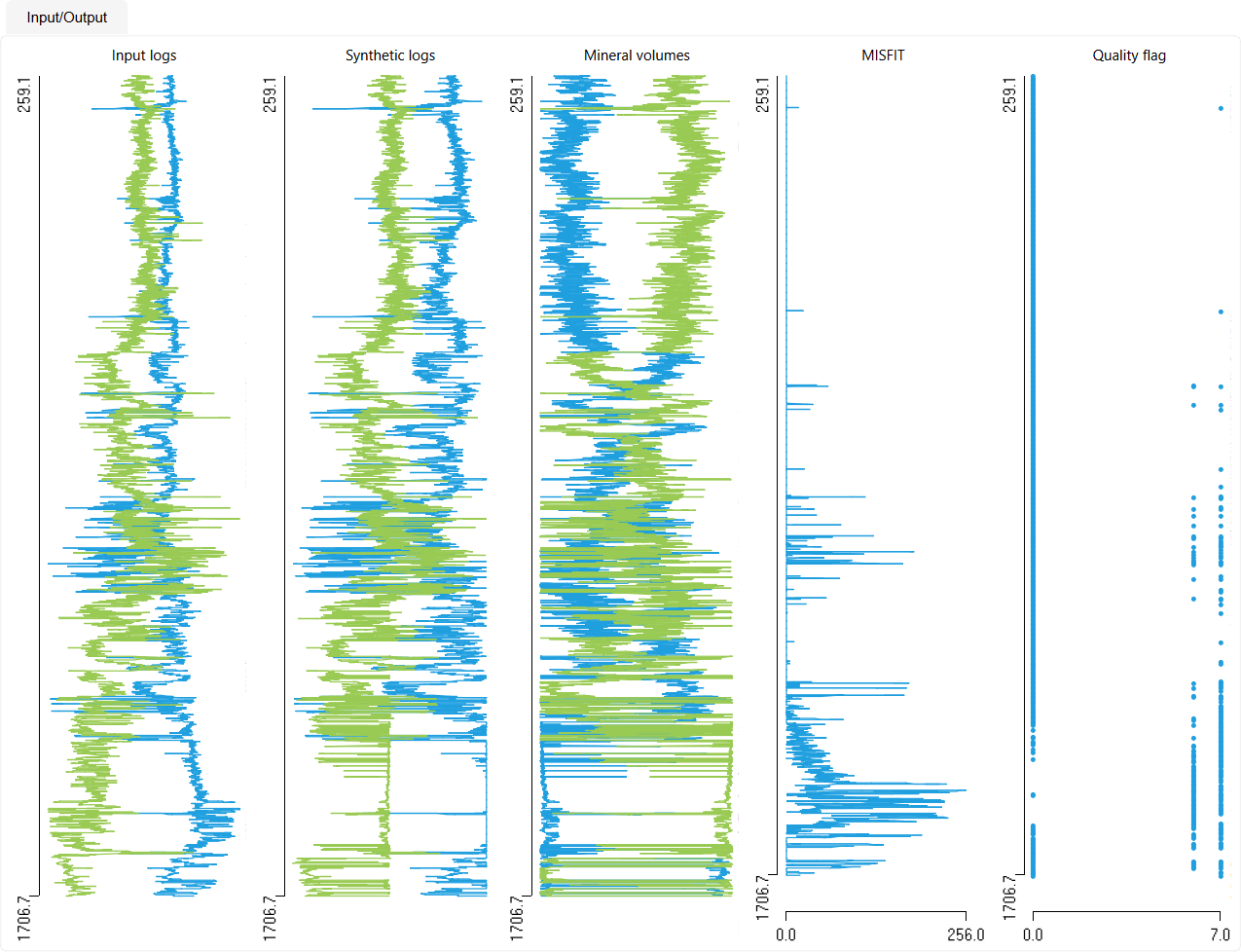
The wizard can be run on a single well or in batch mode across many wells, and provides a live preview of the input logs, synthetic logs, stacked mineral volumes, misfit and quality flag before any curve is written to the project.
Purpose
The tool is designed for:
- Estimating the volumetric fractions of rock-forming minerals from standard petrophysical logs
- Building a consistent lithology / mineralogy model for clastic, carbonate, evaporitic and organic-rich intervals
- Deriving total porosity together with the mineral volumes in a single closed inversion
- Generating synthetic logs, misfit and quality-control curves to validate the mineral model
Requirements
- At least one well with continuous well logs loaded in the Data Manager
- Recommended input curves: RHOB (bulk density), NPHI (neutron), PEF (photoelectric factor), DT (sonic slowness) and GR (gamma ray)
- An optional VSH / VCL curve when the clay/shale volume is to be fixed
- The more independent logs are supplied, the more minerals can be resolved reliably
Launching the Wizard
Open the wizard from the Petrophysics ribbon tab → Lithology group → Mineral volume. The complete ribbon group is shown in the Petrophysics topic.
The wizard opens as a dialog with a parameter panel on the left and an Input/Output preview panel on the right. The bottom of the dialog holds the Save to workflow, Run, Save and Close buttons.
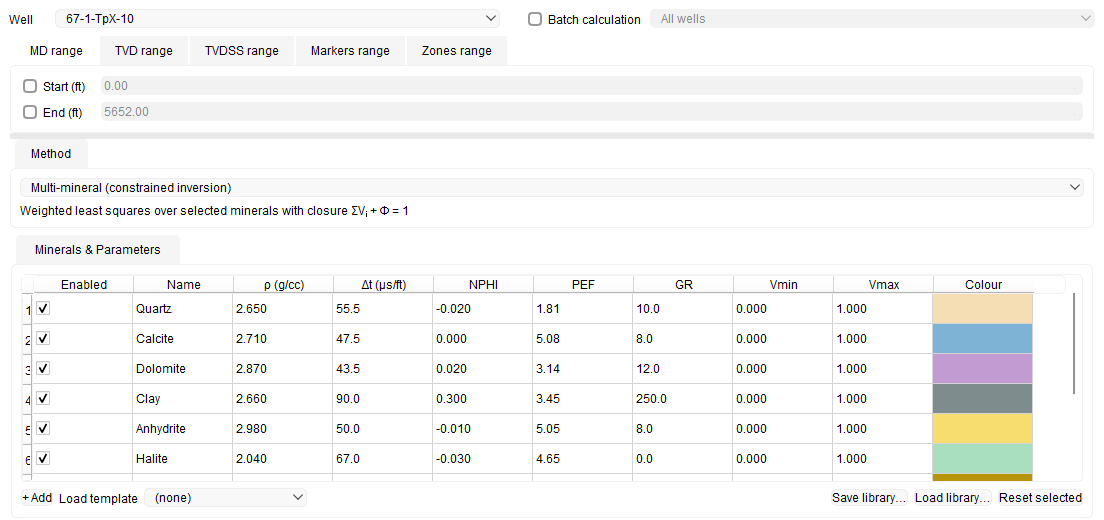
The upper part of the parameter panel holds the well selection, the depth-range tabs, the Method group and the Minerals & Parameters table:
Step-by-Step Guide
Selecting the Well and Interval
- Choose a well from the Well dropdown at the top of the panel.
- To process several wells at once, enable Batch calculation and pick the scope from the adjacent list (for example All wells or a specific well group).
- Define the calculation interval on the depth-range tabs: MD range, TVD range, TVDSS range, Markers range or Zones range, which restricts the calculation to the zones selected from a zone set. Depth units follow the project or well unit system. The tab area opens compact, showing only the fields of the tab in front of it; drag the horizontal border below it to make the area taller when a long marker or zone list needs more room, and back down to give the released space to the Method group and the Minerals & Parameters table. The height you set is restored the next time you open the wizard.
Choosing the Calculation Method
Select a solver in the Method group. A short equation for the selected method is shown below the list.
- Multi-mineral (constrained inversion) – the default method. Estimates any number of enabled minerals plus porosity using constrained weighted least squares. Recommended for complex carbonates, mixed clastic-carbonate, evaporitic and shaly/organic-rich rocks.
- Simple two-mineral – estimates the ratio of exactly two minerals for quick QC (e.g. quartz/clay or calcite/dolomite). A dedicated Porosity (Method 1) group appears for this method, letting you set porosity to None (relative fractions), Fixed value, or From curve.
- Three-mineral linear – solves exactly three components from the mapped logs using linear response equations.
Note: Simple two-mineral and Three-mineral linear require exactly two or three enabled minerals respectively; the wizard warns if the count does not match.
Mapping Input Logs and Weights
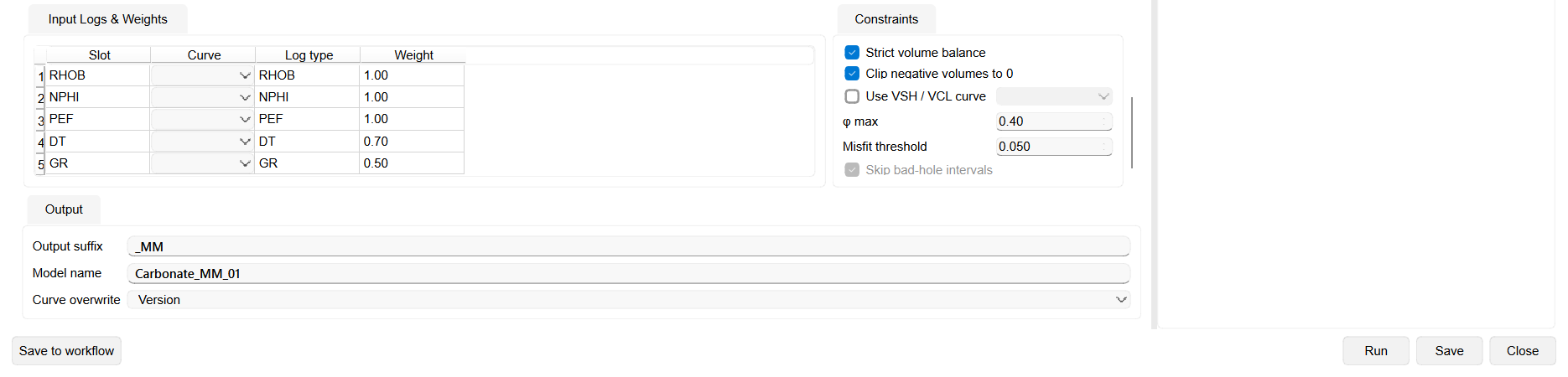
In the Input Logs & Weights table, map a well curve to each of the five log slots and set its relative weight in the inversion. The table has Slot, Curve, Log type and Weight columns.
- The five slots are RHOB, NPHI, PEF, DT and GR. A slot left blank is simply not used.
- Default weights are RHOB 1.0, NPHI 1.0, PEF 1.0, DT 0.7 and GR 0.5; edit the Weight cell to give a log more or less influence.
Mineral Set and Parameters
The Minerals & Parameters table defines which minerals take part in the inversion and their log responses. Columns are Enabled, Name, ρ (density), Δt (sonic slowness), NPHI, PEF, GR, Vmin, Vmax and Colour. The ρ and Δt column headers show the active units (g/cc or kg/m³, µs/ft or µs/m) according to the project unit system.
The default mineral set is Quartz, Calcite, Dolomite, Clay, Anhydrite, Halite, Pyrite, Coal and Kerogen. You can:
- Enable or disable a mineral with its Enabled checkbox (only enabled minerals are solved and saved).
- Edit any parameter cell, set the Vmin / Vmax volume limits, and double-click the Colour cell to change the display colour.
- Add a mineral with + Add, or reset edited rows with Reset selected.
- Load a predefined template from the Load template list – Clean Sandstone, Shaly Sandstone, Carbonate, Evaporitic Carbonate, Organic-Rich Shale or Mixed Clastic-Carbonate. A template populates the mineral list, parameters and recommended logs; all values remain editable.
- Save the current mineral set with Save library… and reload it later with Load library….
Constraints
The Constraints group controls how the inversion is regularised:
- Strict volume balance – forces the sum of mineral volumes plus porosity to equal 1 (enabled by default).
- Clip negative volumes to 0 – removes small negative volumes from the solution (enabled by default).
- Use VSH / VCL curve – fixes the clay/shale volume from a selected curve, solving the remaining minerals inside the clean-rock volume (disabled by default; enable it and pick the curve in the adjacent list).
- φ max – maximum allowed porosity (default 0.40).
- Misfit threshold – misfit above which a sample is flagged as poor quality (default 0.05).
- Skip bad-hole intervals – reserved for a future bad-hole flag curve; the option is present but not available in this version.
Output Settings
In the Output group:
- Output suffix – the suffix appended to every result curve name (default _MM).
- Model name – the name of the mineral model; the output curves are grouped under a LAS set named after it (default Carbonate_MM_01).
- Curve overwrite – how existing curves are handled: Overwrite, Version (default) or Prompt.
The lower part of the parameter panel holds the Input Logs & Weights table, the Constraints group and the Output group, with the wizard buttons along the bottom of the dialog:
Preview and Save
- Click Run to compute the model without writing any curves. The Input/Output panel then displays the input logs, synthetic logs, a stacked mineral-volume track, the misfit curve and the quality-flag track.
- Review the preview, adjust minerals, weights or constraints as needed, and re-run until the fit is satisfactory.
- Click Save to write the result curves to the well. In batch mode the model is applied to every target well and a summary report is shown afterwards.
- Use Save to workflow to store the configured job as a reusable workflow step, or Close to dismiss the wizard.
Results
When you click Save, the result curves are stored under the selected well, grouped in a LAS set named Mineral volumes - <Model name> (for example Mineral volumes - Carbonate_MM_01).
The following curves are created (names use the Output suffix, _MM by default). Only enabled minerals produce a volume curve:
- One mineral-volume curve per enabled mineral, e.g. V_QUARTZ_MM, V_CALCITE_MM, V_DOLOMITE_MM, V_CLAY_MM (v/v).
- PHIT_MM – total porosity (omitted when Method 1 uses relative fractions only).
- Synthetic logs RHOB_SYNTH_MM, NPHI_SYNTH_MM, DT_SYNTH_MM, PEF_SYNTH_MM, GR_SYNTH_MM reconstructed from the solved volumes.
- MISFIT_MM, VOLUME_SUM_MM, QUALITY_FLAG_MM and DOMINANT_MIN_MM quality-control curves.
Each output curve stores calculation metadata (method, solver, input logs and units, weights, minerals and parameters, constraints, interval, model name, date and software version). The QUALITY_FLAG_MM curve carries integer codes (0 = valid, and higher values for missing input, corrected volumes, high misfit and unstable solutions).
In batch mode a summary reports how many wells completed, how many were skipped for missing logs, and which finished with quality warnings.
Recommendations
- Start from the closest Load template to your reservoir, then refine mineral parameters and enabled minerals.
- Keep the number of enabled minerals within what the available logs can resolve; too many minerals for too few logs makes the inversion unstable.
- Always Run and inspect the misfit and synthetic-log tracks before saving; high misfit usually means a wrong mineral set or mis-mapped logs.
- Avoid enabling two minerals with near-identical log responses; the wizard warns when responses are almost identical.
- Enable Use VSH / VCL curve when a reliable shale-volume curve already exists, to stabilise the clay estimate.
- Adjust the Weight of noisy logs downward rather than removing them entirely, so they still contribute to the fit.
See Also