Pore pressure
The Pore pressure wizard estimates formation pore pressure from well log data using standard prediction methods such as Eaton's and Bowers'. The result is a pore-pressure curve that can be used for drilling planning, geomechanical modelling, and seal-integrity analysis.
The tool can be applied to a single well or in batch mode, allowing users to process all wells or selected wells from the Data Manager.
Launching the wizard
Open the Petrophysics ribbon bar and click Pore pressure. Select the target well, pick a prediction method, and provide the required input curves and calibration parameters.
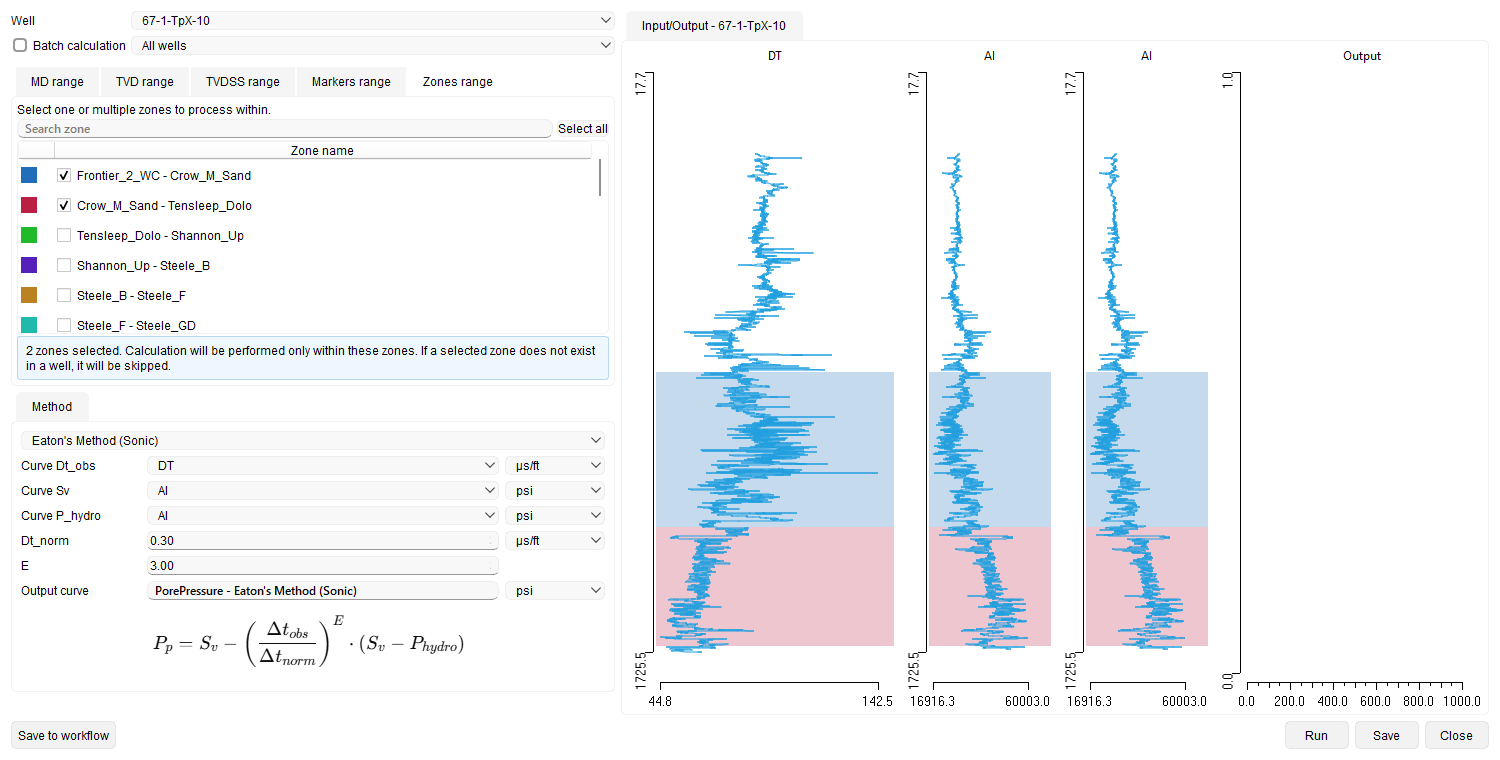
Input Parameters
- Well selection: Choose one well or enable Batch calculation to process multiple wells or a well group.
- Depth filter: The calculation interval can be limited by MD, TVD/TVDSS, markers, or zones. On the Zones range tab, select one or more zones of a zone set; the calculation then runs only inside the selected zone intervals instead of the single depth range, and a selected zone that does not exist in a well is skipped for that well. The Input/Output preview highlights each selected interval in the colour of its zone.
- Method: Choose one of the prediction methods described below. The parameter set displayed in the Method group adapts to the selection, and only the curves and constants required by the chosen method remain editable.
- Input curves: Depending on the method the wizard requires one or several of: sonic slowness (Dt_obs), interval velocity (Vint), observed resistivity (Robs), normal-compaction resistivity (Rnorm), overburden stress (Sv), hydrostatic pressure (P_hydro), porosity, and effective stress (Sigma_eff).
- Calibration constants: Method-specific parameters such as Dt_norm, Eaton exponent E, Bowers coefficients A and B, compaction parameters ϕ₀ and β, and the unloading exponent.
- Output curve: Name and unit of the resulting pore-pressure log (MPa or psi). The name can be edited directly in the wizard before saving.
Calculation Methods
Pick the method that matches the logs available in the well. The wizard shows the formula of the selected method below its parameter fields in the Method group.
Units — metric and imperial
Every numeric field carries a unit selector that follows the project measurement system (Metric or Imperial). The wizard converts the inputs internally before calculating:
- Sonic slowness (Δt): µs/m (metric) / µs/ft (imperial).
- Interval velocity (Vint): m/s / ft/s.
- Stresses and pressures (Sv, Pp, P_hydro, Sigma_eff): MPa / psi.
- Compaction coefficient (β): MPa⁻¹ / psi⁻¹.
- Resistivity (Robs, Rnorm): ohm·m in both systems.
- Porosity (ϕ): fraction in both systems.
Eaton's Method (Sonic)
Predicts pore pressure from the ratio of the observed sonic slowness to the normal-compaction trend, scaled by the difference between overburden stress and hydrostatic pressure.
Inputs: sonic curve Dt_obs, normal-compaction value Dt_norm, overburden stress curve Sv, hydrostatic pressure curve P_hydro, Eaton exponent E.
Use: shaly sections where a normal-compaction trend on the sonic log can be established.
Resistivity Ratio Method (Traugott Equation)
Driven by resistivity logs. Pore pressure rises where the measured resistivity deviates below the normal-compaction trend; the departure is raised to an empirical exponent (Traugott) and applied to the difference between overburden stress and hydrostatic pressure.
Inputs: observed resistivity Robs, normal-compaction resistivity Rnorm, overburden stress Sv, hydrostatic pressure P_hydro, ratio exponent.
Use: wells with good resistivity logs in shales, where no reliable sonic measurement is available.
Bowers' Method
Relates interval velocity to effective stress via an empirical loading curve. The method supports both loading and unloading regimes and therefore handles undercompaction and unloading-induced overpressure.
Inputs: interval velocity curve Vint (or sonic), overburden stress Sv, Bowers coefficients A and B, unloading exponent.
Use: areas where unloading mechanisms (fluid expansion, hydrocarbon generation) drive overpressure and Eaton's assumption of continuous loading breaks down.
Sonic Porosity Method (Effective Stress)
Derives effective stress from a porosity-versus-depth compaction trend ϕ(z) = ϕ₀·exp(-β·z), then subtracts it from the overburden stress to obtain pore pressure. The porosity curve is typically derived from the sonic log.
Inputs: porosity curve, overburden stress Sv, compaction parameters ϕ₀ and β.
Use: wells with reliable porosity logs and well-constrained compaction trends.
Overburden – Effective Stress Method
Uses an existing Sigma_eff curve (for example produced by a geomechanical workflow) and subtracts it from the overburden stress. Useful for importing results from other software or coupling with rock-physics modelling inside g-Space.
Running and saving to Workflow
The wizard has a standard row of buttons along the bottom of the dialog:
- Save to workflow — adds the wizard, together with all of its current settings (selected wells, input and output curves, method, method parameters, user-defined constants, the depth filter including any Zones range selection, and output names), to the project Workflow as a task that can be re-run later.
- Run — executes the calculation with the current settings (this button replaces the former Calculate button).
- Save — stores the resulting curve in the well.
- Close — closes the wizard.
When a saved task is reopened from the Workflow panel, the wizard reopens with every stored setting restored, so it can be reviewed, edited, run, and saved back to the task. Zones that are no longer available in the project, or that belong to a marker dataset which is no longer the default one, are dropped from the restored selection and reported when the task opens; set that dataset as the default one to use those zones again. In this edit-from-workflow mode the bottom row shows Save and Cancel instead.
Results
The wizard produces a single pore-pressure curve per processed well. The Input/Output panel plots the curves selected as inputs next to the resulting Output track, so calibration issues can be caught before saving. Saved curves are stored in the well's LAS files and can be viewed in the Well log view or exported through the Export data menu.
Recommendations
- Calibrate the chosen method against direct pressure measurements (RFT, MDT, mud weight) in offset wells before running it in blind mode.
- Use the Base properties wizard beforehand to prepare consistent Hydrostatic pressure and Overburden stress curves — most methods rely on them.
- For batch mode, verify that every well in the group carries the input curves expected by the chosen method; missing inputs will leave the output curve empty for those wells.
See Also