Velocity volume
The Velocity volume method builds a depth interval velocity model from a velocity volume that already exists in the project. The volume can be a 2D line or a 3D cube, in the time or in the depth domain, and it can hold RMS, interval or average velocities: you declare which type it contains and g-Space converts it accordingly. Use it when seismic velocities are the main constraint and well control is sparse.
The method was previously called From Vrms and merged every RMS velocity data set found in the project; it now converts the single volume you select.
Required inputs
- Velocity volume — one 2D line or 3D cube whose data type is Velocity, in the time or in the depth domain. Only the volume you select is used.
- Time horizons (optional) — smoothing targets for the horizontal smoothing of a time-domain RMS volume.
Parameters
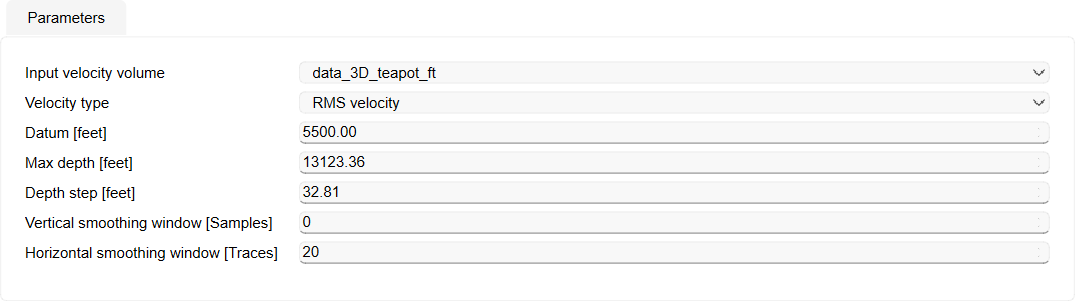
- Input velocity volume — the volume the model is built from. The list contains the 2D lines and 3D cubes of the project whose data type is Velocity, in both domains; it stays empty when the project holds no such data.
- Velocity type — what the selected volume stores: RMS velocity (default), Interval velocity or Average velocity. The conversion follows this setting, so a volume declared with the wrong type produces wrong velocities.
- Datum — elevation reference of the model (editable).
- Max depth — lower bound of the model (default 4000 m).
- Depth step — vertical sampling of the model (default 10 m).
- Vertical smoothing window — moving average applied vertically to the resulting model, in samples. 0 (default) leaves the model unsmoothed.
- Horizontal smoothing window — lateral smoothing along the time horizons of the project, in traces (default 20); 0 switches it off. It applies to a time-domain RMS volume, the other combinations are not smoothed laterally.
How the volume is converted
- Time volume, RMS velocity — Dix conversion to interval velocity and resampling to depth, with the optional smoothing along horizons.
- Time volume, Interval velocity — the interval velocities are converted from time to depth.
- Time volume, Average velocity — the average velocities are turned into interval velocities first, then converted from time to depth.
- Depth volume, RMS velocity — Dix conversion to interval velocity in depth.
- Depth volume, Interval velocity — taken as it is, no conversion is applied.
- Depth volume, Average velocity — the average velocities are turned into interval velocities.
A depth volume keeps its own depth range and sampling, so Max depth and Depth step shape the model only when the input is in the time domain. The vertical smoothing window is applied to the resulting depth model in both cases.
Workflow
- Select Velocity volume under Velocity models in the velocity model wizard.
- Choose the volume in Input velocity volume and set Velocity type to what that volume contains.
- Set Datum, Max depth and Depth step.
- Enter the smoothing windows the model needs, or leave them at their defaults.
- Run the model. The selected volume is converted to interval velocity in depth, smoothed as requested, and written as the new velocity model.
Output
Interval velocity model in depth, covering the geometry of the selected volume and referenced to the datum you entered.
When to use
- Areas with good seismic velocity coverage (for example fresh processing results) and limited well data.
- Starting model for later refinement with well- or marker-based methods.
- High-lateral-resolution use cases where seismic velocities capture features unavailable from sparse wells.
For well-tied models, combine this initial cube with Checkshot + markers + horizons in a second pass.
See Also