Export 3D models
g-Space exports 3D grids to the GOCAD / SKUA-GOCAD ASCII exchange formats. A structured grid is written as a GOCAD SGrid (.sg) and a tetrahedral grid as a GOCAD TSolid (.so), so a model built in g-Space can be handed to GOCAD / SKUA and other packages.
Purpose
Write a g-Space grid and its scalar properties to a GOCAD ASCII file for exchange with third-party software. The export preserves node coordinates and per-node or per-cell properties, and records the time / depth domain and the Z sign convention in the file header so the grid round-trips back into g-Space.
Launching the export
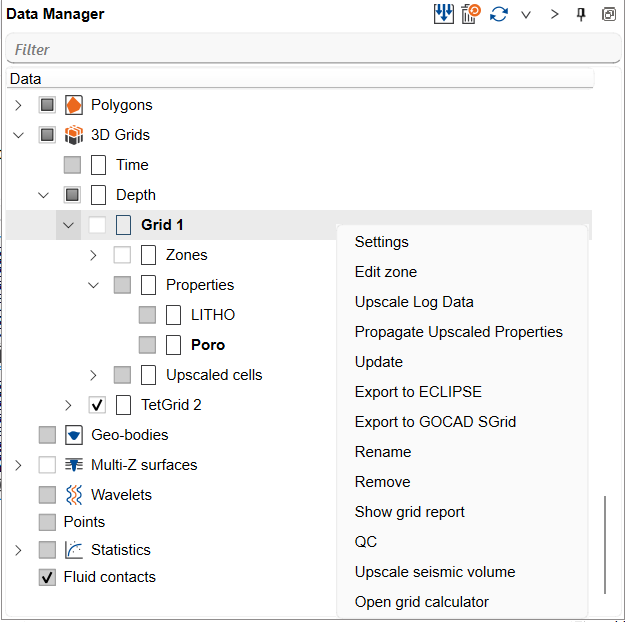
In the Data manager, right-click the grid you want to export under the 3D Grids node. The available GOCAD action depends on the grid type:
- Export to GOCAD SGrid — offered for a structured (S-Grid) grid.
- Export to GOCAD TSolid — offered for a tetrahedral grid.
The example below shows the context menu of a structured grid in the 3D Grids branch, with Export to GOCAD SGrid available.
Step-by-step
- In the Data manager, right-click the target grid under the 3D Grids node.
- Choose Export to GOCAD SGrid for a structured grid, or Export to GOCAD TSolid for a tetrahedral grid.
- If the grid carries properties, a property list opens first — Select properties to save for an SGrid, Select properties to export for a TSolid. Tick the properties you want written and confirm.
- In the save dialog, give the output file a name and location (.sg for an SGrid, .so for a TSolid).
- g-Space writes the GOCAD header with the grid dimensions, domain and property list, plus the geometry and property values. For an SGrid the per-node coordinates and properties are written to a companion ASCII data file alongside the .sg header, so keep the two files together. When the export finishes, g-Space confirms the file it wrote and, for an SGrid, the location of that companion data file.
Notes
- Structured grids export as an SGrid header plus a companion ASCII data file; tetrahedral grids export as a single TSolid file containing the vertices, tetrahedra and per-cell properties.
- The time / depth domain and the Z sign convention (ZPOSITIVE Depth versus Elevation) are written into the header, so an exported file re-imports into g-Space with the same geometry and domain.
- GOCAD Voxet is supported for import only; there is no Voxet export. Export a grid as an SGrid instead.
See Also