Project configuration
The Project configuration dialog stores the global settings of a g-Space project – the coordinate reference system, the measurement units, the datum mode, backup behaviour and the base directory. Configure these settings once, right after creating a new project, before importing data.
This chapter covers how to make global settings for the project such as:
Opening the configuration dialog
Open the dialog from the Main tab of the Ribbon bar, in the Project group, by clicking the Configuration button. The same command is available from the Menu bar with File > Configuration.

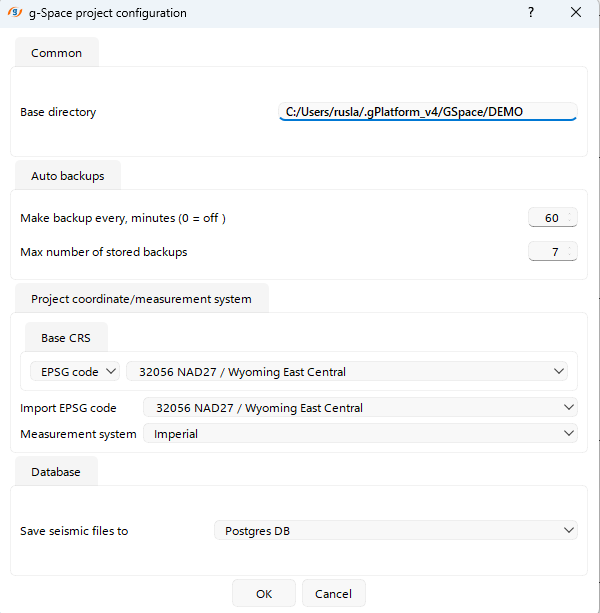
The g-Space project configuration dialog opens:
Configuration options
The dialog groups the project-wide settings into the following sections:
- Common – the project Base directory, the folder used to resolve relative data paths.
- Auto backups – how often a backup is written (Make backup every, minutes; set to 0 to switch backups off) and the Max number of stored backups.
- Datum mode – choose Single datum (all seismic data use the same datum and replacement velocity – the most common case) or Multiple datum (seismic data have different datums or replacement velocities). See Datum configuration.
- Project coordinate/measurement system – set the Base CRS (searchable by EPSG code), an optional Import EPSG code for data in a different system, and the Measurement system. See Coordinate and measurement system.
- Database – the Save seismic files to mode, controlling where seismic files are stored when the project is saved to a database.
Click OK to apply the settings, or Cancel to discard them.
See Also