Workflows
A workflow in g-Space is a named sequence of jobs — procedures and database operations — that run together as a single chain. Workflows are stored inside the project so they are available to every user with access to the project and can be re-executed without re-entering parameters.
Creating and managing workflows
- Create — add a new workflow with a user-supplied name.
- Rename — change the name of an existing workflow.
- Remove — delete a workflow from the project.
- Set current — choose which workflow is edited and executed next.
Building a workflow
Each workflow is composed of jobs and, optionally, notes. A job wraps one g-Space procedure plus its saved parameters, or a database operation; a note is a comment row that documents the sequence but never runs. Jobs can be added, renamed, reopened for editing, reordered and removed inside the active workflow. Execution runs the jobs sequentially, feeding the output of one into the next when their data types line up.
Progress is reported in the Output View while the workflow runs. If any job fails, execution stops and the workflow can be resumed after the error is corrected.
Adding jobs from a wizard
Most g-Space procedure wizards can store their current parameters as a workflow job instead of (or as well as) running immediately. When a wizard supports this it shows a Save to workflow button and its standard buttons are relabelled:
- Run — execute the procedure now with the current parameters. The wizard stays open, so parameters can be adjusted and the procedure re-run.
- Save to workflow — add the current parameters as a new job in the active workflow. The wizard stays open and the entered parameters are kept, so a job can be saved and then run, or several jobs saved in turn.
- Close — close the wizard. Closing does not apply or save the parameters.
If the project does not contain any workflow yet, choosing Save to workflow offers to create one on the spot: enter a name for the new workflow and the job is added to it, without a separate trip to the Workflows wizard.
These labels apply to a wizard opened to configure a new job or to run the procedure. A wizard opened from a job that is already stored in a workflow shows a different set of buttons — see Editing a saved job below.
Adding notes to a workflow
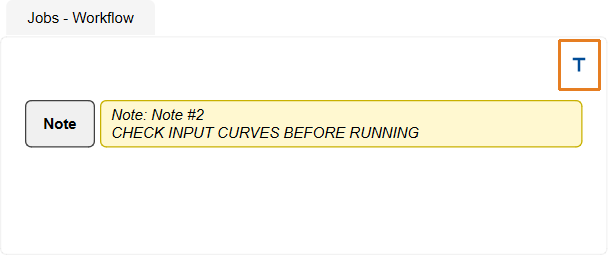
A workflow can also carry notes — short comments that explain the sequence to whoever runs it next. In the Jobs panel of the Workflows wizard, click the note button above the job list (its tooltip reads Add note), type the text in the Add note dialog and confirm. The note is appended to the current workflow as its own row. If the project does not contain any workflow yet, the same Create workflow prompt described above appears first.
A note row is marked with a Note badge in place of the Start or End badge, and is labelled Note: followed by the note's name, with a one-line preview of the text below it. A long text is shortened in the preview and a note left empty is shown as (empty note); point at the row to see the full text.
To change the text, double-click the note row, or right-click it and choose Edit, and edit the text in the Edit note dialog. Notes are renamed and removed with the same Rename and Remove commands as jobs.
Notes never execute. A note placed between two jobs passes the data chain through untouched, so it does not change what the workflow produces. Notes are stored with the workflow and are restored when the project is opened again.
Editing a saved job
A job that is already stored in a workflow can be reopened and edited. In the Jobs panel of the Workflows wizard, right-click the job and choose Open, or double-click the job. A single left-click does not open the job: it drags the job to a new position in the sequence. The same right-click menu also offers Move up and Move down as an alternative to dragging; Move up is unavailable on the first row and Move down on the last. On a note row Open is replaced by Edit, and double-clicking opens the note text instead of a wizard.
Open reopens the procedure's own wizard with the parameters stored in the job already filled in. Most of these wizards open as a single dialog; while a saved job is being edited there, Run is not offered and the wizard has two buttons:
- Save — write the edited parameters back into the same job and close the wizard. The job keeps its name, its position in the sequence and any Start or End badge.
- Cancel — close the wizard and leave the job unchanged.
To run the procedure with the edited parameters, save the job and then execute the workflow.
A wizard that is stepped through page by page with Back and Next — for example Create velocity model — keeps its usual Save to workflow, Run and Close buttons when a saved job is reopened. Save to workflow writes the edited parameters back into the same job; Run carries out the procedure immediately with the current parameters and leaves the stored job unchanged.
Setting Start and End jobs
A workflow can be executed in full or restricted to a contiguous range of its jobs. In the Jobs panel of the Workflows wizard, right-click a job and choose:
- Set as Start — mark the job as the first job to run. A Start badge appears beside it.
- Set as End — mark the job as the last job to run. An End badge appears beside it.
- Clear Start / Clear End — remove the marker so execution reverts to the first or last job.
When the workflow runs, execution begins at the Start job (or the first job when no Start is set) and stops after the End job (or the last job when no End is set). The Start job cannot come after the End job: setting a Start that is later than the current End clears the End marker, and setting an End that is earlier than the current Start clears the Start marker. Start and End can be set on any existing workflow and are stored with it. These commands are offered on job rows only: a note never executes, so it cannot be a run boundary.
Executing a workflow
- Select the workflow to execute in the workflows wizard.
- Confirm the parameters of every job — double-click a job, or right-click it and choose Open, to inspect or change its saved parameters. Doing the same on a note row opens the note text for editing and does not affect the run.
- Press Execute. The full chain runs as a single service task, with progress reported in the Output View.
When to use
- Repeatable workflows used across many wells or survey lines (for example standard petrophysical stacks).
- Team-wide protocols where the same sequence of procedures must be applied to every project.
- Pipelines chaining import, processing and export operations without intermediate user input.
See Also