Satellite imagery downloader
The Satellite imagery downloader wizard fetches a satellite backdrop for the project area and stores it as a georeferenced GeoTIFF raster. The resulting raster can be used as a location-map background in 2D, map and 3D views, helping orient horizons, wells and polygons against real-world geography.
Launching the wizard
In Data manager right-click the Raster files node and choose Download satellite imagery.
Input Parameters
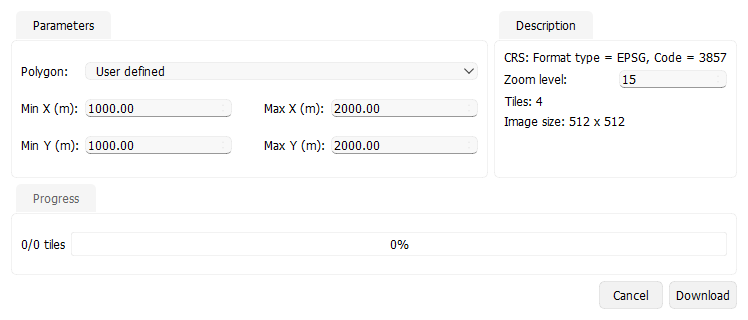
- Polygon — select an existing project polygon to use as the download footprint, or pick User defined to type XY bounds manually.
- Min X / Max X / Min Y / Max Y — bounding box of the request when Polygon is User defined. The fields show metres or feet according to the project measurement system.
- Zoom level — integer tile zoom. Default 15; higher values give more detail but increase download size.
The Description panel shows the project CRS, estimated Tiles and Image size. The CRS is taken from project configuration.
If CRS conversion fails, the Description panel shows Tiles: CRS conversion failed. If the selected bounds fall outside the valid map area, it shows Tiles: bounds are outside the valid map area. In either case, it also shows Download is not available for these bounds. and disables Download. Correct the selected area or project CRS before trying again.
Running the download
Press Download to start. The Progress panel in the wizard shows tile progress, and download errors appear in a dialog. On completion, the generated GeoTIFF is added to the Raster files folder in the Data manager. The raster aligns with the selected area, including when the project CRS uses feet, and can be displayed as a backdrop in views that support raster imagery.
See Also