Import 3D models
g-Space imports 3D geological models stored in the GOCAD / SKUA-GOCAD ASCII exchange formats. This topic covers loading a GOCAD SGrid (.sg), a GOCAD TSolid (.so) and a GOCAD Voxet (.vo) into a g-Space project as grids.
Purpose
These GOCAD formats carry 3D grid geometry together with node- or cell-based scalar properties. Importing them brings an externally built structured grid, tetrahedral mesh or voxel volume into the g-Space grid store so it can be viewed, sampled and used alongside native grids. For a TSolid or a Voxet, the time or depth domain is read from the file metadata; an imported SGrid is always created in the depth domain. The Z sign convention (Z-down depth versus Z-up elevation) is read from the file metadata for all three formats, and elevation values are negated so that Z is stored as depth, positive downwards.
Launching the import
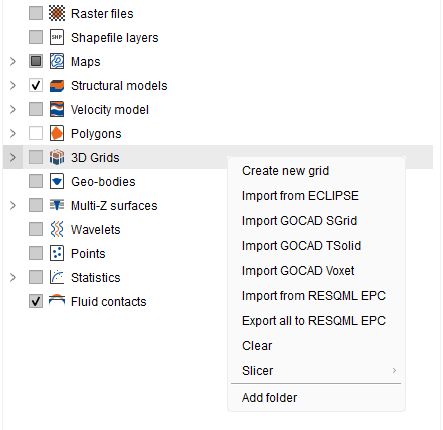
In the Data manager, right-click the 3D Grids root node and choose one of the GOCAD import actions:
- Import GOCAD SGrid
- Import GOCAD TSolid
- Import GOCAD Voxet
Supported formats
- GOCAD SGrid (.sg) — a 3D structured (i, j, k) grid. The .sg file is an ASCII header holding the grid dimensions, coordinate-system and unit metadata and the property list; it references a companion ASCII data file that holds the per-node X / Y / Z coordinates and property columns, so both files are needed. A grid whose nodes form a regular rotated-rectangle lattice loads as a g-Space S-Grid; a warped (faulted or curved) grid is imported as a tetrahedral grid. Properties may be point- or cell-aligned.
- GOCAD TSolid (.so) — an unstructured tetrahedral mesh: a list of vertices and tetrahedra, optionally grouped into TVOLUME parts, with scalar properties stored per cell or on the vertices. It is imported as a g-Space tetrahedral grid, and each property keeps its original name. A property that only carries vertex (node) values is imported as well: each tetrahedron takes the average of its four vertex values, so those values arrive as per-cell averages rather than exact node values; missing or no-data vertex values are skipped, and a tetrahedron with no usable vertex value stays undefined. A single file may contain several TSolid objects, and multiple parts within one object are merged.
- GOCAD Voxet (.vo) — a regular, axis-oriented 3D voxel grid defined by an origin, three axis vectors and a sample count per axis, with property values kept in external property files (ASCII text or raw binary IEEE floats). Because the sampling is regular, g-Space imports a Voxet as a structured S-Grid. Voxet is import only.
Step-by-step
- Right-click the 3D Grids root in the Data manager and pick the action matching your file: Import GOCAD SGrid, Import GOCAD TSolid or Import GOCAD Voxet.
- In the file dialog, select the GOCAD header file (.sg, .so or .vo).
- g-Space reads the header and its referenced data / property files. For an SGrid or Voxet, keep the companion data and property files next to the header. If an SGrid data file cannot be found you are prompted to browse for it; a Voxet property file that cannot be found is reported as a warning and that property is skipped.
- The grid, its dimensions, domain and properties are created from the file, and the new grid appears under the 3D Grids node ready to view and query.
[image: placeholder_Imported_GOCAD_grid_listed_under_the_Gri.png]
Notes
- An SGrid header only points at the geometry, so its companion ASCII data file must travel with it; a regular-looking header can still reference a warped points file, so the actual node coordinates decide whether the grid becomes an S-Grid or a tetrahedral grid.
- For a TSolid or a Voxet, the time or depth domain is taken from the axis name / unit metadata. An imported SGrid is always created in the Depth domain, whatever its axis metadata says, so a time-domain .sg file still arrives as a depth-domain grid. Property no-data values are honoured and mapped to undefined nodes.
- The Z sign convention (ZPOSITIVE Depth versus Elevation) is taken from the header, and elevation values are negated so that Z is stored as depth, positive downwards. A .sg header with no ZPOSITIVE record is read as depth-positive-down and its Z values are used unchanged, so a shared file that actually holds elevations but omits that record loads with its Z values inverted. If an imported SGrid appears inverted in the 3D view, check whether its header declares ZPOSITIVE Elevation.
- Voxet is supported for import only. Export back to GOCAD is available for structured grids (SGrid) and tetrahedral grids (TSolid).
See Also