Import RESQML
RESQML is the Energistics standard for exchanging reservoir and geological models. A RESQML model is delivered as an EPC package - a single .epc file that references its bulk array data in linked .h5 files. g-Space imports RESQML EPC packages directly from the Data manager.
Purpose
Load geological objects stored in a RESQML v2.0.1 EPC package into a g-Space project. A single package can carry several object types, each of which maps to the matching g-Space data category:
- Polylines / polygons (PolylineSetRepresentation) into polygons.
- Point sets (PointSetRepresentation) into point sets.
- Multi-Z surfaces (TriangulatedSetRepresentation) into free Multi-Z surfaces.
- Tetrahedral / 3D grids (UnstructuredGridRepresentation) into tetrahedral grids, including any cell properties they carry.
- IJK / corner-point grids (IjkGridRepresentation) into tetrahedral grids as well: every grid cell is divided into six tetrahedra, and the cell properties are carried over to them.
Coordinates are read from the package CRS and the vertical axis is converted to the g-Space depth-positive convention automatically, so no axis flipping is required afterwards.
Launching the import
RESQML import is launched per object type from the Data manager tree. Right-click the branch that matches the data you want to load and choose the RESQML action:
- Polygons root -> Import -> Import polygons from RESQML EPC.
- Points root -> Import from RESQML EPC....
- Multi-Z surfaces Time or Depth branch -> Import from RESQML EPC (the domain is taken from the branch you click).
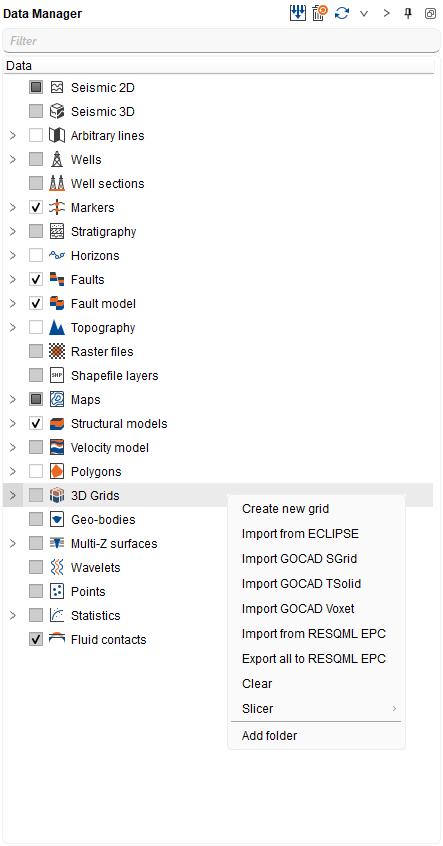
- 3D Grids root -> Import from RESQML EPC.
Step-by-step
- In the Data manager, right-click the target branch and choose the matching Import ... from RESQML EPC action.
- In the file dialog set the filter to RESQML EPC (*.epc) and select one or more .epc packages. Keep each package next to its linked .h5 array files.
- g-Space reads every representation of the requested type from the package; each representation becomes one g-Space object, with all of its geometry patches merged.
- For grids, confirm the import preview: it lists each detected grid with its RESQML type, the number of source cells and the number of tetrahedra they produce, and how many cell properties were found. Confirm it to import the listed grids, or decline to skip that package.
- Review the import report: it lists how many objects were read, the RESQML version, and any non-fatal warnings (for example skipped or empty representations). Non-tetrahedral cells in an unstructured grid are skipped with a warning.
- The new objects appear under the branch you imported into and are drawn in the associated views.
[image: placeholder_Imported_RESQML_tetrahedral_grid_and_sur.png]
Notes
- g-Space reads RESQML v2.0.1 packages. The .epc file is only a container - its bulk arrays live in the linked .h5 files, so copy or move them together.
- The RESQML EPC package carries no time/depth domain marker, so for Multi-Z surfaces the destination domain is defined by the Time or Depth branch you import into rather than read from the file.
- Unstructured grids are imported as tetrahedral meshes: only 4-node (tetrahedral) cells are kept, and other cell shapes are skipped non-fatally.
- IJK / corner-point grids are converted to tetrahedral grids too, so the result is a tetrahedral grid rather than a native IJK grid. Cells whose geometry is not defined in the package are skipped and counted in the import report.
See Also