Export RESQML
RESQML is the Energistics reservoir data-exchange standard. g-Space writes polygons, point sets, Multi-Z surfaces and tetrahedral grids to RESQML .epc packages that other subsurface applications can read. Each data category is exported separately, into its own package.
Purpose
Package one or more g-Space objects into a standard RESQML .epc file so they can be exchanged with reservoir modelling packages that support RESQML.
Launching the export
RESQML export is launched per data category from the Data manager tree. Right-click the branch root that holds the data you want to write and choose its RESQML export action; the command writes every supported object of that branch into one package:
- Polygons root -> Export -> Export polygons to RESQML EPC.
- Points root -> Export all to RESQML EPC....
- Multi-Z surfaces root -> Export all to RESQML EPC.
- 3D Grids root -> Export all to RESQML EPC.
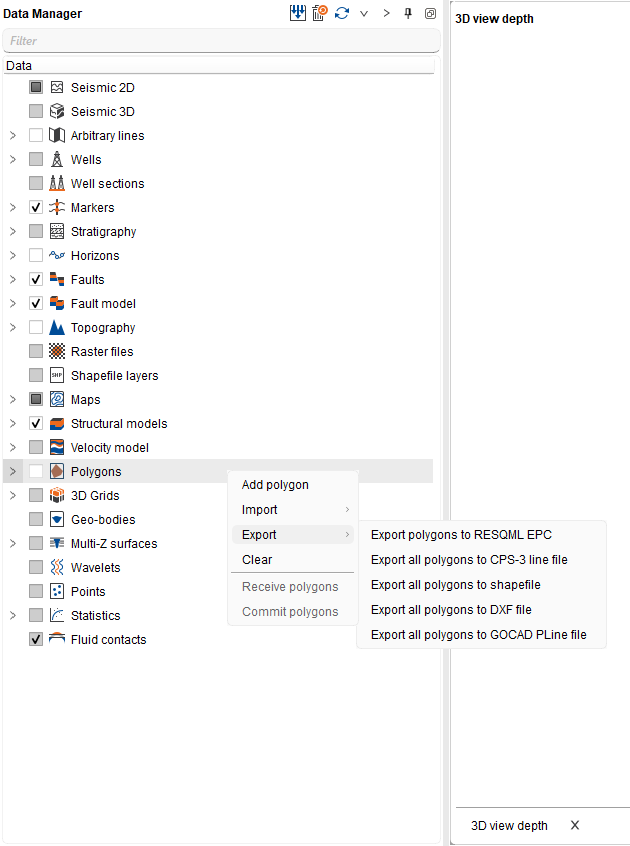
Step-by-step
- In the Data manager, right-click the branch root of the data category you want to export.
- Choose the RESQML export command listed above for that branch.
- In the save dialog set the filter to RESQML EPC (*.epc), choose a target .epc file and confirm.
- Review the completion message: it reports how many objects were written, or why the package could not be created. If the branch holds nothing that can be exported, g-Space reports that instead of writing a file.
Notes
- Each export writes its own package: one .epc file plus a linked .h5 file of the same name beside it, which holds the bulk arrays. Keep the two files together when you copy or send the result.
- Exporting to a file name that already exists replaces it, so give each data category its own file name.
- From the 3D Grids branch only tetrahedral grids are written, together with their cell properties. Grids of other types are skipped.
- Geometry and grid properties are written; g-Space display styling is not part of the RESQML package.
See Also