Import grids
This topic describes how to import a grid stored in Eclipse format (.dat). The same 3D Grids menu also imports GOCAD SGrid, GOCAD TSolid, GOCAD Voxet and RESQML EPC grids, which are described in Model Data Formats.
To import an Eclipse grid into g-Space, follow these steps:
- Open the Data Manager.
- Navigate to the 3D Grids folder.
- Click Import from ECLIPSE.
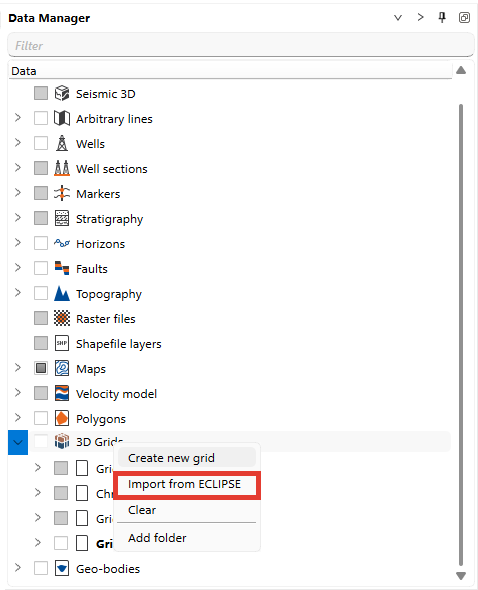
- A pop-up window will appear.
- Select the .dat file that contains the Eclipse grid data.
- Select the coordinate system of the file in the Imported EPSG code row, and select Use converting on import if the file coordinates must be converted to the project coordinate system.
- Click Open to complete the import.
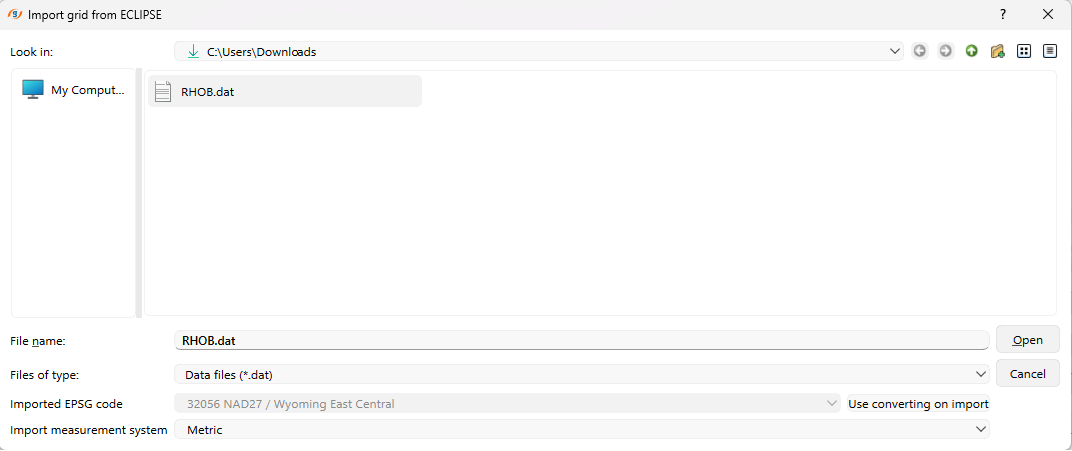
If the file declares its own unit system (METRIC or FIELD), g-Space applies that declaration and sets Import measurement system accordingly. The value selected in the dialog is used only for files that do not declare a unit system. Grids exported from g-Space always declare their unit system, so they are imported back at their original position.
The imported grid will appear in the 3D Grids folder and can be visualized and edited in g-Space.