Fault Data Formats
Fault binary data format
It is the internal g-Space format (*.fsurface) which can be used to share information between workstations. It stores an exact copy of all fault objects (all faults / fault surfaces).
Fault sticks charisma format
File example
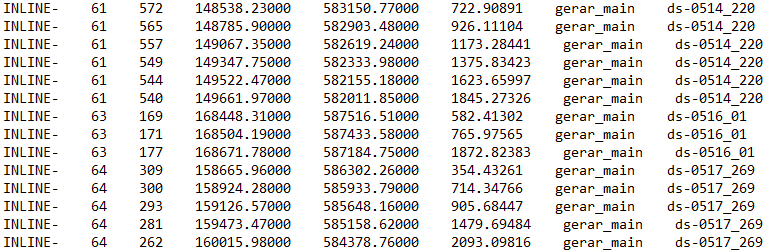
Each line of the file describes one point of a fault stick and holds the inline and crossline numbers, the X, Y and Z coordinates, the fault name and the number of the stick the point belongs to.
On export, g-Space writes every stick of the fault, whether or not it was picked on loaded seismic data. Values follow the current project measurement system: X and Y in the project distance unit, and Z in milliseconds for a time-domain fault or in the project depth unit for a depth-domain fault. The inline and crossline columns hold the numbers of the nearest seismic bin; when no seismic line or volume lies within the Max distance picking projection distance set in the Module Properties panel, both columns are written as -1. Spaces in the fault name are replaced with underscores, and the sticks of a fault are numbered from 1.
For more information about importing this format refer to Import faults
Fault free sticks (ASCII)
Fault free sticks can be imported from a plain text file (*.txt) through the text-table import wizard, in time or depth domain.
GOCAD TSurf fault surfaces
Triangulated fault surfaces are exchanged with GOCAD / SKUA-GOCAD as *.ts files. See GOCAD Data Formats.