Create a curve
The Create a curve wizard adds a new, synthetic LAS curve to an existing well. Use it to create placeholder curves before a calculation, or to seed a curve with a constant value or with values read from the current grid without running an external editor.
Launching the wizard
Open Data manager, right-click the target well and choose Create a curve. If the well already contains log data, the MD boxes open pre-filled with the start, stop and step of its first LAS file.
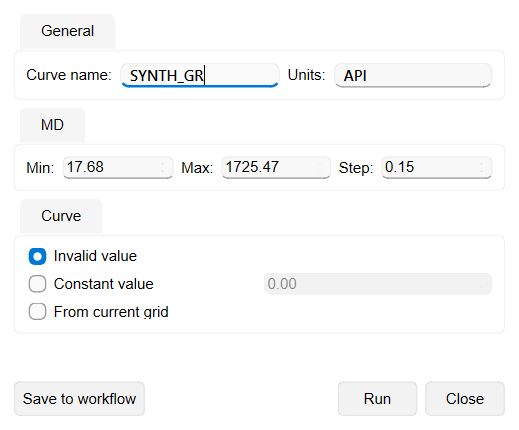
Input Parameters
- Curve name — identifier used to list the curve in the Data manager and referenced by downstream tools. The well must not already contain a curve with this name.
- Units — the unit label stored with the curve.
- MD — Min, Max and Step set the measured-depth range and the sampling interval of the new curve. All three boxes use the project depth unit, which is shown after each value (m or ft) and follows the project measurement system, so the depths you type are read in that unit. Max must be greater than Min, and Step must be positive.
- Curve — how the samples are filled. Invalid value marks every sample as invalid, so the curve is created empty and can be filled in later. Constant value writes the number entered beside the option into every sample. From current grid takes each sample from the current grid property at the point where the well trajectory crosses that depth, so a current grid and a current grid property must be set.
After the curve is created, populate it with data via the LAS editing dialog or any other petrophysical wizard that writes output curves.
Running and saving to Workflow
The buttons along the bottom of the wizard are:
- Run — creates the curve now with the current settings.
- Save to workflow — adds the current settings, including the selected well, to the active workflow as a Create a curve job instead of creating the curve now. The curve is created when the workflow is executed.
- Close — closes the wizard without creating the curve and without saving the settings.
Opening a saved job from the Workflows wizard reopens Create a curve with all of its stored settings restored, so they can be reviewed, edited and saved back to the same job. In that mode the wizard shows Save and Cancel instead.
Load curve from ASCII
To load an existing curve from a text file instead of creating an empty one, right-click the well in the Data manager and choose Load curve from ASCII. This opens a text-import wizard titled Import log [well name] where you map the file columns to the MD, Value, Mnemonic and Units fields to load the curve from a .txt / ASCII file.
See Also