Import polygons
Polygons define closed 2D areas used to constrain maps, restrict volume calculations or delimit project extent. g-Space imports polygons from text files and stores them under Polygons in the Data manager.
How to import
- Open Data manager.
- Right-click the Polygons icon.
- Point to Import and choose Import polygons from CPS-3 line file, then select the source file.
- Confirm the coordinate reference system in the preview and press OK. The imported polygons appear as children of the Polygons node.
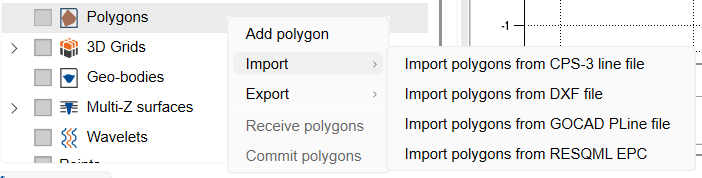
Supported formats
- CPS-3 line (.cps3) — text-based line format; the same reader is used for CPS-3 map imports. Right-click Polygons, point to Import and choose Import polygons from CPS-3 line file.
- GOCAD PLine (.pl) — polylines / polygons from GOCAD. Right-click Polygons, point to Import and choose Import polygons from GOCAD PLine file.
- DXF (.dxf) — AutoCAD polygons and geobodies. See Import DXF.
For a description of the supported file layout, see GIS Data Formats, GOCAD Data Formats and Model Data Formats.
See Also