Python scripting
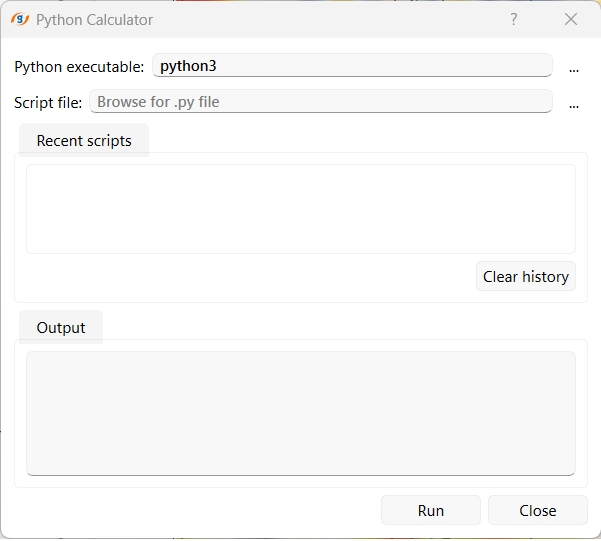
The Python scripting plugin lets users run Python scripts inside g-Space to extend built-in procedures, automate repetitive tasks and prototype custom calculations. Scripts can be run from the Python Calculator or directly with the Run Python script action. The calculator captures stdout, stderr and any exception and displays them in its own Output pane, rather than the separate Output View panel.

Running from the Python Calculator
- On the Main tab, click Python calculator in the Python section.
- Provide the path to the Python interpreter in Python executable. Default: python3.
- Browse to the target script in Script file.
- Optionally, reload a previously used script by double-clicking it in the Recent scripts list (the last 20 scripts are remembered). Use Clear history to empty this list.
- Click Run. The wizard remains open so scripts can be re-run repeatedly while tuning parameters.
Running from Module Properties
To run a script without opening the calculator, set Python executable and Script file under Python scripting in Module Properties, then choose Run Python script.
Execution model
- Scripts run in a subprocess spawned from g-Space. The wizard captures the full stdout and stderr and prints them to its embedded Output pane once the subprocess finishes.
- If the script raises an unhandled exception the traceback is routed to the embedded Output pane and the wizard reports the failure without disturbing the project.
- Any file the script produces on disk can then be imported back into the project via the usual import wizards.
Accessing project data
A script can read and write g-Space project data directly through the built-in gspace Python module, so data does not have to be exported to disk first.
This requires Python 3.8 or newer with numpy installed on the machine that runs the script.
While a script runs, g-Space opens a local TCP server on 127.0.0.1 (a random port) and the subprocess connects back to it. The script uses the gspace module to request data and to write results back: metadata travels as JSON and large numerical arrays as raw binary numpy arrays, while the script's own print() output continues to appear in the Output pane. Every object handed to the script is a copy, so a script can never corrupt project data held in memory.
Data is reached through gspace.project, which exposes the project collections, including:
- Wells, horizons and faults.
- Seismic, velocity models and grids.
- Maps, polygons and wavelets.
A minimal script imports the module and works through gspace.project. For example, to shift a horizon and write it back:
import gspace
h = gspace.project.horizons[0]
points = h.as_numpy() # copy of the horizon points
points[:, 2] += 10.0 # shift Z
h.set_points(points) # write back
The script runs as a task, so it can be cancelled while it works. Long-running scripts should call gspace.check_cancelled() regularly inside their loops so the Stop action is detected promptly; a script that does not stop within a few seconds is terminated. Progress can be reported back to g-Space with gspace.progress.
When to use
- Automating data preparation steps that are tedious to drive through the GUI.
- Running third-party geophysical libraries on project data and importing the result.
- Prototyping a calculation before turning it into a native procedure.
- Reading or modifying project data (wells, horizons, seismic and more) programmatically through the gspace module.
See Also