Export maps
To export Maps stored in g-Space go to Maps in Data manager and choose the Map you want to export
Right-click on the Map and choose one of the following options:
- Save to text file
- Save to CPS-3 grid file
- Save to ZMap grid file
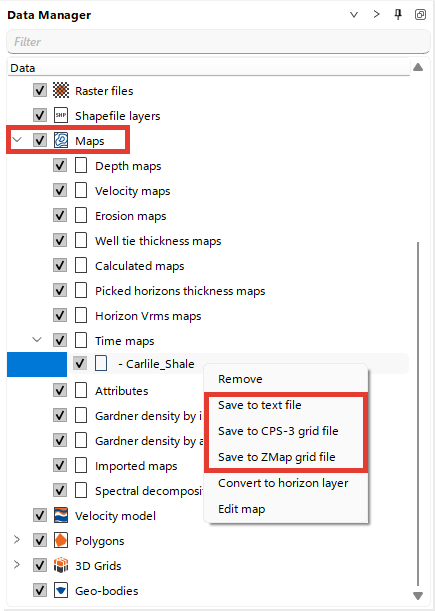
To export several maps in one step, select them in Data manager (hold Ctrl and left-click each map), then right-click the selection and choose the same export option.
g-Space asks only for the output folder. Every selected map is written to its own file, named after the map name shown in Data manager, with the extension of the chosen format: .txt for text files, .cps3 for CPS-3 grid files and .dat for ZMap grid files.
For text files, g-Space asks once whether to write invalid values and applies your answer to all selected maps. A progress bar shows the export and can be stopped. If some maps cannot be saved, their names and the reasons are listed in a message when the export finishes.
For more information about maps formats supported by g-Space refer to Maps Data Formats