Porosity
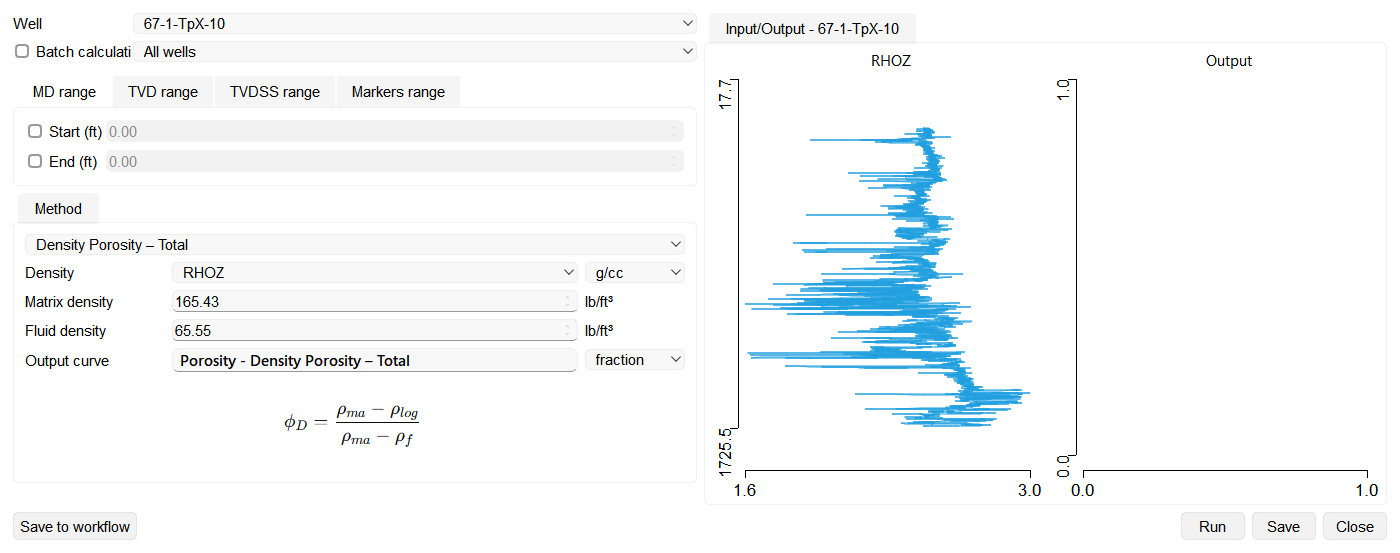
The Porosity wizard calculates total and effective porosity using available well logs such as density, neutron, or a combination of both.
The tool can be applied to a single well or in batch mode, allowing users to process all wells or selected wells from the Data Manager.
Input Parameters
- Well selection: Choose one well or enable Batch calculation to process multiple wells or a well group from the Data Manager.
- Depth filter: The calculation interval can be limited by MD, TVD/TVDSS, markers, or zones. On the Zones range tab, select one or more zones of a zone set; a selected zone that does not exist in a well is skipped for that well.
- Curve selection: Each curve field is named after the log type it expects – Density, Neutron Porosity, P-wave and Curve Shale volume – and only the fields required by the selected method are active. Each field is filled automatically with the first curve of that type in the selected well, and the list also offers the other curves of the well. For the Density curve, choose kg/m³, g/cc, or lb/ft³ from the adjacent unit list.
- Material properties: Type the matrix and fluid values used by the selected method, and the shale porosity where it applies. These fields accept any value, and Matrix density, Fluid density, Matrix travel time and Fluid travel time show a tooltip with typical values for common lithologies and fluids when the pointer rests on them. Every value is expressed in the unit shown beside the field, which follows the project measurement system.
- Output curve: Define the name of the resulting porosity log. The name can be edited directly in the wizard before saving.
Default material properties. The wizard is pre-filled with common presets that can be edited for the local lithology and fluid:
- Matrix density – Sandstone, 2.65 g/cc (Limestone 2.71, Dolomite 2.87).
- Fluid density – Saline water, 1.05 g/cc.
- Shale porosity – 0.2.
- Matrix travel time – Sandstone, 180 µs/m (Limestone 155, Dolomite 145).
- Fluid travel time – Saline water, 605 µs/m.
The density and travel-time presets listed above are the metric values. The wizard shows each of them converted into the unit displayed beside its field, so a project that uses the imperial measurement system opens with Matrix density 165.43 lb/ft³, Fluid density 65.55 lb/ft³, Matrix travel time 54.86 µs/ft and Fluid travel time 184.40 µs/ft.
Calculation Methods
Density Porosity – Total
Calculates porosity directly from the density log assuming a clean (shale-free) formation.
Use:
- For clean formations with minimal shale influence.
- Common for sandstone and carbonate reservoirs.
ρma – matrix density,
ρf – fluid density,
ρlog – measured formation density.
Density Porosity – Effective
Corrects the total porosity for shale content using a shale volume curve and shale porosity.
Use:
- Appropriate for shaly formations.
- Produces an effective porosity excluding bound water in shale.
ϕD,eff = (ρma − ρlog) / (ρma − ρf) − Vsh · ϕsh
Vsh – shale volume,
ϕsh – shale porosity.
Neutron–Density Porosity – Total
Combines the neutron and density porosity responses (cross-plot / average) to give a total porosity that is less sensitive to lithology than either log alone.
Use:
- Mixed or unknown lithology where a single-log estimate is unreliable.
- Requires both Neutron Porosity and Density curves.
Neutron–Density Porosity – Effective
The neutron–density total porosity corrected for shale content using a shale volume curve and the shale porosity, yielding effective porosity.
Use:
- Shaly formations of mixed lithology.
- Requires Neutron Porosity, Density and a shale volume curve.
Sonic Porosity – Total
Calculates total porosity from the sonic (interval transit time) log using the Wyllie time-average relation, with matrix and fluid travel-time constants.
Use:
- Consolidated formations where only a sonic log is available.
- Requires matrix and fluid travel-time values (see defaults above).
Sonic Porosity – Effective
The sonic total porosity corrected for shale content using a shale volume curve and the shale porosity, yielding effective porosity.
Use:
- Shaly, consolidated formations logged with a sonic tool.
- Requires a sonic log and a shale volume curve.
Neutron–Density–Sonic
A triple-combo estimate that jointly uses the Neutron, Density and Sonic logs to derive porosity, improving robustness in complex lithology and reducing gas or lithology artefacts present in any single log.
Use:
- Complex or gas-bearing reservoirs where a full logging suite is available.
- Requires Neutron Porosity, Density and Sonic curves.
Running and saving to Workflow
The wizard has a standard row of buttons along the bottom of the dialog:
- Save to workflow – adds the wizard, with all of its current settings (selected wells, input and output curves, method, method parameters, material constants, and output names), to the project Workflow as a task that can be re-run later.
- Run – executes the calculation with the current settings (this button replaces the former Calculate button).
- Save – stores the resulting porosity curve in the well.
- Close – closes the wizard.
When a saved task is reopened from the Workflow panel, the wizard reopens with every stored setting restored, so it can be reviewed, edited, run, and saved back to the task. In this edit-from-workflow mode the bottom row shows Save and Cancel instead.