Focal Mechanism
The Focal Mechanism wizard calculates a focal-mechanism solution for each valid row of a seismic event dataset. From the mapped strike, dip and rake it derives a second nodal plane, the P, T and B axes, a mechanism class and a beachball preview.
The wizard uses orientations already supplied with the events. It does not locate events, process waveforms, perform polarity or moment-tensor inversion, or decide which nodal plane is the fault.
Launching the wizard
A seismic event dataset must exist first. To import one, in the Data manager right-click Points and choose Import seismic events from ASCII...
Open the Petrophysics ribbon bar and click Focal Mechanism in the GeoMech section; the button caption is shortened to Focal mech.. Alternatively, right-click a seismic event dataset and choose Focal Mechanism...; that dataset is selected when the wizard opens. The wizard is modeless, so the main window remains available while it is open.
Wizard steps
1. Select data
Choose the Seismic event dataset. Under Rows, use All events or select a well-assigned subset when one is available. The page reports the selected event count and lists the source columns.
2. Map columns
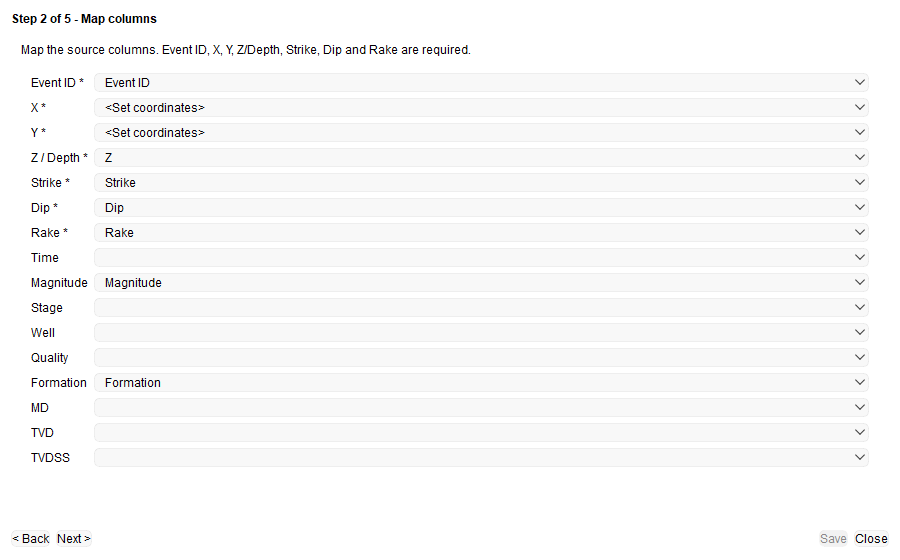
Map the seven required roles, marked with an asterisk: Event ID, X, Y, Z / Depth, Strike, Dip and Rake. For X and Y, select numeric source columns or <Set coordinates> to use the point-set coordinates. The wizard suggests mappings from matching column names; check each selection before continuing.
Optional mappings are Time, Magnitude, Stage, Well, Quality, Formation, MD, TVD and TVDSS. Next > cannot continue until all required roles are mapped.
3. Settings
Review the coordinate, convention and classification settings:
- Coordinates and units — enter the Coordinate system and choose coordinate and depth units in metres or feet, plus Positive down or Positive up for depth.
- Angle conventions and projection — choose Right-hand rule or Left-hand rule, Aki-Richards or Inverted sign for rake, the lower or upper hemisphere, and equal-area (Schmidt) or equal-angle (Wulff) projection.
- Mechanism classification thresholds — set the P, T and B axis-plunge limits used to classify events as Normal, Reverse or Strike-slip. An event outside those threshold patterns is classified as Oblique; classification does not use rake alone.
The defaults are metres for both unit lists, Positive down, Right-hand rule, Aki-Richards, Lower hemisphere and Equal-area (Schmidt). The default plunge thresholds are 52 degrees minimum and 35 degrees maximum for Normal, 35 degrees maximum and 52 degrees minimum for Reverse, and 52 degrees minimum for B with 20 degrees maximum for P or T for Strike-slip.
4. Calculate
Click Calculate. Each selected event is processed independently. The page reports how many events were processed out of the selected count and how many were skipped; the Skipped events table identifies each skipped row by row number, Event ID and reason.
An event is skipped if its Event ID is empty; if X, Y, depth, strike, dip or rake is missing or not numeric; or if strike is outside 0 degrees inclusive to 360 degrees exclusive, dip is outside 0 to 90 degrees, or rake is outside -180 to 180 degrees.
Changing the dataset, row selection, a mapping or a setting clears the previous result. Click Calculate again before continuing to the preview.
5. Preview and save
Select an event in the result table to update the preview. The table lists its Event ID, both nodal planes and mechanism class. The right side shows the beachball and the event details: location, mapped magnitude when available, both nodal planes as strike/dip/rake, the azimuth and plunge of the P, T and B axes, and the mechanism class. The two planes are identified only as Nodal plane 1 and Nodal plane 2; neither can be identified as the fault from the radiation pattern.
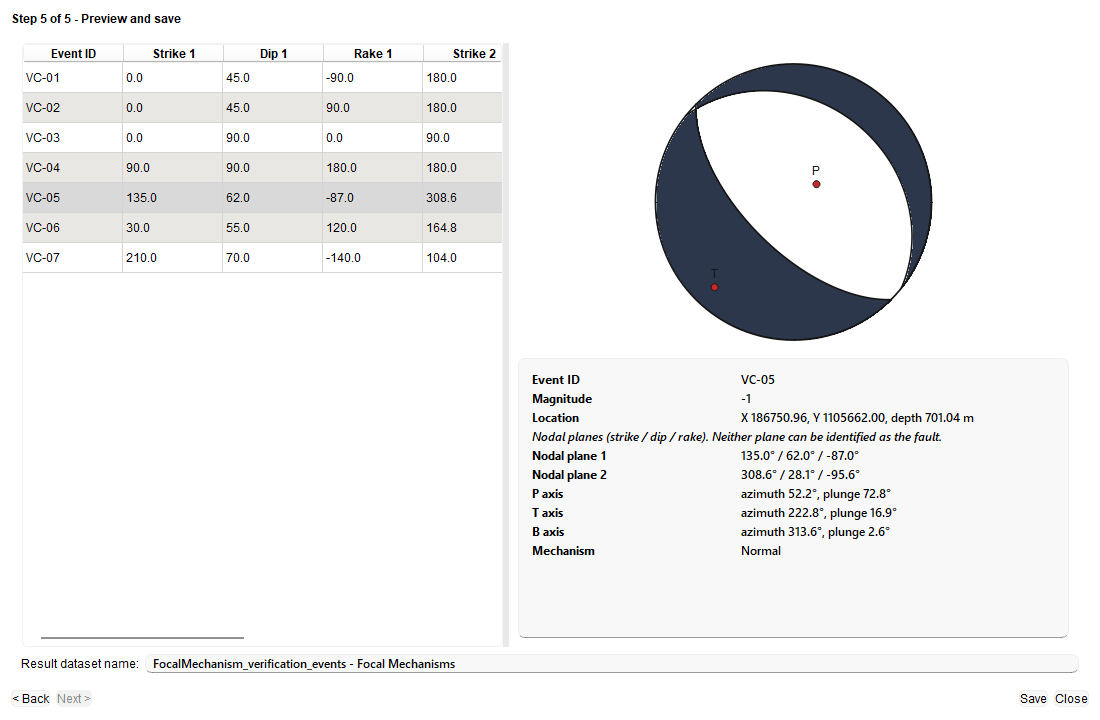
Dark beachball areas are compressional and white areas are dilatational, with the P and T axes marked. A normal-faulting event has a white centre, a reverse event has a filled centre, and a vertical strike-slip event forms a four-quadrant pinwheel.
Check the Result dataset name and click Save. The default name is based on the source dataset and ends with Focal Mechanisms. A name already used by another point set is not overwritten; enter a different name.
Output dataset
Saving creates a new Focal Mechanisms point set under Points, with one row for each successfully processed event. Skipped events are not included, and any well assignments of the included source rows are retained. The result keeps the original source attributes and adds:
- Strike 1, Dip 1, Rake 1, Strike 2, Dip 2 and Rake 2;
- P Azimuth, P Plunge, T Azimuth, T Plunge, B Azimuth, B Plunge and Mechanism Type;
- Source Set and Source Event ID, which preserve the source reference.
The source seismic event dataset is read only and is not modified by calculation or saving.
See Also