Get Trace headers
Get trace collection
Theory
Get Trace Headers module is used to read and extract header information from seismic traces without modifying the trace data. It allows users to inspect, validate, or export trace header values for quality control, debugging, and workflow logic control.
This module reads trace header information from a sorted gather index and makes it available for downstream processing or display. Given a selected gather number, the module retrieves the corresponding group of seismic traces and assembles a trace header collection covering that gather and its immediate neighbours. The assembled collection is passed downstream as an output item and simultaneously displayed on a Vista location map showing the positions of CMPs, shot sources, and receivers. No sample data is read or modified — only header metadata is accessed.
A typical use case is to check the spatial coverage of a dataset before processing: connect the sorted headers output of a geometry module to this module and inspect the resulting CMP, source, and receiver maps to confirm that geometry was applied correctly. The module is also useful as a diagnostic step inside iterative workflows, where specific gathers are inspected one at a time.
Input data
Sorted headers of input data
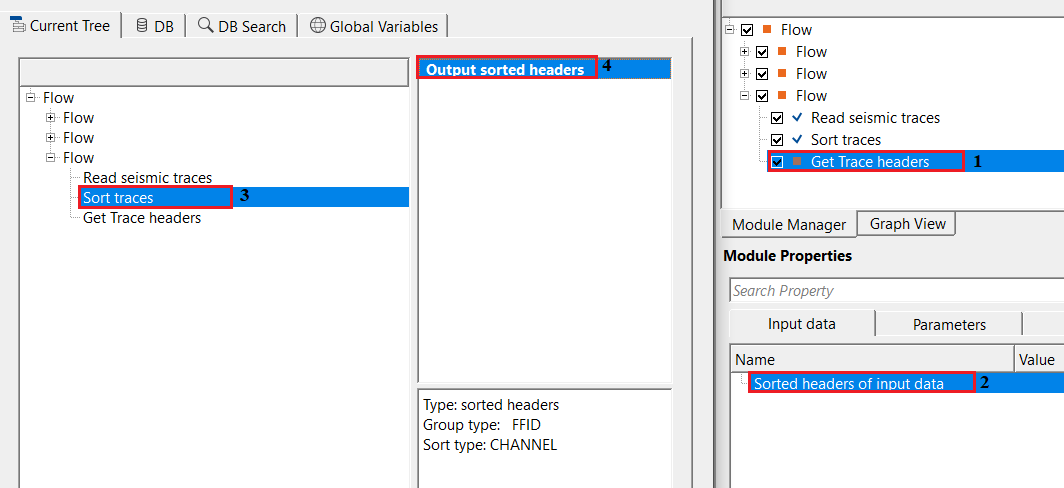
this requires sorted headers information. Connect/reference to Output sorted headers of the input data.
This is the required input connection. Link it to the Output sorted headers item of any upstream module that produces a sorted gather index — for example, a geometry application module or a sorting/binning module. The sorted headers index defines how traces are grouped into gathers and determines the total number of gathers available. The module will report an error and refuse to execute if this connection is missing or invalid.
Parameters
Seq. gather increment - defines the step size for moving between gathers when reading headers. By default, 1.
This parameter controls how many neighbouring gathers are included in each retrieval, centred on the selected gather number. With the default value of 1, only the single gather at the specified gather number is retrieved. Increasing this value causes the module to also include gathers immediately before and after the selected position, producing a wider header collection. For example, a value of 2 causes the module to retrieve the selected gather plus one gather on either side. This is useful when inspecting a range of sequential gathers as a group, or when downstream modules require a window of gathers rather than a single gather. The valid range is 1 to the total number of gathers in the sorted header index.
Sequential gather number - specifies the gather sequence number. By default, 1.
This parameter selects which gather to retrieve, identified by its sequential position in the sorted header index. The first gather in the dataset is number 1, and the maximum allowed value is equal to the total number of gathers defined by the connected sorted header index. Use this parameter to navigate to a specific gather of interest — for example, to inspect the trace header content of a particular CMP gather, shot record, or receiver gather. In an iterative workflow, this value is typically stepped automatically through the dataset; in an interactive or diagnostic workflow, set it manually to examine a specific location.
Settings
Skip
By default, FALSE(Unchecked). This option helps to bypass the module from the workflow.
When checked, this module is bypassed entirely: no header data is read and no output is produced. Use this option to temporarily disable the module during workflow development or testing without removing it from the flow graph.
Output data
Trace headers
outputs the trace headers information. It also generates Location map as a vista item.
This output delivers the assembled collection of trace headers for the selected gather (and any neighbouring gathers included via the Seq. gather increment parameter). The output contains the full header metadata for every trace in the selected window — including CMP coordinates, source and receiver positions, offsets, fold, and any other header fields populated during geometry application. This item can be connected to downstream modules that consume trace header collections, such as header arithmetic, geometry QC, or attribute extraction modules.
In addition to the output data item, the module automatically updates three Vista location map displays: CMPs (midpoint positions), Sources (shot point positions), and Receivers (geophone positions). These maps are displayed in the 2D location map view and show the spatial positions of all traces in the retrieved gather window, making it easy to visually confirm coverage and geometry correctness.
Information
There is no information available for this module.
Examples
In this example, we are getting the trace headers information from the sorted trace headers.
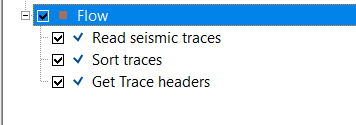
Make the necessary connections/reference to Output sorted headers to Sorted headers of input data.
Actions
There are no action items available for this module.
Video lesson
YouTube video lesson, click here to open [VIDEO IN PROCESS...]
Related articles
Yilmaz. O., 1987, Seismic data processing: Society of Exploration Geophysicist
 * * * If you have any questions, please send an e-mail to: support@geomage.com * * *